
Best VPN for Small Business Owners in 2026: Security That Fits Your Size
Small businesses live in an uncomfortable middle: big enough to hold customer data and banking credentials worth stealing, too small for a security team or enterprise budget. Attackers know this arithmetic. A well-chosen VPN closes a real slice of that exposure for the price of a few coffees a month, encrypting every connection your laptops and phones make. This guide covers what a VPN genuinely protects in a small business, what it does not, and the five services we recommend.
The cyber risks small businesses actually face in 2026

The threat list, sized for firms without security teams.
- Credential theft is the front door. Phishing and password reuse open more small-business breaches than any exotic hack, because one stolen login often unlocks email, banking, and customer records at once. The VPN does not stop phishing, an honesty note this guide repeats, but it does protect credentials in transit on hostile networks.
- Public and shared WiFi snooping. Owners and staff work from cafes, co-working spaces, hotels, and airports, where the network operator and its other guests can observe unencrypted traffic patterns. The tunnel converts every such network into a mere carrier, per our public-WiFi guidance, which is the VPN’s cleanest business win.
- Unsecured remote access. The pandemic-era habit of exposing office machines and dashboards directly to the internet persists in small firms, and scanners find those exposures within hours. Routing remote access through encrypted tunnels removes the public-facing surface, the pattern the remote-access section details.
- Ransomware’s small-business preference. Attackers target firms likely to pay quickly and least likely to have hardened defences, and small businesses fit both filters. The VPN contributes one layer, network privacy, while the beyond-VPN section covers the backup discipline that actually defeats ransomware’s leverage.
- Vendor and client impersonation. Invoice fraud and payment-redirection scams exploit email trust rather than networks, another category the VPN honestly cannot touch. Naming what sits outside the tool’s reach is half this guide’s job, so the budget goes where the risk is.
Why small businesses need a VPN in 2026

The genuine business case, without the marketing inflation.
- Every network becomes safe to work on. One subscription makes the cafe, the airport, the client’s guest WiFi, and the home office equivalent from a privacy standpoint, which matches how small-business work actually happens. Mobility is the small firm’s advantage; the VPN removes its main tax.
- Client confidentiality gets infrastructure. Contracts, financials, and customer data crossing encrypted tunnels is a defensible baseline you can state plainly in security questionnaires and client conversations. Increasingly, winning bigger clients requires exactly such statements.
- Banking and payments harden. The firm’s most sensitive logins, banking, payroll, payment processors, gain the encrypted-path and stable-location benefits our banking guide details. Fewer location flags also means fewer lockouts at inconvenient moments.
- Geo-flexibility serves real work. Checking your ads, listings, and pricing as customers in other markets see them is legitimate daily business, and region-switching makes it a two-click task. Market research is the unglamorous VPN use case that quietly pays for the subscription.
- The price is a rounding error. Covering a five-person team costs less monthly than one business lunch, against breach costs that close small firms outright. Few line items in the budget carry this ratio.
What a VPN does for your business, and what it does not
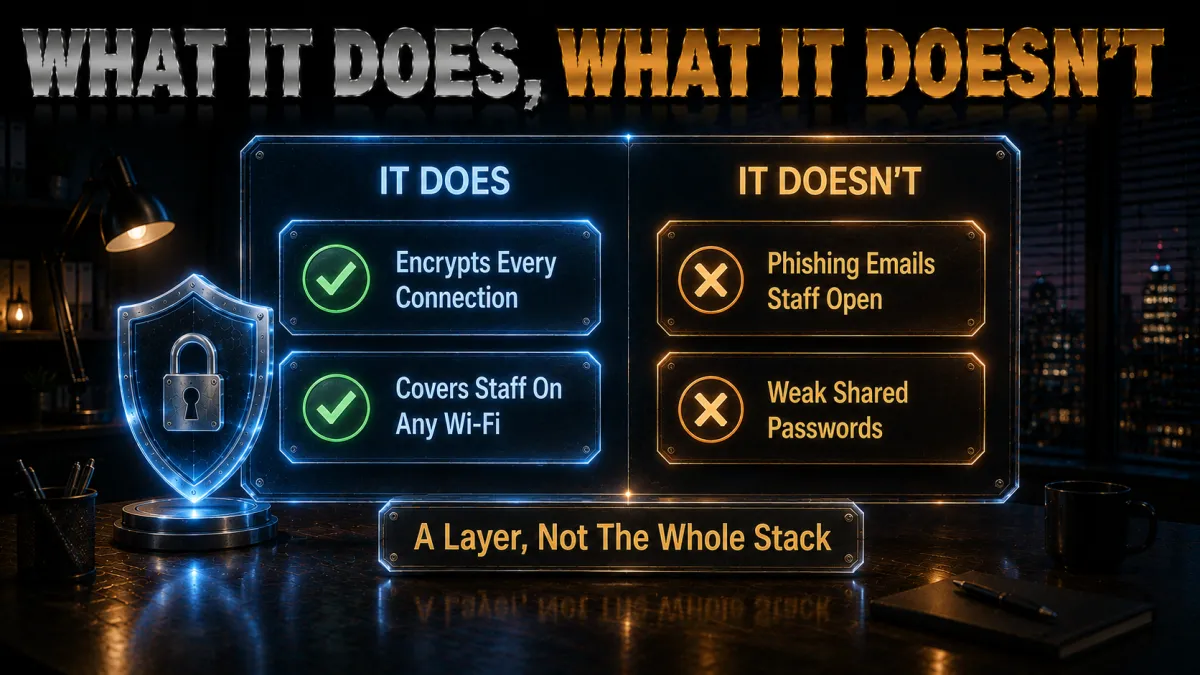
The honest scope, before any recommendations.
- It encrypts connections. Traffic between your devices and the VPN server is sealed against every intermediate network, which neutralises WiFi snooping and ISP-level observation. This is the core deliverable, and it is real.
- It stabilises your network identity. Dedicated-IP options give the business a consistent address for allow-listing dashboards, admin panels, and remote tools, the feature-section’s centrepiece. Consistency here is security you can configure once.
- It does not stop phishing or malware. A staff member who types credentials into a fake login page does so through a perfectly encrypted tunnel. Email judgement, filtering, and 2FA own that risk, per the beyond-VPN section.
- It does not replace backups or updates. Ransomware leverage dies to offline backups and patched systems, not to network encryption. The VPN belongs in the stack; it is not the stack.
- It does not make you anonymous to your tools. Logged-in services know the business through any tunnel, per the standing identity distinction. The VPN moves network location, not accounts.
Securing remote and hybrid teams

The distributed-work patterns that actually hold up.
- Every remote device gets the tunnel. The policy is binary: work happens through the VPN or it waits, because one unprotected cafe session undoes the other nine. Per-device installation with always-on settings makes compliance the default rather than a memory test.
- Allow-listing via dedicated IP. Point your admin panels, databases, and internal dashboards to accept only the business’s dedicated VPN address, and remote access stops being a public-internet exposure. This single configuration is the biggest security upgrade most small firms can make in an afternoon.
- Kill switches as team policy. Every recommended app includes one; enabling it fleet-wide means a dropped tunnel produces silence instead of leaks. Thirty seconds per device, permanent insurance, per our kill-switch guidance.
- Shared accounts need a plan. Device caps shape whether one subscription covers the team, which is where Surfshark’s and IPVanish’s unlimited connections change the arithmetic. The cost section runs those numbers.
- Offboarding includes the VPN. Departing staff lose the account access the same day they lose email, an item worth adding to the checklist now. Forgotten credentials on former staff phones are a classic small-firm leak.
What a small business VPN solution actually includes
The phrase VPN solution for small business covers two quite different things, and knowing which one you need saves both money and a wasted rollout.
Remote access is what most small businesses actually want. Each person installs an app, connects, and their traffic is encrypted wherever they are working. It protects staff on hotel and cafe networks and gives everyone a predictable exit address. This is what the five providers below do, and for a team of two to fifty people it is almost always the right answer.
Site-to-site is the other kind. It joins two fixed locations, such as an office and a warehouse, into one private network so the machines at each end reach each other directly. It runs on routers or firewalls rather than on laptops, which makes it a networking project rather than a subscription. A business with one office and remote staff rarely needs it. If you have two premises that must share a file server or a till system, that is when it earns its place.
Whichever you pick, these are the parts of a business plan that a personal subscription does not give you.
- Per-user seats and a central console. You add and remove people as staff join and leave, rather than sharing one login between everybody. When someone leaves, you revoke their access in one place instead of changing a password the whole team knows.
- A dedicated or static IP. A fixed address the team shares means your accounting software, your bank portal or a client system can allowlist it, so those tools stop challenging every login. This is the single feature small businesses most often underestimate.
- Enforced settings. An administrator can require the kill switch and auto-connect across the team, rather than hoping each person switched them on.
- Billing and support that fit a company. Proper invoices, VAT handling, and a support path that does not run through a consumer help desk.
- Evidence for compliance. If you handle personal data under UK or EU GDPR, being able to show that remote access is encrypted and access-controlled is part of the paperwork rather than a nice-to-have.
A consumer plan with enough device slots is a legitimate starting point for a very small team, and for two or three people it is the honest recommendation. The moment you are managing joiners and leavers, or a client asks how you secure remote access, the per-seat business plan stops being an upsell and starts being the cheaper option.
VPN features that matter for business use
The shortlist that separates business-fit from consumer-fine.
- Dedicated IP availability. The allow-listing pattern above depends on it, and stable addresses also reduce the CAPTCHA friction and service flags that shared IPs attract. NordVPN, Surfshark, and CyberGhost offer it as an add-on; the comparison table marks who does.
- Audited no-logs policies. Routing company traffic through a provider is a trust decision that only independent audits justify, the standing criterion across this site, doubly weighted when client data rides the tunnel. Marketing claims without audits are not evidence.
- Device count per account. Team coverage is device math: laptops plus phones per person, times headcount. Unlimited-device plans simplify the spreadsheet to zero.
- Simultaneous platform quality. Windows, macOS, iOS, Android, and router support all matter the day you discover the office runs on a mix. All five picks cover the spread; app polish varies, per the cards.
- Support that answers. When the tunnel misbehaves during invoicing week, live chat that resolves in minutes is a business feature, not a luxury. Refund windows let you test exactly this before money sticks.
Consumer VPN vs business VPN plans: the honest comparison
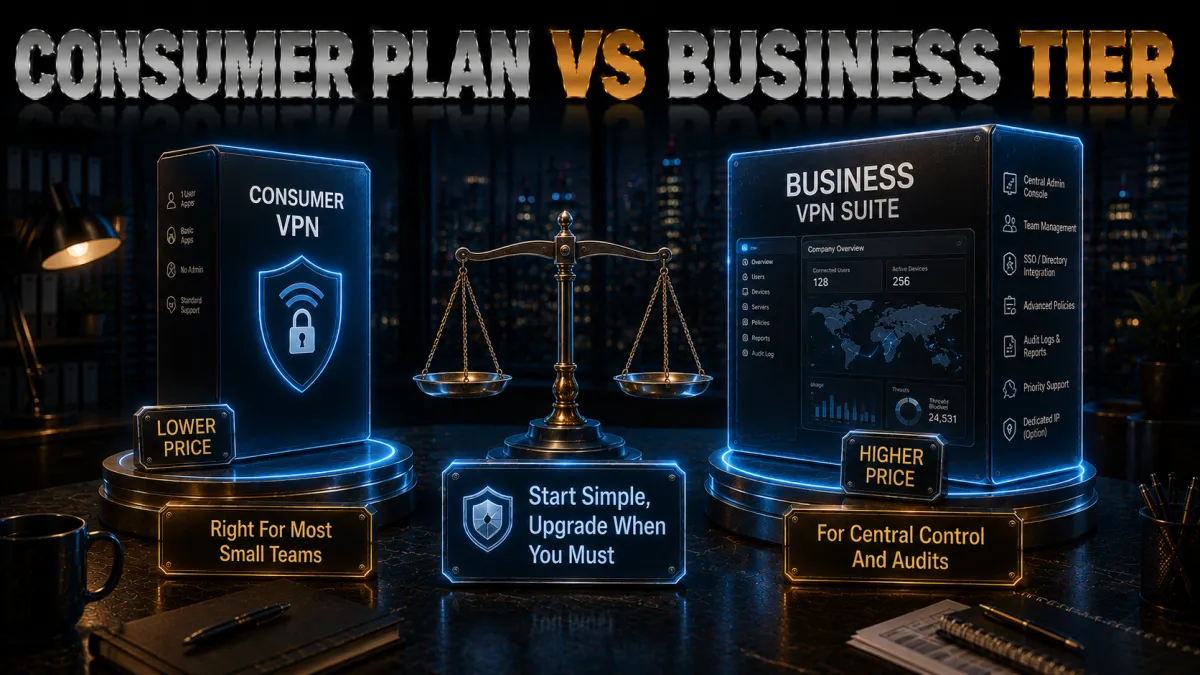
Which tier your firm actually needs.
- Consumer plans fit most micro-firms. For teams under roughly ten people, consumer subscriptions deliver the same encryption, apps, and audited policies at consumer prices, and this guide’s picks are chosen on that basis. The label says consumer; the cryptography does not know that.
- Business tiers add management. Central dashboards, per-seat billing, team member provisioning, and admin controls are the genuine business-plan additions, worth paying for once headcount makes manual management annoying. The features are administrative, not protective.
- Dedicated IP narrows the gap. The allow-listing capability that business tiers advertise arrives on consumer plans via dedicated-IP add-ons, per the features section. For many firms this single add-on is the whole business requirement.
- Compliance may decide for you. Firms under contractual or regulatory security requirements sometimes need the audit trails and centralized control business tiers provide, a box consumer plans cannot tick. Read your client contracts before choosing the cheaper row.
- Start consumer, graduate deliberately. The refund-window trial on a consumer plan answers whether the whole approach fits; migrating to a business tier later is straightforward. Spending on management features before management pain exists is premature optimisation.
How to choose the right VPN for your business
The decision path, in order.
- Count devices first. Headcount times devices per person, plus the office router if you route centrally, gives the number the plan must cover. This single figure eliminates half the options immediately.
- Decide on dedicated IP. If any internal tool, dashboard, or database should be reachable only by your team, the allow-listing pattern needs it, and your shortlist narrows to providers offering the add-on. If not, the requirement drops away.
- Weight audits over adjectives. Between two providers, the one with the deeper independent-audit history wins, per the features section. Client data deserves verified policies, not confident marketing.
- Trial during a real work week. Deploy to two or three actual team members, on actual client work, across the refund window. The trial that mirrors production is the only one that predicts it.
- Write the two-line policy. Work traffic goes through the VPN; the kill switch stays on. The policy section expands this, but those two lines capture most of the value.
The 5 best VPNs for small business owners in 2026

Ranked for audited trust, dedicated-IP capability, team device math, and support quality.
1. NordVPN – Best overall for small business
NordVPN combines the audit depth client data deserves, multiple independent no-logs verifications, with a clean dedicated-IP add-on that makes the allow-listing pattern this guide recommends a same-day project. NordLynx keeps encrypted work traffic feeling like no traffic at all, and Threat Protection filters trackers and malicious domains fleet-wide.
Ten devices per account covers the owner-plus-few-staff shape neatly; larger teams stack accounts or step up to business tiers when management pain arrives.
✔ Pros
- Multiple independent no-logs audits
- Dedicated-IP add-on for allow-listing
- NordLynx speed for daily work
- Threat Protection filtering included
- 30-day refund window for team trials
✘ Cons
- 10-device cap needs planning past small teams
- Dedicated IP costs extra
| Dedicated IP | Yes, add-on |
| Audited no-logs | Yes, multiple audits |
| Devices | 10 |
| Jurisdiction | Panama |
| Support | 24/7 live chat |
| Money-back | 30 days |
2. Surfshark – Best budget pick for whole teams
Surfshark’s unlimited simultaneous connections turn team device math into a non-problem: one subscription, every laptop and phone in the firm, at the lowest long-term price on this page. The dedicated-IP add-on covers the allow-listing pattern, and the audited no-logs policy holds the trust floor.
Speeds sit a step behind the top pick, honest placement rather than criticism, and the value case for lean firms is simply unmatched.
✔ Pros
- Unlimited devices, one subscription
- Lowest long-term price of the five
- Dedicated-IP add-on available
- Audited no-logs policy
- 30-day refund window
✘ Cons
- Speeds a step behind NordVPN
- No central team dashboard on consumer plan
| Dedicated IP | Yes, add-on |
| Audited no-logs | Yes, audited |
| Devices | Unlimited |
| Jurisdiction | Netherlands |
| Support | 24/7 live chat |
| Money-back | 30 days |
3. ExpressVPN – Zero-maintenance reliability for owner-operators
ExpressVPN is the pick for owners who want security that never becomes a project: the market’s most polished apps, RAM-only audited infrastructure, and Lightway reliability that survives hotel and client-site WiFi without fiddling. For the solo consultant or two-person firm, it simply works and stays out of the way.
Honest limits: no standard dedicated-IP add-on, so the allow-listing pattern points elsewhere, and the eight-device cap plus premium price suit small headcounts best.
✔ Pros
- Most polished, zero-maintenance apps
- RAM-only audited infrastructure
- Excellent hostile-network reliability
- Consistent Lightway performance
- 30-day refund window
✘ Cons
- No standard dedicated-IP add-on
- Priciest per seat, 8-device cap
| Dedicated IP | No |
| Audited no-logs | Yes, audited |
| Devices | 8 |
| Jurisdiction | British Virgin Islands |
| Support | 24/7 live chat |
| Money-back | 30 days |
4. CyberGhost – The longest team trial window
CyberGhost’s 45-day money-back guarantee gives a small team six full weeks to trial the tunnel against real client work before any money sticks, the longest evaluation on this page. Plain-language apps make staff rollout painless, the dedicated-IP add-on covers allow-listing, and the audited no-logs policy plus transparency reports carry the trust side.
Speeds rate good rather than leading, and seven devices covers small crews with a little planning.
✔ Pros
- 45-day refund, longest trial here
- Plainest apps for staff rollout
- Dedicated-IP add-on available
- Audited no-logs, transparency reports
- Huge server network
✘ Cons
- Speeds good rather than leading
- 7 devices is the tightest cap here
| Dedicated IP | Yes, add-on |
| Audited no-logs | Yes, audited |
| Devices | 7 |
| Jurisdiction | Romania |
| Support | 24/7 live chat |
| Money-back | 45 days |
5. IPVanish – Many devices on a budget
IPVanish pairs brisk WireGuard speeds with unlimited connections at a fair price, covering a device-heavy small firm on one subscription. Apps are straightforward and support responds quickly.
The business-fit honesty: no dedicated-IP add-on for the allow-listing pattern, US jurisdiction, and a lighter independent-audit history than the four above, which is exactly why it anchors the list rather than leading it.
✔ Pros
- Unlimited simultaneous connections
- Brisk WireGuard speeds
- Fair pricing for device-heavy firms
- Straightforward apps
- 30-day refund window
✘ Cons
- No dedicated-IP option
- US jurisdiction, lighter audit history
| Dedicated IP | No |
| Audited no-logs | Policy in place, lighter audit history |
| Devices | Unlimited |
| Jurisdiction | United States |
| Support | 24/7 live chat |
| Money-back | 30 days |
| Feature | NordVPN | ExpressVPN | Surfshark | CyberGhost | IPVanish |
|---|---|---|---|---|---|
| Dedicated IP | Add-on | No | Add-on | Add-on | No |
| Audited no-logs | Multiple audits | Audited | Audited | Audited | Lighter history |
| Devices | 10 | 8 | Unlimited | 7 | Unlimited |
| Team trial window | 30 days | 30 days | 30 days | 45 days | 30 days |
| Speed | Leading | Very strong | Solid | Good | Brisk |
| Best fit | All-round firms | Owner-operators | Budget teams | Cautious starters | Device-heavy budget |
Rolling out a VPN across your business, step by step
A one-afternoon deployment for a small team.
- Subscribe and note the refund deadline. Sign up on the provider’s site and put the refund date in the business calendar; the window is your evaluation period and the deadline forces a decision. Add the dedicated-IP option now if allow-listing is in the plan.
- Install from official sources on every work device. Provider website or official app stores only, laptops and phones both, per the standing security rule. A device that touches client data gets the app; that is the whole inventory logic.
- Enable kill switches fleet-wide. Walk each device’s settings and turn the kill switch on, adding always-on VPN where the OS offers it. This is the single setting that turns drops into silence instead of leaks.
- Configure the dedicated IP and allow-lists. Assign the dedicated address, then restrict admin panels, databases, and dashboards to accept only it. One afternoon of configuration removes your public-internet exposure.
- Run the leak suite on each device. Our leak-check guide’s IP, DNS, and WebRTC tests take a minute per machine and confirm the seal is real. A leaking tunnel protects nobody’s invoices.
- Brief the team on the two-line policy. Work traffic goes through the VPN; the kill switch stays on. The policy section below adds detail, but the briefing takes five minutes.
- Trial against real work, then decide. Two or three staff on genuine client tasks across the window tell you whether speeds, stability, and support hold up. Keep what passes; refund what does not.
Writing a simple VPN usage policy for staff

The rules that make the tool actually protect the firm.
- State the default plainly. All work on all networks goes through the VPN, no exceptions for quick tasks, because quick tasks on cafe WiFi are precisely the exposure. A rule with exceptions is a suggestion.
- Make the kill switch non-negotiable. Staff do not disable it to chase a flaky connection; they change servers or call support instead. The fix ladder in our slow-VPN guide handles the flakiness properly.
- Separate work and personal where it matters. Client data lives on devices running the company VPN under company policy; personal browsing habits stay personal. Clean separation simplifies both security and privacy conversations.
- Include the VPN in onboarding and offboarding. New staff get the app before they get client files; departing staff lose access the same day as email. The offboarding half is the one small firms forget.
- Review twice a year. Device lists drift, staff change, and providers update features; a calendar reminder twice yearly keeps the policy matching reality. Ten minutes per review is the entire cost.
What a business VPN actually costs

The honest arithmetic, without invented price tables.
- Consumer plans price per account, not per seat. One subscription covers its device allowance regardless of who holds the devices, which is why unlimited-device plans dominate small-team value. Check current pricing on provider sites; promotional rates move too often for any guide to print honestly.
- Longer terms cut the rate steeply. Multi-year plans routinely halve effective monthly cost versus rolling monthly, and the refund window removes the commitment risk of the longer term. Trial first, then buy the long plan you have already validated.
- Dedicated IP is a modest add-on. The allow-listing capability adds a small monthly increment on providers offering it, trivially justified the first time it blocks an exposure. Price it as security infrastructure, not as a VPN accessory.
- Compare against the alternative. Small-business breach costs, downtime, ransom demands, client-trust damage, run to figures that make the entire category a rounding error. The comparison every owner should run is not between VPN plans; it is between the plan and the incident.
Mistakes small businesses make with VPNs
The recurring errors, collected so you can skip them.
- Treating the VPN as the whole security stack. It encrypts connections; phishing, weak passwords, and missing backups walk straight past it, per the honest-scope section. Layer it with the beyond-VPN list or the protection is theatre.
- Protecting laptops and forgetting phones. Staff answer client email from phones on public WiFi daily; unprotected mobiles are half the fleet and often the softer half. Every work device gets the app.
- Skipping the dedicated IP where it fits. Leaving admin panels open to the whole internet when a small add-on could allow-list them is the cheapest unforced error in this guide. One afternoon closes it.
- Free VPNs for business traffic. Routing client data through services whose business model is monetising traffic inverts the entire purpose, per our free-VPN analysis. The refund-window trial makes real services free to evaluate; use that instead.
- No offboarding step. Former staff with working VPN credentials are an access-control hole with a name attached. Add the checkbox to the leaver checklist today.
- Choosing on price alone. The cheapest option without audits or the features your firm needs costs more the day it matters. Weight trust and fit first; the price differences are small against business stakes.
Beyond the VPN: the rest of your security stack
The layers that cover what the tunnel cannot.
- A password manager for the whole team. Unique strong passwords per service end the credential-reuse chain that opens most small-firm breaches. This is the highest-value security purchase after the VPN, arguably before it.
- Two-factor authentication everywhere it exists. 2FA turns stolen passwords into failed logins, directly countering the phishing risk the VPN cannot touch. Enable it on email, banking, and admin accounts first.
- Backups with an offline copy. Ransomware’s leverage dies when yesterday’s data exists somewhere the attacker cannot reach. Automate it, test the restore twice a year, and the worst day becomes an inconvenience.
- Updates on a schedule. Patched systems close the known holes scanners probe for; auto-update everything that allows it. Boring, free, effective.
- Staff scepticism as culture. Five minutes monthly on current phishing patterns beats any filter, because the person who pauses before clicking is the control that scales. Security culture is a habit, not a product.
Related reading:
Frequently asked questions
Do small businesses really need a VPN?
Any firm whose staff work outside one trusted office network, or that holds client data worth protecting in transit, gets genuine value from encrypted connections. The need scales with mobility: the more cafes, homes, and client sites in your week, the stronger the case.
Is a consumer VPN enough for a small business?
For teams under roughly ten people, consumer plans deliver the same encryption and audited policies as business tiers, and adding a dedicated IP covers the main business-specific need. Business tiers earn their premium when central management, per-seat billing, or compliance requirements arrive.
What is a dedicated IP and why does my business want one?
It is a stable VPN address unique to your account, which lets you configure admin panels, databases, and dashboards to accept connections only from it. That allow-listing pattern removes your internal tools from the public internet, the biggest one-afternoon security upgrade most small firms can make.
Which VPN is best for a small business in 2026?
NordVPN leads our list for audit depth plus the dedicated-IP option, with Surfshark the budget pick covering unlimited team devices. Match the choice to your device count and whether allow-listing is in your plan, per the choosing section.
Will a VPN slow down our work?
Modern protocols to nearby servers typically cost a slice of speed that video calls and cloud tools never notice. Trial during a real work week inside the refund window; your own tools on your own connection are the only benchmark that binds.
Does a VPN protect against ransomware?
Not directly: ransomware arrives through phishing, exposed services, and unpatched systems, and its leverage dies to offline backups rather than encryption in transit. The VPN closes the exposed-service route via allow-listing; backups and updates own the rest.
Can my whole team share one VPN account?
Within the plan’s device allowance, yes, which is why unlimited-device options from Surfshark and IPVanish dominate small-team value. Count devices per person honestly, laptops plus phones, before choosing a capped plan.
Should remote employees use the company VPN on personal devices?
Any device that touches client data should run the tunnel under the two-line policy, which in practice means installing the app on personal phones used for work email. Pair it with clean work-personal separation so the policy protects the firm without governing staff’s private browsing.
What should our VPN policy say?
Two lines carry most of the value: work traffic goes through the VPN, and the kill switch stays on. Add onboarding, offboarding, and twice-yearly review, per the policy section, and the document stays one page.
Do these VPNs work for international business travel?
All five run global server networks, so hotel and airport WiFi anywhere becomes tunnel-protected, and home-country servers keep banking logins stable abroad per our banking guide. ExpressVPN’s hostile-network reliability makes it the frequent-flyer favourite.
Are free VPNs safe for business use?
No. Free tiers cap and throttle the daily work case, and the free market’s business models monetise exactly the traffic your clients expect you to protect. Refund windows make real services free to evaluate, which removes the only argument for free tiers.
How do we test a VPN before committing?
Deploy to two or three staff on genuine client work across the refund window, run the leak suite on each device, and stress the busiest hours. CyberGhost’s 45 days is the longest such window; all five picks offer at least 30.
What security tools do we need besides a VPN?
A team password manager, 2FA on every account that offers it, backups with an offline copy, scheduled updates, and a monthly five-minute phishing briefing. The VPN encrypts connections; this stack covers everything the tunnel honestly cannot.
What is the best VPN solution for a small business?
For most small businesses it is a remote access VPN sold on per-user seats, with a central console, a dedicated IP the team shares, and enforced kill switch settings. That covers staff working from home, hotels and client sites, which is where the actual risk sits. A site-to-site setup is only worth the extra work if you have two physical premises that need to reach each other directly. Start with the per-seat plan, add a dedicated IP if your finance or client systems keep challenging logins, and only look at site-to-site when a second office exists.
What is the difference between a remote access VPN and a site-to-site VPN?
A remote access VPN protects people. Each person runs an app on their laptop or phone and their traffic is encrypted wherever they are. A site-to-site VPN connects places. It links two fixed locations through routers or firewalls so the machines at both ends behave as one network, with nothing installed on individual devices. Small businesses with one office and remote staff need the first. The second becomes relevant once you have two premises sharing systems.
How many employees does it take before we need a business VPN plan?
There is no fixed number, but the trigger is administration rather than headcount. While two or three people can reasonably share a consumer plan with enough device slots, the moment you are onboarding and offboarding staff, or you need to prove to a client how remote access is secured, per-user seats and a central console save more time than they cost. Most small businesses cross that line somewhere between five and ten people.
The Bottom Line
- Small firms are targets, and connections are a real exposure. A reputable VPN closes the network slice of the risk for the price of a coffee run.
- NordVPN leads for audited trust plus dedicated IP. The allow-listing pattern it enables is the biggest one-afternoon upgrade in this guide.
- Surfshark owns the budget case. Unlimited devices on one cheap plan fits lean teams; IPVanish offers the same shape with lighter business fit.
- The VPN is a layer, never the stack. Passwords, 2FA, backups, and updates cover what encryption in transit cannot, and pretending otherwise is the category’s favourite lie.
- Trial on real work inside the refund window. CyberGhost gives 45 days, the rest 30; the deadline forces the honest decision.
Security that fits a small business is boring, layered, and affordable. Put the tunnel under your connections, the rest of the stack around it, and get back to the work that pays for both.
Jyoti VPN Expert leads VPN testing at VPN Expert Guide, covering streaming and regional access, speed and latency testing, and leak checks on Windows, Android and router-level setups. Our guides are built from vendor documentation, provider terms and our own connection testing on a residential line in India, and we publish those measurements in full so readers can check them. Every guide is reviewed before publication and dated so you can see how current it is.
Meet our testing team →Last updated: September 2, 2026