
What Is an IPv6 Leak? The VPN Blind Spot Hiding on Modern Connections
The IPv6 leak is the most forgivable and most forgotten hole in home privacy: your connection runs two internet protocols at once, your VPN tunnels one, and the other walks around the tunnel carrying your real address. The app glows green and the leak announces you anyway. This guide explains IPv6 leaks in plain language, how to test for one in thirty seconds, every fix from app toggles to OS settings, and which VPNs handle IPv6 properly.
What an IPv6 leak actually is

The anatomy of the quietest leak in the VPN world.
- One connection, two address systems. IPv4 is the classic internet addressing everyone knows, and IPv6 is its vastly larger successor, rolled out because the old system ran out of numbers. Modern ISPs increasingly assign both at once, called dual-stack, so your device holds an IPv4 and an IPv6 address simultaneously, each capable of carrying full traffic to sites that support it.
- The leak is a coverage gap, not a break-in. A VPN built only for IPv4 captures and encrypts that traffic perfectly while simply not seeing IPv6, so the operating system routes IPv6 traffic out the ordinary unprotected path. Nothing is hacked and nothing malfunctions; one lane of the motorway just never got a tunnel, and your traffic uses whichever lane each website prefers.
- Websites increasingly prefer the leaking lane. Major platforms support IPv6 and clients often favour it when available, meaning a dual-stack household with a leaky VPN may route much of its real browsing outside the tunnel while the IPv4 test page shows everything working. The preference mechanics are exactly why this leak deceives careful people.
- Exposure is symptom-free by design. Pages load normally, speeds look fine, and the VPN app reports connected because its IPv4 tunnel genuinely is. Only an IPv6-aware test reveals the parallel traffic, which is why this guide leans so hard on the thirty-second check rather than on watching for signs that never come.
IPv4 vs IPv6: the two-minute context

Enough protocol literacy to make every fix below obvious.
- IPv6 exists because IPv4 ran dry. The old system’s address pool was exhausted years ago, patched along by address sharing and translation tricks, while IPv6’s enormous space assigns unique addresses generously, often giving each device its own globally reachable one. That abundance is good engineering and, unmanaged, a privacy consideration all its own.
- Dual-stack is the awkward transition state. Rather than switching overnight, the internet runs both protocols side by side, letting each connection use whichever the destination supports. Dual-stack is why your device can leak: two live paths exist, and protecting one says nothing about the other.
- Your IPv6 address is chattier than you think. It typically encodes your ISP‘s allocation and can remain stable for long stretches, making it a workable tracking identifier, and unlike shared IPv4 addresses it often points at your specific connection rather than a pool. The leak therefore exposes an identifier at least as revealing as the IPv4 address your VPN is hiding.
- Whether you even have IPv6 takes ten seconds to learn. Any IPv6 test page answers instantly: an address appears or it does not. No IPv6 connectivity means this leak cannot affect you today, with the standing caveat that router swaps and ISP upgrades switch it on silently, which the re-testing section returns to.
Why VPNs fall short on IPv6
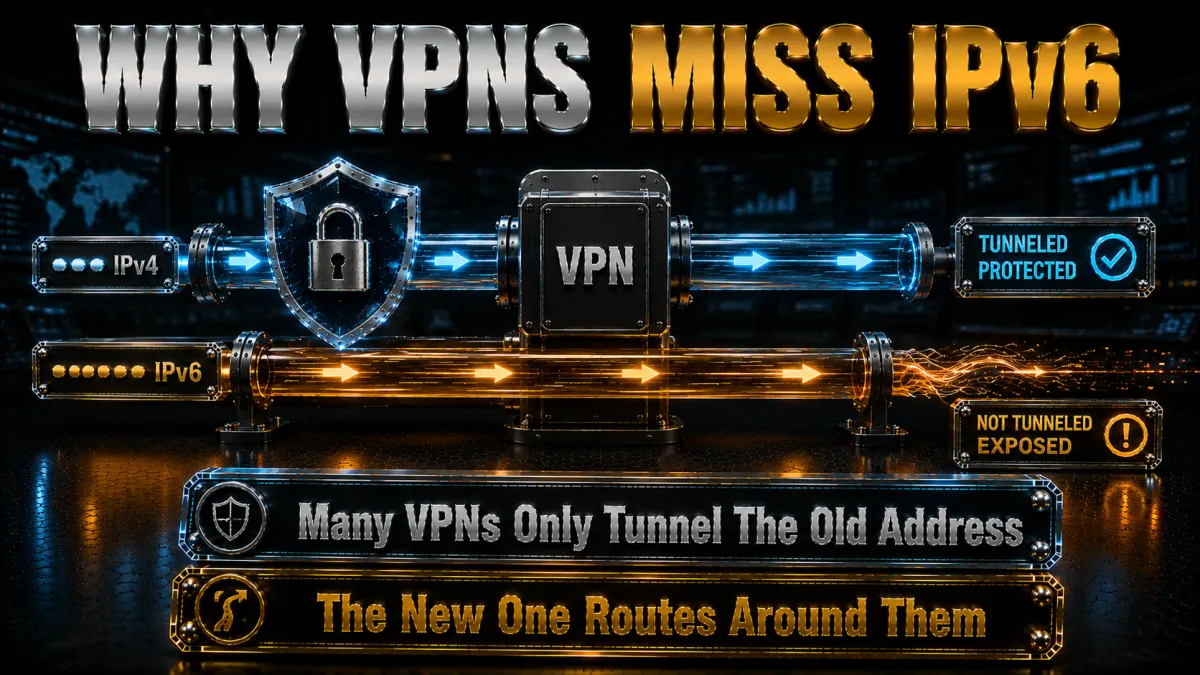
The engineering reasons behind the gap, which explain the two fix philosophies.
- Tunnelling IPv6 properly is real work. A provider must run IPv6 on its servers, assign tunnel addresses, route the larger address space, and keep DNS behaviour consistent across both protocols, none of it impossible and all of it effort. Providers built in the IPv4 era often deferred that work, and some never finished it.
- Blocking is the pragmatic alternative. Instead of carrying IPv6, a VPN can firewall it entirely while connected: the device keeps its IPv6 address but nothing can use the unprotected path. This disable-while-connected approach is legitimate leak protection, trading IPv6 functionality inside the tunnel for guaranteed coverage, and many reputable apps take exactly this route.
- Careless services do neither. The leak lives in VPNs that neither tunnel nor block, leaving the OS free to route IPv6 around them, common among free services and unmaintained apps whose engineering stopped in the IPv4 era. Price does not predict this; engineering culture does, which the picks section screens for.
- Operating systems add their own enthusiasm. Modern OS networking prefers IPv6 when available and re-establishes it eagerly after sleep and network changes, so half-measures that worked at connect time can erode during a session. Proper protection has to be continuous, another reason app-level toggles from serious providers beat manual hacks.
What an IPv6 leak actually exposes

The honest damage assessment, without inflation.
- Your real address, to every IPv6 site. Websites reached over IPv6 see your genuine address and location while you believe the VPN’s identity is showing, defeating the core purpose for those visits. Given how much of the major web is IPv6-enabled, the affected share of browsing is larger than intuition suggests.
- A linkage between your VPN identity and real identity. Sites and trackers seeing your VPN’s IPv4 address in one request and your real IPv6 address in another can connect the two, undoing the separation the VPN exists to create. This linkage risk is the quietly serious part for privacy-motivated users.
- ISP visibility into the leaked traffic. Connections outside the tunnel are visible to your ISP like any unprotected traffic, so the browsing-privacy motive fails for the leaked share. Encryption of the sites themselves still applies where they use HTTPS; the metadata of what you connected to does not hide.
- What it does not do. A leak does not break the IPv4 tunnel’s encryption, expose passwords on HTTPS sites, or invite intrusion; it is an exposure of address and traffic pattern, not a compromise of your device. Calibrated seriousness: fix it promptly, panic about nothing.
Testing for an IPv6 leak, step by step
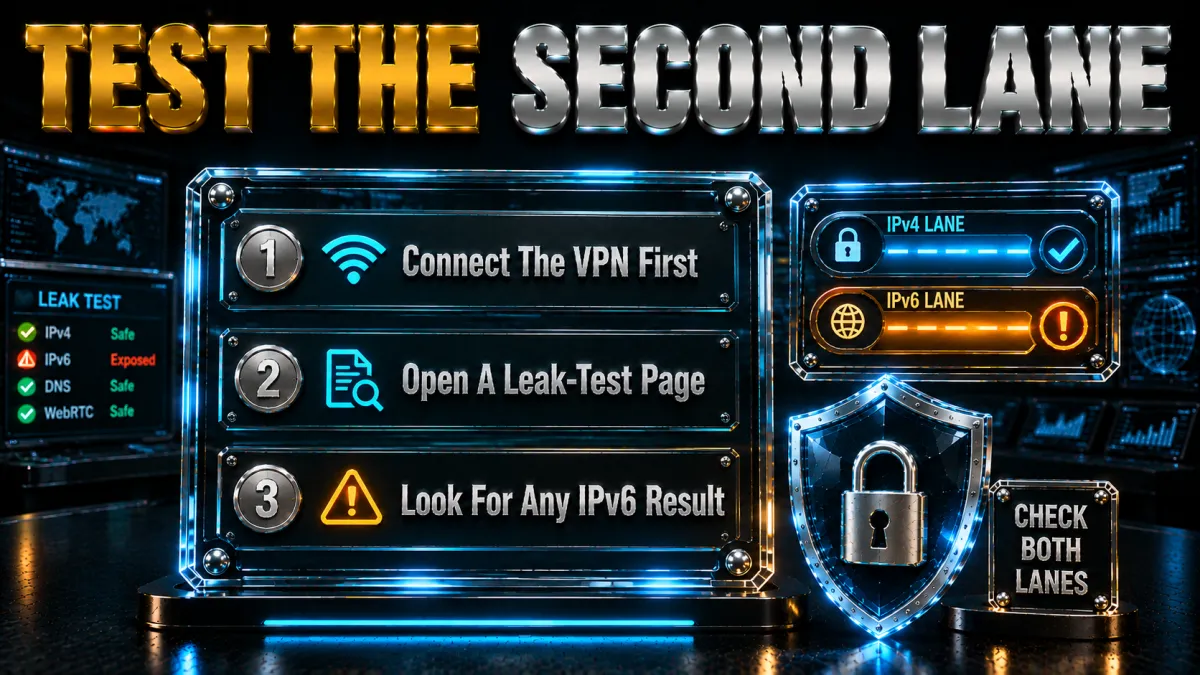
The thirty-second verification, done properly.
- Learn your baseline first. With the VPN off, open an IPv6 test page and note the result: an IPv6 address means dual-stack and leak potential; none means the topic is moot for you today. Screenshot the address if present, it is the number that must not appear later.
- Connect the VPN normally. Usual server, usual settings, because you are testing the reality you live with rather than a dressed-up configuration. Let the connection settle to fully established.
- Reload the IPv6 test. Three outcomes: no IPv6 detected means your VPN blocks it, a pass; an IPv6 address belonging to the VPN means it tunnels properly, also a pass; your baseline address still showing means the leak is live.
- Run the full leak suite while you are here. IP, DNS, and WebRTC tests take another ninety seconds combined and catch the sibling leaks our complete leak-checking guide covers. IPv6 leaks travel in the company of other sloppy engineering often enough that the full pass is worth it.
- Re-test at the moments that matter. After VPN app updates, OS upgrades, router swaps, and ISP plan changes, the exact events that reshuffle IPv6 behaviour. A calendar-quarterly habit plus event-triggered checks keeps yesterday’s clean result true.
Fixing an IPv6 leak: the repair ladder
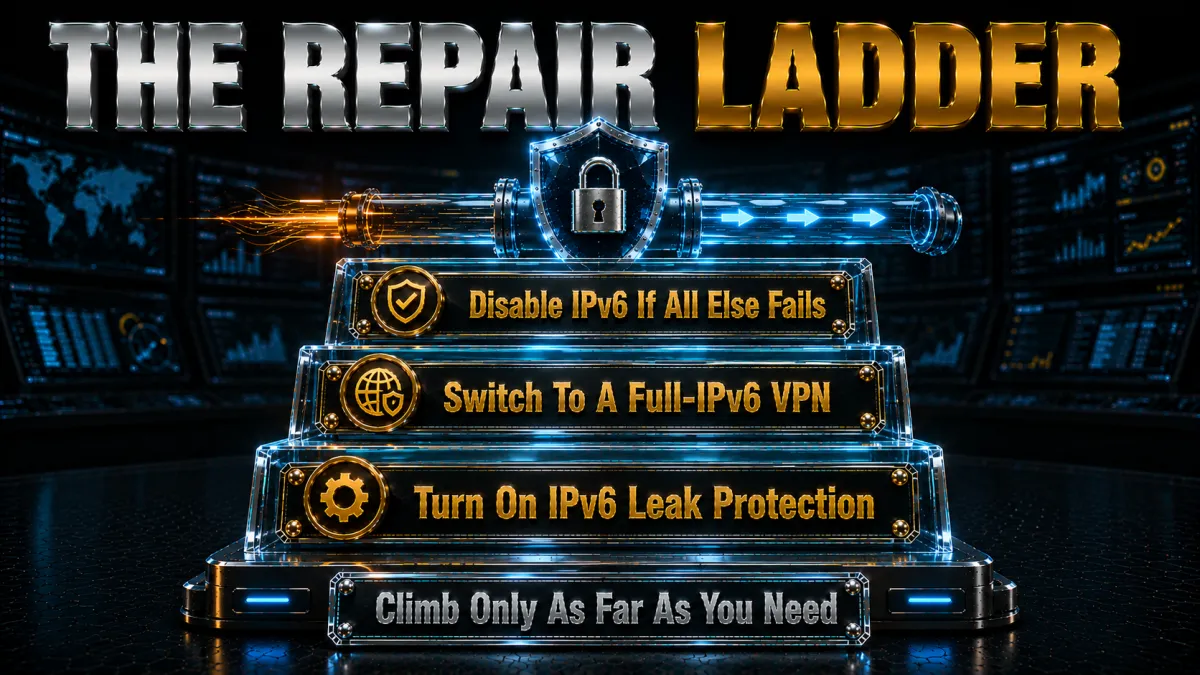
From gentlest to bluntest, stopping when the test turns clean.
- Rung one: the app’s own protection. Look for IPv6 leak protection or equivalent in your VPN’s settings and enable it, then reconnect and re-test. Serious providers ship this on by default; finding it off or absent tells you something about the service either way.
- Rung two: update everything. IPv6 handling has improved across the industry, and an old client build may lack protections the current one ships. Update the app, reboot, re-test; a surprising share of leaks end at this unglamorous step.
- Rung three: change providers. If your VPN neither tunnels nor blocks IPv6 and its settings offer nothing, the service has told you its engineering priorities. The picks below all pass this page’s test out of the box, and refund windows make the migration free to verify.
- Rung four: disable IPv6 at the OS. The blunt fallback that always works: turn IPv6 off in your operating system’s network settings, removing the leaking lane entirely. Fully reversible and detailed in the next section, at the cost of IPv6 connectivity you likely will not miss today.
- Always finish with the re-test. Whatever rung worked, confirm with the test page and repeat once after a reboot. Clean twice is fixed; clean once is promising.
How to choose an IPv6-safe VPN
The selection criteria this specific leak imposes.
- An explicit, documented IPv6 stance. The provider should state plainly whether it tunnels IPv6 or blocks it while connected, because documented policy correlates with finished engineering. Silence on the topic is itself an answer, and not the good one.
- Protection that is on by default. Leak protection buried off in advanced settings protects the people who least need protecting. The right products ship sealed and let experts open holes deliberately, not the reverse.
- The rest of the sealed-tunnel checklist. Kill switch, private DNS with stray-query firewalling, and WebRTC guidance, since IPv6 is one door among four and a provider careful about one tends to be careful about all. Our leak guide’s criteria apply wholesale.
- Audits that cover the claims. Independent audits verify that engineering promises describe reality, the same verification logic this site applies everywhere. IPv6 handling claims are engineering promises like any other.
The 5 best IPv6-safe VPNs in 2026
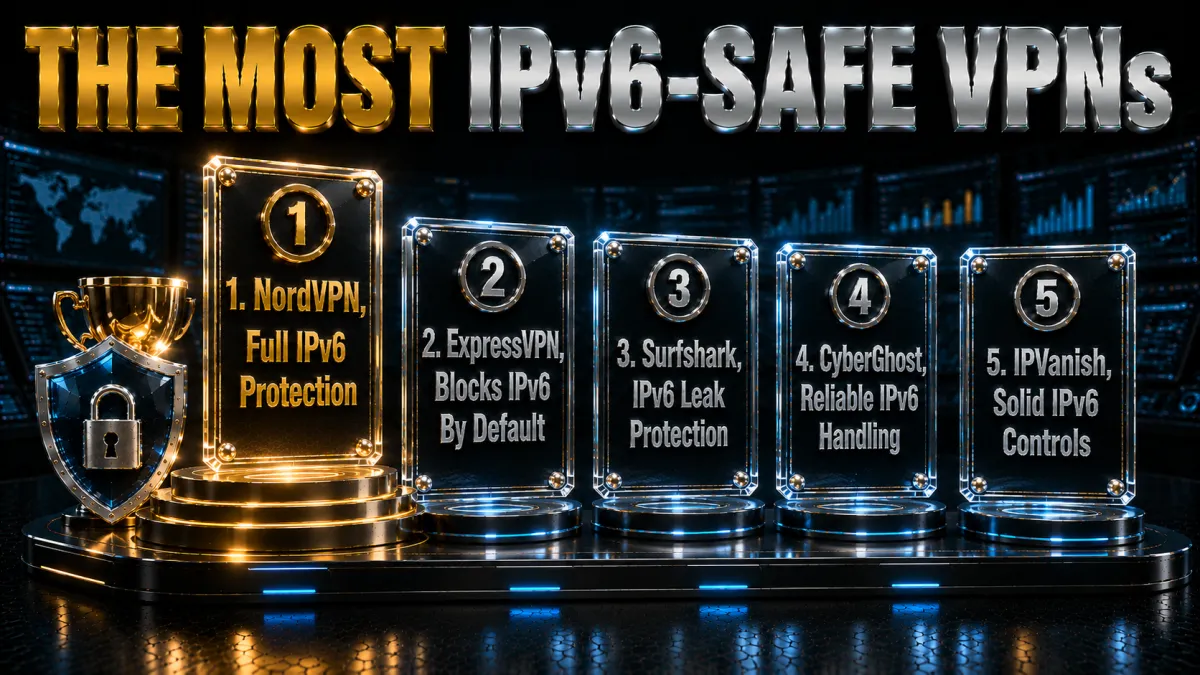
Ranked for IPv6 handling and sealed-tunnel engineering first, then audits, speed, and value.
1. NordVPN – Best overall IPv6 protection
NordVPN treats IPv6 as part of the sealed-tunnel contract: connections are protected against IPv6 leakage by default, alongside the firewalled private DNS and system-level kill switch that close the other three doors. Run this page’s test against it and the clean result is the routine outcome, no settings safari required.
Multiple independent no-logs audits on RAM-only servers verify the engineering culture behind the toggle, and NordLynx keeps the sealed connection fast enough that leaving it always-on costs nothing noticeable.
✔ Pros
- IPv6 leak protection on by default
- Full sealed-tunnel package: DNS, kill switch
- Multiple independent no-logs audits
- NordLynx speed on the sealed connection
- Clean results on the standard leak suite
✘ Cons
- Denser settings than minimalist apps
- Best price needs a longer plan
| IPv6 handling | Leak-protected by default |
| Kill switch | Yes, system-level |
| Private DNS | Yes, firewalled |
| Audited no-logs | Yes, multiple audits |
| Devices | 10 |
| Money-back | 30 days |
2. ExpressVPN – Architecture that never left the gap
ExpressVPN’s leak posture is architectural: IPv6 is handled as part of the same design that runs DNS on every server and slams Network Lock shut on any drop, so the four leak doors close together without user involvement. It is the zero-configuration answer for people who want sealed to be the factory state.
RAM-only infrastructure and audited no-logs carry the verification side at the familiar premium price with the eight-device cap, the standing trade for the most polished reliability in the market.
✔ Pros
- IPv6 handled in the core architecture
- Network Lock seals every drop
- DNS on every server
- RAM-only fleet, audited no-logs
- Zero configuration to stay sealed
✘ Cons
- Most expensive of the five
- 8-device cap is the tightest here
| IPv6 handling | Architecturally protected |
| Kill switch | Yes, Network Lock |
| Private DNS | Yes, on each server |
| Audited no-logs | Yes, audited |
| Devices | 8 |
| Money-back | 30 days |
3. Surfshark – Sealed against IPv6 on every screen
Surfshark closes the IPv6 door across unlimited devices at the lowest long-term price of the five, pairing its leak protection with WireGuard speed and an audited no-logs policy. For dual-stack households where every phone, laptop, and TV needs the same sealed behaviour, the unlimited model removes the counting.
Honest placement: engineering polish and documentation depth sit a step behind the top two, and the Netherlands base is inside the EU. Tested behaviour on this page’s check is what earns the slot.
✔ Pros
- IPv6 leak protection included
- Unlimited simultaneous devices
- Lowest long-term price of the five
- Audited no-logs policy
- Kill switch and private DNS standard
✘ Cons
- Documentation lighter than the leaders
- Netherlands base, inside the EU
| IPv6 handling | Leak protection included |
| Kill switch | Yes |
| Private DNS | Yes |
| Audited no-logs | Yes, audited |
| Devices | Unlimited |
| Money-back | 30 days |
4. CyberGhost – IPv6 safety without the homework
CyberGhost handles IPv6 the way it handles everything: automatically, in plain language, with protection on duty from the first connection. First-timers who found this page after a failed test get the shortest path from leaking to sealed, and the audited no-logs policy with transparency reports covers the trust question.
The 45-day money-back guarantee gives six full weeks to run this page’s test on every network and device you own before any commitment sticks, the longest such window in the market.
✔ Pros
- Protection on by default, plainly labelled
- 45-day refund, longest test window
- Audited no-logs with transparency reports
- Huge server network
- Simplest apps of the five
✘ Cons
- Lighter advanced controls
- Speeds good rather than leading
| IPv6 handling | Protected by default |
| Kill switch | Yes |
| Private DNS | Yes |
| Audited no-logs | Yes, audited |
| Devices | 7 |
| Money-back | 45 days |
5. IPVanish – The essentials sealed, fast and unlimited
IPVanish covers the IPv6 question alongside the other leak essentials, own DNS and kill switch included, at brisk WireGuard speeds on unlimited connections for a fair price. Run the test; the expected result is clean.
Fifth for the standing reason: US jurisdiction and a lighter independent audit history than the four above, relevant here because leak-handling claims are precisely the kind audits verify. Ordinary threat models are well served.
✔ Pros
- IPv6 handled with the leak essentials
- Brisk WireGuard speeds
- Unlimited simultaneous connections
- Fair pricing
- Kill switch and own DNS included
✘ Cons
- US jurisdiction
- Lighter audit history than the leaders
| IPv6 handling | Handled |
| Kill switch | Yes |
| Private DNS | Yes |
| Audited no-logs | Policy in place, lighter audit history |
| Devices | Unlimited |
| Money-back | 30 days |
| Feature | NordVPN | ExpressVPN | Surfshark | CyberGhost | IPVanish |
|---|---|---|---|---|---|
| IPv6 handling | Default protection | Architectural | Included | Default | Handled |
| Kill switch | System-level | Network Lock | Yes | Yes | Yes |
| Private DNS | Firewalled | On each server | Yes | Yes | Yes |
| Audited no-logs | Multiple audits | Audited | Audited | Audited | Lighter history |
| Devices | 10 | 8 | Unlimited | 7 | Unlimited |
| Money-back | 30 days | 30 days | 30 days | 45 days | 30 days |
Disabling IPv6 at the OS: the reliable fallback

The blunt fix, done properly per platform, and honestly assessed.
- Windows. Open your network adapter’s properties, untick Internet Protocol Version 6, apply, and reboot for cleanliness. The change applies per adapter, so laptops using both Wi-Fi and Ethernet should untick it on each; reversal is the same ticks restored whenever you want IPv6 back.
- macOS. In network settings for the active connection, set IPv6 configuration to link-local only, which keeps the protocol off the internet while satisfying the OS internally. Terminal equivalents exist for those who prefer them, and the settings route reverses just as easily.
- Android and iPhone. Mobile systems expose little direct IPv6 control, which makes the app-level protection from a good VPN the practical answer on phones. Where a leak persists on mobile, the provider-change rung of the ladder is realistically the fix rather than OS surgery.
- At the router. Many home routers allow disabling IPv6 for the whole network in one setting, closing the lane for every device at once, TVs and consoles included. This is the household-scale version of the fix, with the same trade: no device gets IPv6 until you re-enable it.
- The honest trade-off. Disabling IPv6 costs you nothing visible on today’s web, IPv4 still reaches everything, but it is a retreat rather than a repair: the elegant end state is a VPN that handles IPv6 properly, with the OS switch as the guaranteed fallback for setups that need certainty now.
IPv6 leaks on phones: the mobile specifics
The pocket version of the problem, where dual-stack is most common.
- Mobile carriers lead IPv6 adoption. Cellular networks moved to IPv6 earlier and harder than home ISPs, so phones on mobile data are among the likeliest dual-stack devices you own. The leak potential travels with you between networks, which desktop-centric advice quietly misses.
- Network hopping multiplies the checks. A phone moves between home Wi-Fi, mobile data, and public networks daily, each with its own IPv6 situation, and VPN protection must hold across every switch. The good news: modern protocols reconnect near-instantly, and app-level IPv6 protection from serious providers follows the connection wherever it lands.
- Test on both bearers. Run the thirty-second test once on Wi-Fi and once on mobile data with the VPN connected, because passing on one says nothing about the other. Two clean results cover your actual life; one covers half of it.
- App choice does the heavy lifting on mobile. With OS-level IPv6 control largely absent on phones, the provider’s engineering is your whole protection, which concentrates the choose-well advice from the picks section. All five above ship mobile apps whose IPv6 behaviour matches their desktop promises.
Common mistakes around IPv6 leaks
Five habits that keep the quiet leak quietly open.
- Testing IPv4 and declaring victory. The standard what-is-my-IP check can pass perfectly while IPv6 streams around the tunnel, which is the entire deception this page exists to break. Only an IPv6-aware test answers the IPv6 question.
- Assuming paid means sealed. Price predicts marketing budgets, not IPv6 engineering; some paid services leak while well-run ones block by default. The thirty-second test respects no logo, so run it against whatever you use today.
- Fixing once and never re-testing. Router swaps, ISP upgrades, OS updates, and app updates all reshuffle IPv6 behaviour, and each is a moment yesterday’s clean result can silently expire. Event-triggered re-tests plus a quarterly habit keep the door verifiably closed.
- Disabling IPv6 and forgetting why. The OS switch works, and years later a new machine or reinstall arrives with IPv6 on and no memory of the reason it was off elsewhere. Prefer providers that handle it properly so the protection follows your account rather than your folklore.
- Treating the leak as exotic. Dual-stack is the growing default, not a niche condition, and the affected population expands with every ISP rollout. The mundane framing is the accurate one: this is a standard checklist item now, like the kill switch.
The re-testing habit: keeping the door closed
When thirty seconds of checking earns its keep.
- After ISP or router changes. New equipment and plan upgrades are precisely when IPv6 switches on silently, making this the highest-value trigger on the list. Test the same day the new router goes in.
- After OS and VPN app updates. Networking stacks and leak protections both change in updates, usually for better, occasionally not. Major version jumps earn the quick check.
- On networks that matter. First session on hotel, office, or client Wi-Fi with sensitive work ahead, run the suite before the work rather than after. Unfamiliar networks are where assumptions go to fail.
- Quarterly, as calendar hygiene. Four times a year, two minutes each, covering all four leak types per our leak guide. The habit converts leak protection from a belief into a record, which is the whole difference this topic allows.
Related reading:
Frequently Asked Questions
What is an IPv6 leak in simple terms?
Your connection may run two internet protocols at once, IPv4 and IPv6, and a VPN that only tunnels IPv4 leaves all IPv6 traffic travelling outside the tunnel with your real address attached. The VPN shows connected because its half genuinely works; the other half leaks, and only an IPv6-aware test reveals it.
How do I check for an IPv6 leak?
With the VPN connected, open any IPv6 leak test page: no IPv6 detected or an address belonging to your VPN means you are safe, while your own IPv6 address showing means the leak is live. Checking your baseline address beforehand with the VPN off makes the comparison certain, and the whole exercise takes about thirty seconds.
How do I fix an IPv6 leak?
Climb the ladder: enable your VPN’s IPv6 leak protection setting and re-test, update the app, switch to a provider that tunnels or blocks IPv6 properly, or disable IPv6 in your operating system as the blunt reliable fallback. Finish with the test again after a reboot; clean twice means fixed.
Is disabling IPv6 safe?
Yes, and fully reversible: today’s internet remains reachable over IPv4, so switching IPv6 off in Windows, macOS, or your router costs nothing you will notice while removing the leaking lane entirely. It is a retreat rather than a repair, though, so treat it as the fallback while preferring VPNs that handle IPv6 properly.
Why does my VPN leak IPv6 but not IPv4?
Because tunnelling IPv6 requires separate engineering, server-side addresses, routing, and consistent DNS, that IPv4-era providers deferred or skipped, while the operating system happily routes IPv6 around a tunnel that ignores it. Good providers either finished that work or firewall IPv6 while connected; careless ones do neither, and that difference is the leak.
Does every internet connection have IPv6?
Not yet: rollout varies by country and ISP, with mobile carriers generally furthest along and home broadband catching up steadily. A ten-second test page tells you your own status today, and it changes silently with router swaps and plan upgrades, which is why re-testing after such events matters.
What does an IPv6 leak expose exactly?
Your real IPv6 address and location to sites reached over IPv6, your connection metadata to your ISP for that traffic, and a linkage between your VPN identity and real identity for trackers that see both. It does not break the tunnel’s encryption or expose passwords on HTTPS sites; it is an exposure of address and pattern, fixable in minutes.
Can an IPv6 leak happen on my phone?
Phones are prime candidates: mobile carriers adopted IPv6 aggressively, and handsets expose little OS-level control, so the VPN app’s engineering is your whole protection. Test on both Wi-Fi and mobile data with the VPN on, and if the leak persists, changing to a provider that handles IPv6 is realistically the mobile fix.
Do free VPNs protect against IPv6 leaks?
Rarely: proper IPv6 handling is exactly the unglamorous engineering that free business models skip, and leak tests catch free services with the door open routinely. If IPv6 safety brought you here, a refund-window trial of an audited provider is the honest free option, thirty to forty-five days of the real thing.
Is an IPv6 leak the same as a DNS leak?
Different doors on the same house: a DNS leak sends your lookups outside the tunnel while an IPv6 leak sends whole traffic flows outside it over the second protocol. They often co-occur on carelessly built VPNs, which is why the full four-test suite, IP, DNS, WebRTC, IPv6, in our leak guide is the standard check rather than any single test.
Should I prefer a VPN that tunnels IPv6 or blocks it?
Either passes the safety test: tunnelling is the elegant end state that keeps IPv6 working inside protection, while blocking-while-connected guarantees coverage by removing the lane. Documented, default-on behaviour of either kind beats undocumented anything, and the audit-backed providers above each chose one deliberately.
My IPv6 test shows an address. How do I know if it is the VPN’s?
Compare against your baseline: the address you noted with the VPN off is yours, and anything different while connected belongs to the VPN’s infrastructure, typically in the server’s location rather than your city. Same address in both states is the leak; changed address or none at all is a pass.
Does IPv6 make me easier to track than IPv4?
It can: IPv6 addresses are often stable per connection and unique per device rather than shared through translation layers, making them workable long-term identifiers when exposed. Managed properly, through a VPN that tunnels or blocks it and OS privacy extensions that rotate device addresses, IPv6 is no worse for privacy; leaked, it is at least as revealing as IPv4.
The Bottom Line
The IPv6 leak is what happens when the internet upgrades underneath a tool that stopped paying attention: two protocols running side by side, one tunnel covering one of them, and the green connected icon telling a half-truth the whole time. The response is proportionate and quick, a thirty-second test, a repair ladder that starts with a settings toggle and ends with a reliable OS fallback, and a re-testing habit tied to the router swaps and updates that reshuffle the situation. Choose a provider that closed this door by design and the topic retires to the quarterly checklist where it belongs.
The five picks in one line each:
- NordVPN ships IPv6 leak protection by default under the market’s strongest audit record.
- ExpressVPN handles it architecturally: sealed from the factory, nothing to configure.
- Surfshark closes the door on unlimited devices for the least money.
- CyberGhost pairs default protection with 45 days to verify it on every network you use.
- IPVanish covers the essentials briskly and affordably, audit caveat noted.
Run the test today, whatever you currently use: thirty seconds decides whether this page was reassurance or a rescue, and both outcomes end with the door closed.
Jyoti VPN Expert leads VPN testing at VPN Expert Guide, covering streaming and regional access, speed and latency testing, and leak checks on Windows, Android and router-level setups. Our guides are built from vendor documentation, provider terms and our own connection testing on a residential line in India, and we publish those measurements in full so readers can check them. Every guide is reviewed before publication and dated so you can see how current it is.
Meet our testing team →Last updated: September 2, 2026