
Best VPN for Sports Streaming in 2026: Speed, Access, and the Honest Rules
Sport is streaming’s hardest test and its most territorial product: the match is live, buffering is unforgivable, and the rights map decides the same game is on one service here and blacked out there. A VPN earns its place in a sports fan’s toolkit for reasons from unimpeachable to honestly grey, and this guide covers the whole territory with the print read aloud: how blackouts work, what live 4K demands, which VPNs hold up, and where the terms lines sit.
Why sports fans use a VPN at all

The real reasons, from cleanest to greyest, all named.
- Travelling with your own subscriptions. The services you pay for at home lock or shrink abroad, and a home-country server restores exactly what your money already bought. This is the sympathetic core of the whole topic and the use case every later section assumes first.
- Match-day WiFi is hostile territory. Hotel, airport, and pub networks on big fixtures are crowded, filtered, and occasionally fake, and the VPN’s encryption converts them into mere carriers, per our public-WiFi guide. Security rides along free with every other benefit here.
- Following leagues your region barely carries. Diaspora fans and niche-sport followers often find their league’s proper coverage lives on another country’s services, and the VPN is how they reach broadcasts they are willing to pay for. Technically identical to the clean case; contractually greyer, and the honesty sections treat it squarely.
- ISP throttling on video, where it exists. Some providers deprioritise recognisable streaming traffic at peak hours, and an encrypted tunnel removes the label their shapers key on. Real in some markets, oversold in others; our slow-VPN guide shows how to test rather than assume.
How sports geo-blocking actually works

The rights machinery behind every unavailable-in-your-region screen.
- Rights are sold country by country. Leagues auction broadcast rights per territory, different buyers win different maps, and each service must enforce the borders it bought. The same match therefore streams on different platforms per country, each checking your IP at the door.
- Detection is the standard streaming stack. IP reputation lists, DNS path checks, session echoes, and density analysis, the same machinery our Prime and Hulu guides dissect, guard sports services identically. Everything those fix ladders teach transfers here unchanged.
- Live raises the enforcement stakes. Sports rights are the most expensive properties in media, and rights holders audit enforcement hardest around marquee fixtures. Match days concentrate both traffic and attention, which is why rotation needs spike exactly then.
- The map keeps moving. Rights cycles re-auction every few years, services launch and fold, and the platform carrying your league this season may lose it next. This guide deliberately avoids naming current rights holders; check who carries your competition this season before building anything around it.
Speed for live sport: what actually matters

Live traffic punishes weaknesses on-demand viewing forgives.
- Sustained throughput beats peak numbers. A live stream needs its bitrate held for two-plus hours without sag, so the speed-test snapshot matters less than the server’s behaviour under evening load. Test at match time on the server you will actually use; that number is the review.
- Latency shapes the experience differently. Live sport tolerates a few seconds of broadcast delay but hates jitter-driven quality drops and rebuffering, which nearby, uncrowded servers minimise. The distance rule from our slow-VPN guide applies at full strength.
- Protocol choice is settled. WireGuard-class protocols, NordLynx and Lightway included, are the live-sport defaults for their efficiency and instant reconnects; OpenVPN TCP remains the hostile-network fallback at a speed cost. The division of labour from our protocol guides, unchanged.
- The reconnect is the hidden metric. WiFi hiccups mid-match are inevitable, and the difference between a two-second blip and a two-minute renegotiation is protocol and app quality. Modern stacks make recovery near-instant, which live viewing values more than any headline Mbps.
Why 4K sport is the hardest stream
The bandwidth reality behind the sharpest picture.
- Motion eats bitrate. Sport’s constant panning and fine detail, grass, crowds, ball flight, compress far worse than static drama, so 4K sport runs at the top of streaming bitrates. Around 35 Mbps of steady headroom keeps it comfortable; less invites the quality ladder downward.
- The VPN must not be the bottleneck. A good nearby server on a WireGuard-class protocol costs little enough that a healthy home line still clears 4K; a congested or distant server converts the same line into a buffering exhibition. Server choice, not VPN-or-not, is usually the whole story.
- HD is the honest fallback. On hotel WiFi and mobile data, deliberately capping quality to HD trades pixels for stability, which live viewing almost always prefers. The best stream is the one that never stops.
- Test the whole chain once. Router WiFi band, device decoder, service tier, and VPN server each cap the result, and a ten-minute quiet-evening test finds the actual bottleneck before match day does. Our slow-VPN checklist walks it in order.
Blackouts: the local rule, honestly explained

The strangest wall in sports streaming deserves its own honest section.
- What a blackout is. Leagues and broadcasters sometimes bar the local market from streaming a fixture, protecting stadium attendance or an exclusive local TV deal, so the match is watchable everywhere except near it. The rule frustrates precisely the fans closest to the team, which is why this question fills forums.
- Why VPNs collide with it. A server outside the blackout zone presents an address the rule does not cover, which is exactly the circumvention the services’ terms prohibit and their detection watches for. Technically it is the same geo-mechanics as everything above; contractually it is the clearest breach on this page.
- The honest print. Dodging blackouts breaches the service’s terms even on a paid account, enforcement observed remains blocked streams rather than documented bans, and league services have historically paid closer attention to this pattern than general streamers. This site explains the mechanics and prints the line; where you stand on it is yours to decide.
- The legitimate alternatives exist. Out-of-market packages, league passes, and delayed replays are the sanctioned routes around local restrictions in many competitions, often at the price of patience or a second subscription. Worth checking before engineering, since the sanctioned route needs no arms race.
Watching international sport: the traveller’s playbook

The clean case, done properly end to end.
- Home server, home services, anywhere. Connect to your home country before opening the apps you pay for, and the trip disappears from the services’ view: same catalogue, same live rights, same account calm. Favourite the endpoint that proves itself and the routine is one tap.
- Set up before departure. Install, log in, test a full match-length stream at home, because app stores and VPN sites are themselves sometimes blocked on foreign or hotel networks. The pre-flight hour prevents the hotel-lobby debugging session.
- Mind the clocks and the data. Time-zone arithmetic decides whether the fixture is breakfast or midnight, and mobile-data streaming of live sport consumes seriously; hotel WiFi plus the VPN is usually the economical pairing. Downloadable replays, where your service offers them, are the long-flight answer.
- Expect match-day turbulence abroad too. The same detection weather applies on the road, so the rotation habit and a noted backup server travel with you. Chat support that answers mid-match is worth more in a hotel than anywhere.
How to choose a sports-streaming VPN
The criteria live sport actually imposes, in order.
- Sustained speed on nearby servers. The whole experience rests on servers near you holding bitrate through evening load, testable in one refund-window match. Headline server counts matter less than how the three nearest behave at nine on a Saturday.
- Coverage in your broadcast countries. Home country for travellers, league countries for internationals, with several cities each so rotation has room. Check the map against your actual competitions before anything else.
- Detection resilience on match days. Fresh address pools and fast rotation decide whether the big fixture streams or errors, per the arms-race sections of our platform guides. The majors fund this; the budget tier visibly does not.
- Reconnects, devices, and chat. Instant recovery from WiFi blips, apps on your actual screens including TV and stick, and live support that answers mid-match complete the kit. Each is invisible until the minute it is everything.
The 5 best VPNs for sports streaming in 2026
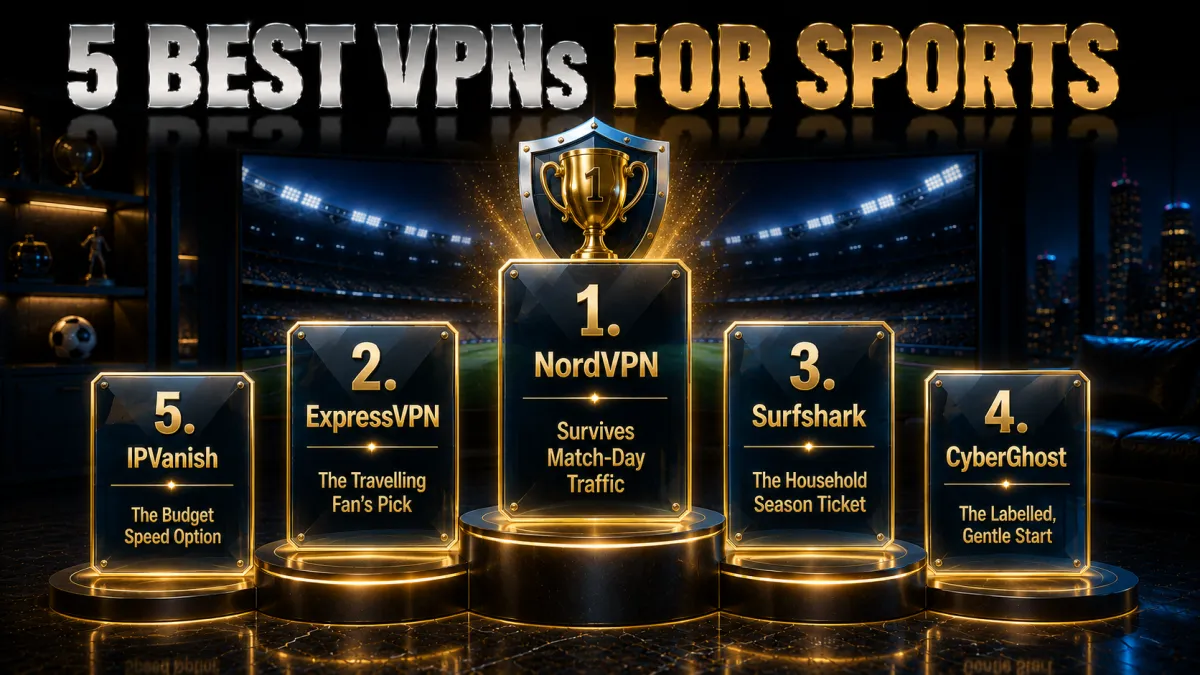
Ranked for live-sport performance: sustained speed, detection resilience, coverage, and recovery, then value.
1. NordVPN – Best overall for live sport
NordVPN holds bitrate through evening load the way live sport demands, with NordLynx reconnects fast enough that WiFi blips read as broadcast hiccups rather than VPN events. Wide country and city coverage serves travellers and internationals alike, and the address rotation that keeps match days streaming is routine operations here.
SmartPlay smooths app-side checks, TV and stick apps cover the living room, and the audited no-logs record anchors trust as everywhere.
✔ Pros
- Best sustained speeds under evening load
- Match-day detection resilience
- Wide country and US city coverage
- Instant NordLynx reconnects
- Audited no-logs, 24/7 chat
✘ Cons
- Best price needs a longer plan
- Settings denser than minimalist apps
| Live-sport speed | Leading, sustained |
| Smart DNS | Yes, SmartPlay |
| TV apps | Android TV, Fire TV |
| Audited no-logs | Yes, multiple audits |
| Devices | 10 |
| Money-back | 30 days |
2. ExpressVPN – The travelling fan’s pick
ExpressVPN is the pick for the fan who watches from hotels: automatic obfuscation walks through venue networks that block VPNs, Lightway holds live streams steadily, and MediaStreamer puts the match on app-less hotel TVs. The reliability record under awkward conditions is the product.
The premium price and eight-device cap remain the familiar trade for the polish.
✔ Pros
- Best hostile-network passage for hotels
- MediaStreamer for app-less TVs
- Steady Lightway live performance
- RAM-only fleet, audited no-logs
- Smoothest recovery experience
✘ Cons
- Most expensive of the five
- 8-device cap is the tightest here
| Live-sport speed | Very strong, steady |
| Smart DNS | Yes, MediaStreamer |
| TV apps | Android TV, Fire TV |
| Audited no-logs | Yes, audited |
| Devices | 8 |
| Money-back | 30 days |
3. Surfshark – The household season ticket
Surfshark puts live sport on every screen in the house, phones at the cafe, the TV in the lounge, the tablet in the kitchen, at the lowest long-term price here, with speeds that carry HD and 4K on decent lines and modestly more match-day rotation than the top two.
Audited no-logs and the standing Netherlands note complete the honest picture.
✔ Pros
- Unlimited simultaneous devices
- Lowest long-term price of the five
- Solid live speeds on decent lines
- Generous country coverage
- Audited no-logs policy
✘ Cons
- More match-day rotation than top two
- Netherlands base, inside the EU
| Live-sport speed | Solid |
| Smart DNS | Yes |
| TV apps | Android TV, Fire TV |
| Audited no-logs | Yes, audited |
| Devices | Unlimited |
| Money-back | 30 days |
4. CyberGhost – The labelled, gentle start
CyberGhost’s labelled streaming servers turn the which-endpoint question into a menu pick, the friendliest start for a first-time sports streamer, with good rather than leading speeds and more rotation on marquee fixtures. The 45-day refund covers most of a season’s worth of test evenings.
Plain apps and transparency reports round out the beginner case.
✔ Pros
- Streaming servers labelled in-app
- 45-day refund, longest here
- Plainest apps of the five
- Audited no-logs with transparency reports
- Huge server network
✘ Cons
- Speeds good rather than leading
- More rotation on marquee fixtures
| Live-sport speed | Good |
| Smart DNS | Yes |
| TV apps | Android TV, Fire TV |
| Audited no-logs | Yes, audited |
| Devices | 7 |
| Money-back | 45 days |
5. IPVanish – The budget speed option
IPVanish brings genuine raw speed and unlimited connections at a fair price, with streaming access more variable than the four above on big fixtures, honest placement for a service whose strength is throughput rather than the streaming arms race. Its large US footprint suits American sports especially.
US jurisdiction, lighter audit history, and no Smart DNS remain the standing notes.
✔ Pros
- Brisk sustained WireGuard speeds
- Unlimited simultaneous connections
- Large US server footprint
- Fair pricing
- Kill switch and leak protection included
✘ Cons
- Most match-day rotation of the five
- US jurisdiction, lighter audit history
| Live-sport speed | Fast, variable access |
| Smart DNS | No |
| TV apps | Fire TV |
| Audited no-logs | Policy in place, lighter audit history |
| Devices | Unlimited |
| Money-back | 30 days |
| Feature | NordVPN | ExpressVPN | Surfshark | CyberGhost | IPVanish |
|---|---|---|---|---|---|
| Live-sport speed | Leading | Very strong | Solid | Good | Fast |
| Match-day resilience | Best here | Very reliable | Solid | Good | Variable |
| Hotel-network passage | Obfuscated servers | Automatic | Camouflage | None dedicated | Scramble |
| Smart DNS | SmartPlay | MediaStreamer | Yes | Yes | No |
| Devices | 10 | 8 | Unlimited | 7 | Unlimited |
| Money-back | 30 days | 30 days | 30 days | 45 days | 30 days |
Match-day setup, step by step
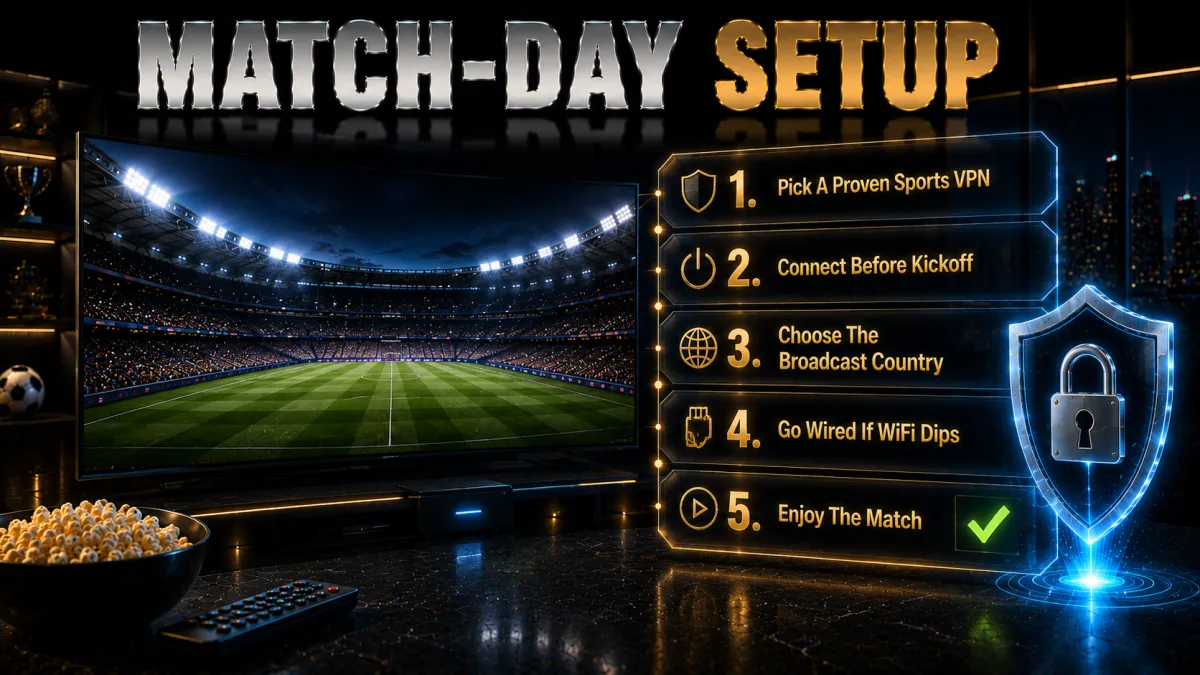
The routine that makes kickoff boring.
- Build the kit on a quiet evening. Install the VPN on the actual watching devices, log in, and enable the kill switch, days before the fixture that matters. Preparation converts match-day turbulence into a shrug.
- Pick and prove your server. Home country for travellers, broadcast country for internationals; stream twenty full minutes on it, then favourite it and note a backup. The proven pair is your entire contingency plan.
- Run the leak suite once. DNS, WebRTC, and IPv6 sealed means detection has no mismatch to read, per our leak guides. One minute now prevents the mysterious mid-match error later.
- Connect early on the day. Tunnel up ten minutes before coverage starts, app opened after, quality settled before the anthem. Early connection leaves rotation margin if the first address misbehaves.
- Know your recovery moves. Error screen: rotate to the backup and clean the session. Buffering: drop to HD or switch to the nearer server. WiFi blip: let the reconnect do its two seconds. Three rehearsed moves cover the whole evening.
Sport on the big screen: TVs, sticks, and consoles
Where the match actually gets watched.
- Android TV and Fire TV: the direct route. Native VPN apps put the tunnel on the TV itself, remote-friendly, with the sports apps running inside it. Where your screen supports this, every other path is unnecessary.
- App-less TVs: router or Smart DNS. Whole-home router coverage or provider DNS services carry platforms without VPN apps, per our smart-TV guide, with fixes living at that layer. MediaStreamer and SmartPlay serve exactly this tier.
- Consoles double as sports boxes. PlayStation and Xbox run the major sports apps and accept Smart DNS directly, making them serviceable streamers where the TV resists. Router coverage reaches them too.
- Casting is the universal fallback. The protected phone or laptop casting to any screen converts blocked hardware into a watched match with zero setup. Keep it in the toolkit for hotels especially.
Fixing sports-streaming VPN errors mid-match
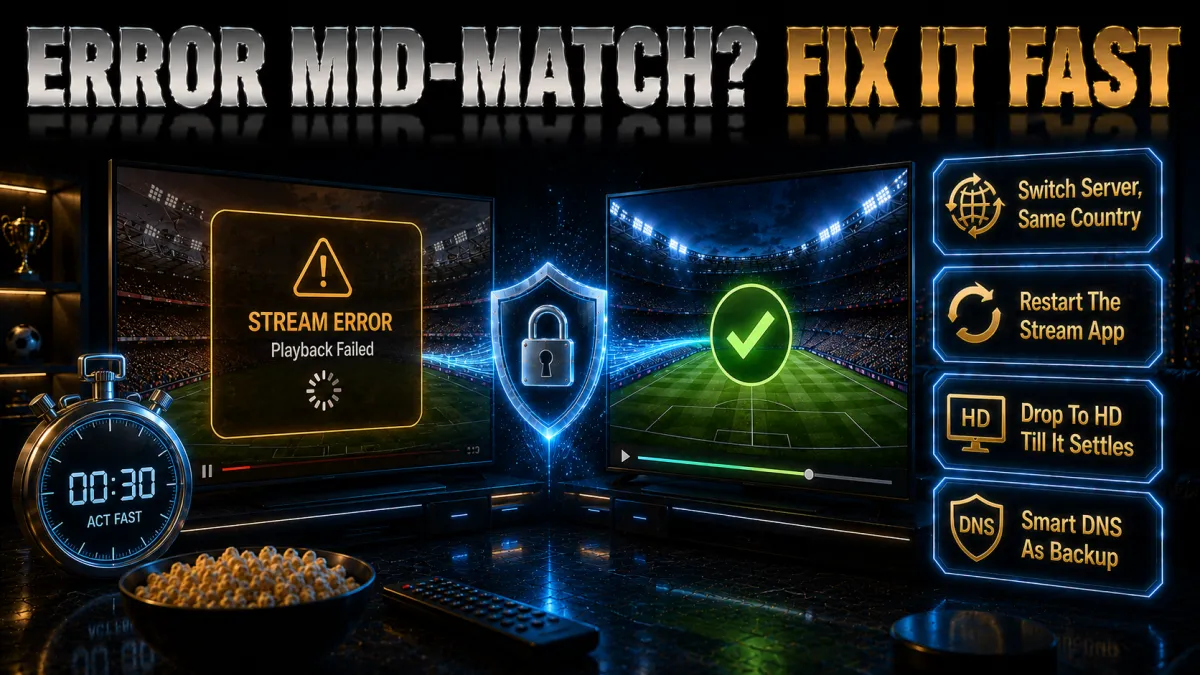
The compressed ladder, ordered for urgency.
- Error screen: rotate and clean. Switch to your backup server in the same country and restart the app or use a private window; the address was listed, the echo contradicted, or both. This pairing clears most mid-match blocks inside a minute.
- Buffering: nearer, emptier, or lower. Move to a closer or less crowded server, or cap quality to HD and let stability win. The distance-and-load physics from our slow-VPN guide decide this, not the service.
- Dead connection on venue WiFi: step down protocols. Hotel and stadium networks that block VPN signatures answer to OpenVPN TCP or your provider’s obfuscated mode, per our WiFi-unblocking guide. One settings switch, reconnect, through.
- Recurring failure on one device: clear its state. The TV or stick that errors while the phone streams carries stale app data; clear or reinstall the sports app and reboot. Device state explains most it-works-everywhere-except cases.
- Everything failing: chat, then fallback. Provider chat hands over today’s working endpoint faster than experimentation, and the cast-from-phone fallback saves the half you would otherwise miss. Ask early rather than at full time.
Legality and terms: the honest map
Three separate layers, kept separate.
- The tool is legal almost everywhere. VPN use itself is lawful in most countries, the standing short restrictive list aside, and nothing about pointing it at sport changes that. Our country guides cover the exceptions for travellers.
- The terms are where the lines sit. Every sports and streaming service prohibits circumventing regional restrictions, blackouts included, so the grey uses on this page breach contracts even on paid accounts. Enforcement observed remains blocked streams; the print deserves stating exactly once and plainly.
- Piracy is the different thing entirely. Unlicensed restreams and cracked apps carry malware economics and, in some jurisdictions, legal exposure that watching your own subscriptions never does. The consistent line across this site: pay for the sport, then solve the geography.
- Watching your own subscriptions abroad is the calm zone. It technically brushes the same terms, enforcement interest in it is minimal on all public evidence, and it remains the use case this guide is happiest recommending. The sympathetic case earns its adjective.
Common sports-streaming VPN mistakes
Five habits that ruin fixtures.
- First connection at kickoff. Untested setups meet marquee-fixture detection and evening load simultaneously, and every weakness surfaces at once. The quiet-evening rehearsal is the whole cure.
- Free VPNs against live sport. Throttled, capped, and permanently listed, they fail the hardest streaming test structurally. Refund windows remain the honest free trial, per our free-VPN guide.
- Distant servers for no reason. A tunnel across the planet adds latency and sag the match will surface at the worst moment; the nearest working server wins, always. Distance physics forgive nobody.
- Ignoring the device layer. Blaming the VPN while the TV app’s stale cache or the router’s WiFi band is the bottleneck wastes halves of matches. The chain test finds the true culprit once.
- Reading reviews instead of testing. Match-day behaviour on your line, your fixtures, and your servers is the only evidence that matters, and refund windows exist to gather it. This page is the map; your test is the territory.
Related reading:
Frequently Asked Questions
What is the best VPN for sports streaming?
NordVPN leads on the combination live sport demands, sustained evening speeds, match-day detection resilience, wide coverage, and instant reconnects, with ExpressVPN the travelling fan’s pick and Surfshark the household value. The real test is a full match on your own line inside the refund window.
Why is sport geo-blocked at all?
Broadcast rights are auctioned country by country, different services win different territories, and each must enforce the borders it bought. The same match therefore lives on different platforms per country, each checking your IP, with live rights being the most expensive and most tightly policed in media.
What speed do I need for live sports streaming?
Around 35 Mbps of steady headroom keeps 4K sport comfortable, HD needing far less, and sustained behaviour under evening load matters more than any speed-test peak. If streams sag, the nearest uncrowded server and the slow-VPN checklist fix more than upgrading your plan.
Can I watch my home sports subscriptions while travelling?
Yes, and it is the clean case: connect to a home-country server before opening the apps you pay for, and the services see the familiar address regardless of continent. Set up and test before departure, favourite the proven server, and the trip disappears from your streaming.
Do VPNs work around sports blackouts?
Technically the mechanics are the same as any geo-block, and honestly it is the clearest terms breach on this page: services prohibit circumventing blackouts, league platforms watch the pattern attentively, and sanctioned alternatives like out-of-market packages exist. This guide explains the machinery and prints the line; the decision is yours.
Why does my VPN fail specifically on big match days?
Marquee fixtures concentrate traffic and enforcement at once: more streams crowd the servers while detection pays closest attention, so addresses get listed exactly when patience is shortest. Connect early, keep a proven backup server favourited, and treat rotation as weather rather than failure.
Is using a VPN for sports streaming legal?
The VPN is legal in most countries; circumventing regional restrictions breaches the services’ terms, a contract matter whose observed enforcement is blocked playback rather than account action. Unlicensed restreams are the genuinely risky different thing, carrying malware and legal exposure your own subscriptions never do.
How do I watch sports on my TV through a VPN?
Native VPN apps on Android TV and Fire TV are the direct route; app-less TVs take the router or Smart DNS path, MediaStreamer and SmartPlay serving exactly that tier; consoles accept DNS directly; and casting from a protected device covers everything else. Our smart-TV guide walks each in detail.
Why does my stream buffer only through the VPN?
Server distance or congestion, almost always: the tunnel adds a hop, and a far or crowded endpoint turns a healthy line into a buffering exhibition. Move to the nearest working server, try its neighbours at match time, and cap to HD on weak networks; the physics answer before the service does.
Do free VPNs work for live sport?
Structurally no: throttled speeds and data caps meet streaming’s most demanding traffic, and small shared address pools live permanently on detection lists, failing marquee fixtures first. The 30-to-45-day refund windows across our picks are the honest way to trial the real thing free.
Does a VPN stop my ISP throttling sports streams?
Where video-specific throttling exists, yes: encryption removes the traffic label shapers key on, and streams ride as anonymous data. Test rather than assume, per our slow-VPN guide, since congestion and WiFi explain more buffering than throttling in most markets.
Which server country should I choose for sport?
Your home country when watching your own subscriptions abroad, the broadcast country of the service you hold otherwise, and within either, the city nearest your real location for speed. Favourite what proves itself at match time and note one backup; that pair is the strategy.
Can hotels block sports streaming even with a VPN?
They can block VPN protocols themselves, which looks like dead connections rather than error screens: step down to OpenVPN TCP or your provider’s obfuscated mode and the tunnel usually walks through, per our WiFi-unblocking guide. ExpressVPN’s automatic obfuscation makes this invisible, its specific strength.
Should I stream on mobile data instead of stadium WiFi?
Often yes: crowded venue networks combine congestion with aggressive filtering, while a decent mobile connection with the VPN engaged is private, unfiltered, and frequently faster on event days. Watch the data budget, since live HD consumes seriously over a full match, and cap quality accordingly; the stable lower-bitrate stream beats the stuttering sharp one every time.
The Bottom Line
Sports streaming is where every VPN claim gets audited in real time, by evening load, by marquee-fixture detection, by hotel WiFi, and by the zero tolerance live viewing has for buffering. The kit that passes is unspectacular: a provider whose nearby servers hold bitrate at nine on Saturday, whose addresses outrun the lists on match days, whose reconnects make blips invisible, and whose chat answers mid-match. Around it, the honest map stays fixed: your own subscriptions abroad are the calm zone, other regions’ broadcasts and blackouts breach terms with error-screen enforcement, and piracy remains the separate, genuinely risky thing this site keeps declining to dress up.
The five picks in one line each:
- NordVPN makes match day stream like an ordinary evening, at the top of the speed table.
- ExpressVPN carries travelling fans through any hotel network with MediaStreamer for the TV.
- Surfshark is the household season ticket: every screen, least money.
- CyberGhost labels the streaming servers and gives 45 days of match nights to verify.
- IPVanish brings raw budget speed, US sports especially, rotation included.
Build the kit on a quiet evening, prove it on a full match, and let the fixture itself be the only drama: that is the entire product this page was selling.
Related guide: For Indian cricket and JioHotstar access, use our JioHotstar VPN guide before picking a streaming server.
Jyoti VPN Expert leads VPN testing at VPN Expert Guide, covering streaming and regional access, speed and latency testing, and leak checks on Windows, Android and router-level setups. Our guides are built from vendor documentation, provider terms and our own connection testing on a residential line in India, and we publish those measurements in full so readers can check them. Every guide is reviewed before publication and dated so you can see how current it is.
Meet our testing team →Last updated: September 14, 2026