
Best VPN for Netflix USA in 2026: Watch American Netflix from Anywhere
American Netflix is not the biggest library in the world, but it is arguably the most sought-after. Hollywood blockbusters, prestige originals, and US-exclusive licensed titles that simply do not exist anywhere else. Here is how to get there from wherever you are.
The myth about Netflix USA and why it still draws the world

Here is something that surprises most people: the United States does not have the largest Netflix library in the world. As of mid-2026, the US catalogue sits at roughly 6,700 titles and ranks around sixth or seventh globally. Slovakia, Czech Republic, Japan, Iceland, and a handful of other countries technically have more titles by raw count.
So why does everyone want Netflix USA?
Because raw title count misses the point entirely. The US Netflix library is not the biggest, but it is built around the most commercially valuable content on earth. Hollywood studio output, prestige American television, and the highest-profile Netflix Originals all appear in the US library first and most completely. The reason the US catalogue is not the largest is also the reason it is the most coveted: the American streaming market is so competitive that Disney+, Max, Peacock, and Paramount+ pull their licensed content away from Netflix in the US. Disney+ takes Disney and Marvel content. Max takes HBO. Peacock takes NBC shows. The result is a more curated but higher-average-quality library compared to markets where Netflix has no serious competition and can license everything.
Beyond the library itself, there are two other audiences who need a US Netflix VPN for entirely different reasons.
- People outside the US who want the American library. Certain Hollywood films, licensed US television series, and exclusive content deals mean some titles simply do not exist on your home country’s Netflix. Connecting to a US server shows you those titles.
- Americans travelling or living abroad. The moment you connect from a non-US IP, Netflix switches you to the local library. Your US subscription still works, but you are suddenly watching a different, often smaller catalogue. A VPN with a US server restores your home library wherever you are in the world.
What is actually in Netflix USA that you cannot get elsewhere?

The honest answer is nuanced. Most Netflix Originals are available globally because Netflix produces them and owns the rights in every market. What makes the US library distinct is the licensed content: films and series where the streaming rights belong to different companies in different countries, and in the US those rights happen to be with Netflix.
- Licensed Hollywood films. Certain studio deals give Netflix US rights to films that stream on entirely different platforms elsewhere. A film available on Netflix in the US might be on Amazon Prime in the UK, on a local broadcaster in Germany, or simply unavailable on any streaming service in some countries. The only way to watch it on Netflix is from a US IP.
- US-exclusive television series. Shows that air on American networks or cable channels sometimes land on Netflix in the US under licensing deals that do not extend to other territories. The Resident and similar network dramas are examples of content Netflix holds specifically for American subscribers.
- The depth of the animated catalogue. Netflix US carries a notably deeper catalogue of animated content, including both American studio animation and licensed anime titles, compared to many other markets.
- Stand-up comedy specials. Netflix has invested heavily in stand-up, and the US library has the deepest collection of specials from both Netflix-produced talent and licensed content from American comedians.
- Sports documentaries. Series like Formula 1: Drive to Survive, Break Point, and various NFL and NBA documentaries sometimes have territorial licensing complications that affect availability. The US library tends to carry the broadest selection.
- Early access to new seasons. Netflix sometimes releases new seasons to the US library before rolling them out globally. Getting there first requires a US IP.
The reverse is also worth knowing. Some content famously absent from US Netflix is available on other country libraries. Friends, for example, is on Netflix in the UK and many other markets but streams on Max in the US. A good VPN works in both directions.
5 best VPNs for Netflix USA in 2026
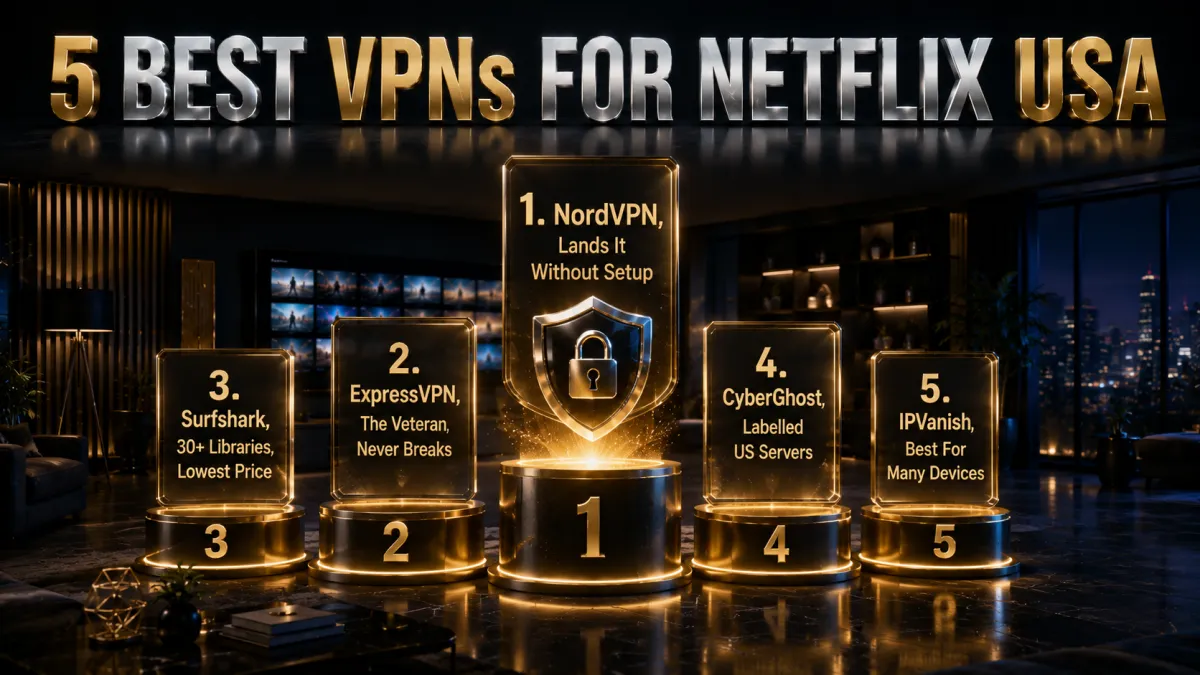
Every VPN claims to unblock Netflix. Most do not survive contact with Netflix’s actual detection systems for more than a few weeks. The three below have a documented track record of consistent access, maintained through ongoing infrastructure investment rather than luck. Each has a different primary strength, so the right pick depends on what you value most.
1. NordVPN – Best overall for Netflix USA
What sets NordVPN apart for Netflix USA is SmartPlay. It is not a marketing term for merely having VPN servers. It is a genuine technology that automatically combines VPN routing with SmartDNS optimisation specifically for streaming platforms. When you connect to a US server and open Netflix, SmartPlay handles the detection evasion in the background. You do not configure anything. You do not check which server is currently working. You just connect and watch. That zero-friction experience is harder to build than it sounds, and it is why NordVPN consistently tops Netflix unblocking tests across independent reviewers.
The speed story is equally strong. NordLynx, built on the WireGuard protocol, is consistently one of the fastest VPN protocols available. For 4K Netflix streaming you need sustained bandwidth without drops or latency spikes. NordVPN delivers this reliably even when connecting from Asia or India to US servers across significant geographic distance.
✔ Pros
- SmartPlay handles Netflix detection automatically, no manual server hunting
- Unblocks 25+ Netflix libraries including USA, UK, Japan, Canada, Australia
- NordLynx delivers consistently fast speeds for 4K streaming
- 10 simultaneous device connections per subscription
- Independently audited no-logs policy
- Threat Protection blocks ads and trackers while browsing
✘ Cons
- Monthly plan is noticeably more expensive than the long-term price
- App interface changes across updates can disorient returning users
| Netflix libraries | 25+ including USA, UK, JP, CA, AU |
| Price from | ~$3/mo (long-term plan) |
| Servers | 7,000+ across 110+ countries |
| Simultaneous devices | 10 |
| Money-back guarantee | 30 days |
2. ExpressVPN – The veteran that never breaks
There is a version of this that reads like a press release: “ExpressVPN is fast, secure, and easy to use.” That is all true, but it misses what actually makes it worth recommending. ExpressVPN has been in the Netflix unblocking game longer than almost any other provider, and it has maintained access through every wave of Netflix’s detection upgrades since the mid-2010s. That institutional knowledge, knowing which server infrastructure configurations survive Netflix’s scanning, how to rotate IP pools effectively, how to stay a step ahead, is not something a newer provider can replicate quickly.
The apps themselves are the cleanest in the industry. No cluttered dashboards or settings buried three levels deep. RAM-only servers ensure no connection data survives a reboot. The cost is real: ExpressVPN is more expensive than both NordVPN and Surfshark on long-term plans. But if you have tried a cheaper VPN and hit a proxy error right before the season finale you have been waiting for, you understand what you are actually paying for.
✔ Pros
- The longest track record of consistent Netflix USA access in the industry
- Lightway protocol is fast, stable, and efficient on mobile
- RAM-only servers, no session data stored on disk
- The cleanest and simplest apps across every platform
- Works on Smart TVs, routers, and consoles in addition to standard devices
✘ Cons
- Genuinely more expensive than the alternatives, especially on long-term plans
- Only 8 simultaneous connections, the fewest of the three picks
| Netflix libraries | 20+ including USA, UK, JP, CA |
| Price from | ~$5/mo (long-term plan) |
| Servers | Across 105 countries |
| Simultaneous devices | 8 |
| Money-back guarantee | 30 days |
3. Surfshark – 30+ libraries, unlimited devices, lowest price
Surfshark’s case for this list rests on two things neither NordVPN nor ExpressVPN can match simultaneously: it unblocks more Netflix libraries than either (over 30, including the US, UK, Australia, Canada, Japan, Korea, Brazil, and more), and it costs less than both on a long-term plan. Add unlimited simultaneous device connections and you have a proposition that any household with multiple Netflix-watching devices will find compelling.
The trade-off is that Surfshark occasionally requires a server switch to find one that is currently clean on Netflix. This is not unique to Surfshark. All VPNs have this issue to varying degrees, but NordVPN’s SmartPlay and ExpressVPN’s infrastructure investment mean it happens less often with those two. Surfshark compensates with a wider server selection and a genuinely affordable price that makes it easy to recommend as a primary Netflix VPN for cost-conscious households.
✔ Pros
- Unlocks 30+ Netflix libraries, more than any other pick in this guide
- Unlimited simultaneous device connections on one subscription
- The lowest long-term price of the three picks by a notable margin
- CleanWeb blocks ads and trackers across all your devices simultaneously
- WireGuard delivers strong speeds for HD and 4K US Netflix
✘ Cons
- Occasionally requires switching servers to find one Netflix has not flagged recently
- Speeds on very distant servers can drop more than NordVPN under load
| Netflix libraries | 30+ including USA, UK, AU, JP, KR, BR |
| Price from | ~$2.50/mo (long-term plan) |
| Servers | 3,200+ across 100 countries |
| Simultaneous devices | Unlimited |
| Money-back guarantee | 30 days |
4. CyberGhost, easiest for beginners
CyberGhost is the friendliest way into US Netflix for a first-time VPN user, and the reason is its app design. Instead of dropping you into a list of thousands of servers, it groups them by purpose, with a dedicated streaming section that names the exact service, including US Netflix. You scroll to that entry, select it, and the app connects you to a node CyberGhost actively maintains against Netflix detection, so you never have to guess which server is currently working.
On speed it holds up well for HD and 4K when you pick a server close to home or inside the US, though it can dip a little during the busy evening hours when its network is under the most load. For everyday living-room viewing that difference is effectively invisible, and you would only notice it on a congested night against a faster rival like NordVPN or ExpressVPN.
The real standout is the 45-day money-back guarantee, the longest of the five and well beyond the usual 30 days. That gives you a month and a half to confirm US Netflix, your other streaming services, and your own connection all behave before you commit, which makes CyberGhost the lowest-risk way to try a streaming VPN.
✔ Pros
- Streaming servers labelled for US Netflix
- Beginner-friendly apps and setup
- Longest 45-day money-back window
- Large server network including the US
- Reliable HD and 4K on nearby servers
✘ Cons
- Can slow down at peak times
- Fewer devices than the value picks
| US Netflix access | Yes, streaming servers |
| 4K streaming | Good |
| US server choice | Large |
| Price from | ~$2 to $3/mo (long-term plan) |
| Simultaneous devices | 7 |
| Money-back guarantee | 45 days |
5. IPVanish, best for many devices
IPVanish reaches reliability from a different direction: it owns and runs its entire server network rather than renting capacity from third parties. That control over its own hardware and routing gives it steady, consistent throughput, which for US Netflix in 4K means the bandwidth stays level instead of dropping in the sudden dips that trigger buffering. Because it also allows unlimited simultaneous connections, every TV, tablet, and phone in the house can stream from a US server at once on a single plan.
Where it trails the top picks is breadth and detection. It opens US Netflix dependably, but it unblocks fewer of the smaller regional catalogues than NordVPN or Surfshark, so if you like hopping between many countries libraries it will feel more limited. It is also US-based, inside the 9 Eyes intelligence-sharing alliance, which weighs more on privacy than on pure streaming but is worth knowing.
That makes IPVanish a focused choice rather than an all-rounder. If your goal is dependable US Netflix in 4K across a lot of devices for a low price, it delivers exactly that; if you want the widest global library access, the higher-ranked providers are the better fit for you.
✔ Pros
- Owns its network for steady 4K speed
- Unlimited simultaneous devices
- Reliable US library access
- Simple, no-clutter apps
- Good long-term value
✘ Cons
- Unblocks fewer libraries than rivals
- US-based, inside the 9 Eyes alliance
| US Netflix access | Yes |
| 4K streaming | Very good |
| US server choice | Owned network |
| Price from | ~$3 to $4/mo (long-term plan) |
| Simultaneous devices | Unlimited |
| Money-back guarantee | 30 days |
Side by side, here is how the three picks compare on the factors that actually decide which one to get.
| Feature | NordVPN | ExpressVPN | Surfshark | CyberGhost | IPVanish |
|---|---|---|---|---|---|
| Netflix USA reliability | Excellent | Excellent | Very good | Very good | Good |
| 4K streaming speed | Excellent | Excellent | Very good | Good | Very good |
| Netflix libraries total | 25+ | 20+ | 30+ | 20+ | 15+ |
| Simultaneous devices | 10 | 8 | Unlimited | 7 | Unlimited |
| Auto-detection handling | SmartPlay | Strong | Manual switch sometimes needed | Streaming servers | Basic |
| Price from | ~$3/mo | ~$5/mo | ~$2.50/mo | ~$2.50/mo | ~$3.50/mo |
| Audited no-logs | Yes | Yes | Yes | Yes | Yes |
| Money-back | 30 days | 30 days | 30 days | 45 days | 30 days |
How Netflix detects VPNs and how the best providers stay ahead

Understanding how Netflix’s detection works explains why some VPNs succeed consistently while others fail the moment you need them most. Netflix does not have access to your device or your actual traffic. What it can see is your IP address, your DNS requests, and certain patterns in how your connection behaves.
- IP reputation databases. Netflix maintains and licenses databases of IP addresses known to belong to data centres rather than residential internet connections. A VPN server IP that appears in those databases gets blocked. Quality providers rotate and refresh their IP pools regularly so that clean, data-centre-registered IPs are always available. This is the primary reason free VPNs fail almost immediately. Their small, static IP pools get flagged and stay flagged.
- DNS leak detection. If your DNS queries travel outside the VPN tunnel, they reveal your real location even when your IP says US. Netflix checks whether the DNS server handling your queries is consistent with your claimed IP location. A VPN with proper DNS leak protection routes all queries through the tunnel. One without it gets caught immediately.
- WebRTC leaks. Browsers can expose your real IP through WebRTC even when a VPN is active. A properly configured VPN app handles this at the OS level. Browser-based VPN extensions often do not, which is one reason they consistently fail with Netflix while full VPN apps succeed.
- IPv6 leaks. If your VPN does not handle IPv6 traffic, Netflix can read your real IPv6 address alongside your VPN’s IPv4 address and block accordingly. All three picks in this guide handle IPv6 correctly.
The arms race element is real. Netflix’s detection team regularly updates the IP reputation data and scanning methods. Providers who stay ahead invest in dedicated streaming server infrastructure, automated IP monitoring, and rapid response when a block is detected. NordVPN’s SmartPlay and ExpressVPN’s dedicated streaming servers are examples of this investment. Surfshark achieves similar results through a larger server pool that gives more options when any given IP gets flagged.
How to watch Netflix USA with a VPN: step by step

The process is simpler than most people expect. Netflix itself is not the complicated part. The VPN is doing all the work in the background.
- Choose your VPN and sign up. NordVPN for automatic reliability, ExpressVPN for proven track record, or Surfshark for the widest library access and lowest cost. All three have 30-day money-back guarantees. You are not making a permanent commitment until you have tested it.
- Download the official app. From the App Store, Google Play, or directly from the provider’s website. Never use unofficial VPN apps. The VPN category has a well-documented problem with fake apps that log data or deliver malware.
- Connect to a US server. Open the VPN app and select United States from the server list. On NordVPN, SmartPlay activates automatically. On ExpressVPN and Surfshark, any US server should work. Try New York, Los Angeles, or Chicago first as these typically have the cleanest IPs for streaming.
- Open Netflix in a fresh session. If you already have Netflix open in a browser tab, close it completely and reopen it after the VPN connects. The platform caches your previous location and may not register the new US IP unless you start a fresh session.
- Sign in and check the library. Browse to a show you know is US-only. If it appears and plays, the VPN is working correctly. If you see a proxy error, proceed to the next step.
- Switch US servers if you get a proxy error. Disconnect from the current server and connect to a different US city. New York, Los Angeles, Seattle, and Chicago usually have the most server variety. The issue resolves on the next server in almost all cases with the three picks above.
- Clear cookies if the library does not change. If Netflix loads but still shows your home country’s library rather than the US one, clear your browser’s cookies and cache for netflix.com, then reload the page with the VPN still connected.
Netflix USA on every device: what works and how
Netflix runs on an enormous range of devices. Getting a VPN working correctly varies slightly by platform, but the three picks in this guide cover all the major ones.
- Android phones and tablets. Install the VPN app from Google Play, connect to a US server, and open the Netflix app. Android handles VPN routing at the operating system level so the Netflix app automatically uses the VPN connection without any additional setup.
- iPhones and iPads. Same process as Android but from the App Store. Grant the VPN configuration profile permission when prompted during the first setup. Once connected to a US server, the Netflix app picks up the US IP automatically.
- Windows and macOS laptops. Install the desktop app, connect to a US server, and watch Netflix in your browser or the Netflix app. Both Chrome and Firefox work well. The browser approach lets you quickly verify the library has changed by checking the titles visible on the home screen before starting a stream.
- Smart TVs. Android TV and Google TV devices support VPN apps natively from the Play Store. For Samsung and LG TVs running their own operating systems, the best approach is to install the VPN on your router so all devices on your home network connect through the US IP automatically. ExpressVPN is the only provider of the three that also offers a dedicated router app, which simplifies the setup considerably.
- Amazon Fire TV Stick. All three providers have Fire TV apps in the Amazon Appstore. Install directly on the Fire Stick, connect to a US server, and open Netflix. This setup is one of the most seamless ways to watch US Netflix on a large screen without touching your router.
- Gaming consoles (PlayStation, Xbox). Consoles do not support VPN apps natively. The router-level approach is the most reliable solution. Alternatively, share a VPN-connected laptop’s internet as a Wi-Fi hotspot and connect the console to that network.
- Apple TV. Apple TV running tvOS 17 or later supports native VPN apps. NordVPN and ExpressVPN both have Apple TV apps. For older Apple TV devices, the router approach or a hotspot from a VPN-connected device are the practical alternatives.
Getting the best speeds for Netflix USA from outside the US

Distance is the biggest speed factor when connecting to US Netflix servers from outside North America. If you are in Europe, the Middle East, India, or Australia, you are routing your traffic thousands of kilometres further than a US-based user. Here is how to get the best experience despite that distance.
- Use a WireGuard-based protocol. NordLynx, Lightway, and Surfshark’s WireGuard implementation all dramatically reduce the overhead of the encrypted tunnel compared to older protocols like OpenVPN. For streaming across long distances this matters: the lower the protocol overhead, the more of your actual bandwidth reaches Netflix rather than being consumed by the encryption process.
- Choose the nearest US city server. New York is closer to Europe. Los Angeles is closer to Asia and Australia. Seattle is a reasonable middle ground. Connecting to the geographically nearest US city reduces the baseline latency from your location to the VPN server significantly.
- Connect before starting your stream. VPN connections occasionally take a few seconds to fully stabilise after the initial handshake. Connecting thirty seconds before you start Netflix gives the tunnel time to reach full operating speed.
- Check your base internet speed first. A VPN cannot add bandwidth your ISP does not provide. If your base connection is 20 Mbps, Netflix 4K which requires approximately 25 Mbps will struggle regardless of the VPN. HD at 5 Mbps will be fine.
- Switch servers if a stream starts buffering after working initially. A server that was clean and fast when you connected may get more load as more users join it. If a previously smooth stream starts buffering mid-episode, switching to a different US server usually fixes it within a minute.
Why free VPNs do not work with Netflix USA
Every few months someone discovers that the free VPN they installed stopped working with Netflix and cannot understand why it worked briefly at first. The reason is almost always the same, and understanding it makes the case for a paid provider clearer than any marketing pitch.
Free VPNs operate with a fundamental cost problem. Running VPN infrastructure, servers, bandwidth, IP address management, engineering to stay ahead of platform detection, costs real money. Free providers recover that cost somehow: through data collection and sale, advertising injection, or by offering a stripped-down service designed to funnel users toward a paid upgrade. None of these models allow sustained investment in the Netflix arms race.
- Static, shared IP pools. Free VPNs cannot afford to rotate IP pools regularly. Their US server IPs are the same ones used by thousands of other users, and Netflix identifies and blacklists data-centre IP ranges continuously.
- No dedicated streaming infrastructure. Staying ahead of Netflix’s detection requires purpose-built streaming servers, ongoing monitoring, and rapid response when IPs get blocked. Free providers do not invest in this because there is no revenue stream to fund it.
- Data caps make streaming impractical. Most free tiers limit data to between 500 MB and 10 GB per month. A single episode of a Netflix series in HD consumes roughly 1-3 GB. A movie in 4K consumes 7-15 GB. Free tier limits make sustained Netflix streaming mathematically impossible.
- Privacy risk. Accessing Netflix through a free VPN that logs your traffic to sell browsing data defeats a core reason people use VPNs in the first place. You are adding a surveillance layer to your streaming, not removing one.
The 30-day money-back guarantees from all three paid picks above make this a straightforward comparison. Test a paid VPN thoroughly with Netflix USA, and if it does not deliver the access and speeds you need, claim a full refund. That is less risk than installing a free VPN and discovering its actual privacy practices six months later.
What you actually gain when you unlock Netflix USA
Most VPN guides tell you to get US Netflix without telling you what is actually there waiting for you. That vagueness is fine if you already know what you are chasing. But if you are weighing whether a VPN subscription is worth it for Netflix specifically, concrete examples matter more than abstractions about thousands of exclusive titles.
Here is the honest picture. The US Netflix library is built around a specific type of content that the American market demands and that licensing deals keep concentrated there.
- Network television back catalogues. Shows that ran on ABC, CBS, NBC, and Fox for years ended up on Netflix US under licensing deals that do not extend to all markets. Series like The Resident, Manifest, and various long-running procedural dramas sit in the US library under deals struck specifically for American audiences. If you are outside the US and have been looking for one of these titles across streaming platforms without finding it, there is a good chance it is sitting in US Netflix waiting for you.
- The full animated catalogue. Netflix US carries one of the most complete animated content libraries available through any streaming platform. This covers American animation ranging from classic series to adult animation, plus a curated selection of anime that is deeper than most other regional Netflix catalogues. For animation fans, the US library alone justifies the VPN investment.
- Cult films and indie cinema. Licensing deals for art house, independent, and cult films are often done market by market, and the US market tends to attract the broadest range. Films licensed to local broadcasters or different streaming services in your country may sit quietly available on US Netflix instead.
- Sports documentaries and docuseries. Formula 1: Drive to Survive is a Netflix Original available globally, but the deeper sports documentary catalogue including NFL, NBA, and MLB content has territorial complications that concentrate a lot of it in the US library. For sports fans outside the US, this is some of the most immediately valuable content a US VPN unlocks.
- Stand-up comedy depth. Netflix’s investment in stand-up comedy specials is one of its most underrated content categories, and the US library has the most complete collection. Some specials produced for American audiences under licensing arrangements do not appear in other markets. Comedy fans consistently find the US library has specials missing from their home catalogue.
At the same time, be honest about what you lose if you are from a country with its own strong Netflix library. UK Netflix has Friends, which streams on Max in the US and is absent from the American Netflix catalogue entirely. South Korean Netflix has the deepest K-drama selection outside of local Korean platforms. Japanese Netflix carries anime titles that do not appear on US Netflix at all.
This is precisely why a VPN that handles multiple libraries is more valuable than one that only does the US. You want to move between catalogues based on what you are actually looking for. NordVPN’s 25+ libraries and Surfshark’s 30+ libraries both enable this. ExpressVPN’s 20+ covers all the major markets you will realistically want.
Netflix USA vs other top libraries: what each one has that the others do not

Before you invest in a VPN purely for Netflix USA, it is worth knowing which other libraries are worth accessing and why. The headline that US Netflix is not the biggest sometimes makes people wonder whether it is even worth the effort. Here is a grounded, honest comparison of what each major library does best.
| Country | Approx. Titles | Best for | What it has that US lacks |
|---|---|---|---|
| Slovakia / Czech | ~8,100 | Raw volume | European licensed content, local productions |
| Japan | ~7,850 | Anime, J-drama | Deepest anime library globally, Japanese originals |
| Australia | ~8,000 | Volume + variety | AU/UK licensed crossovers, large back catalogue |
| Canada | ~6,800 | Mix of US + UK | Some titles licensed for Canada but not the US |
| USA | ~6,700 | Hollywood, prestige TV | N/A (this is the baseline for this guide) |
| UK | ~6,400 | British TV, US classics | Friends, British dramas, BBC-adjacent content |
| South Korea | ~5,500 | K-drama, K-content | Best K-drama catalogue outside Korea itself |
The practical takeaway is simple: no single Netflix library has everything. Japan is the destination for anime. The UK has Friends and British drama. Australia punches above its weight on volume. The US has the most concentrated Hollywood content and the best collection of American television back catalogues. If you are using a VPN with access to multiple libraries, you can check any of these on demand. Tools like JustWatch and uNoGS let you search for a specific title across Netflix regions before you even connect, so you know exactly which country server to use without guessing.
Netflix USA not working with your VPN: the proper fix sequence
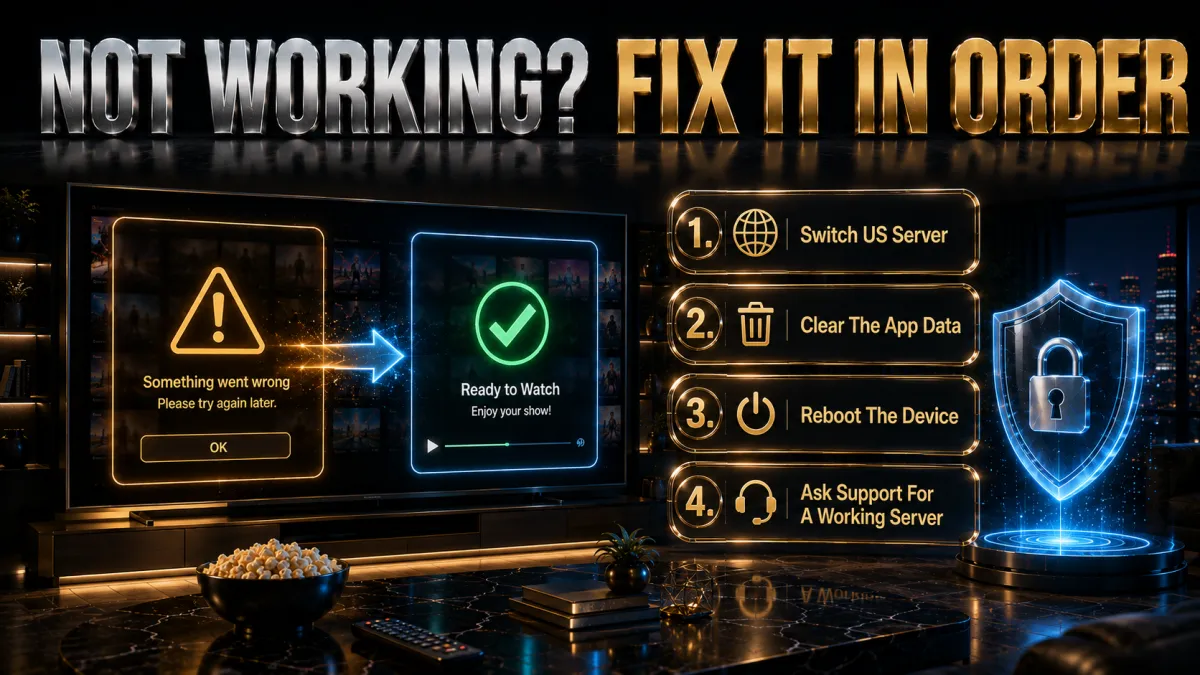
Everyone who uses a VPN for Netflix runs into a proxy error at some point. The fix is almost always simple, but there is a sequence to follow that resolves the vast majority of problems without any technical knowledge required. Work through these steps in order before concluding something is fundamentally broken.
- Switch to a different US server immediately. This is step one, and it fixes the problem around 80 percent of the time. The proxy error means Netflix has flagged that specific server’s IP. In NordVPN, tap the server name and choose a different US city. In ExpressVPN, select a different city within the US location. In Surfshark, pick a US city you have not tried yet. New York, Los Angeles, Chicago, and Seattle typically offer the most server variety and the highest chance of finding a clean IP quickly.
- Clear Netflix session data. If switching servers loads the right US IP but Netflix still shows your home library, the platform is reading a cached location from your previous session. In a browser, clear cookies and site data for netflix.com specifically, then reload with the VPN still connected. In the Netflix mobile app, go to your phone’s settings, find Netflix, and clear the app cache. Do not log out of Netflix before clearing the cache or you may need to verify your account again.
- Run a DNS leak test. Visit a DNS leak test site while your VPN is connected to a US server. If the DNS servers showing in the results belong to your real ISP or country rather than to the US, your connection has a leak that Netflix can read even when your IP looks American. Enable DNS leak protection in your VPN app settings, reconnect, and test again.
- Check IPv6 handling. On some home networks, IPv6 traffic travels outside the VPN tunnel even when IPv4 is routed correctly. Netflix can read this and detect your real location. All three picks in this guide handle IPv6 by default, but if you have changed any advanced network settings, confirm that IPv6 leak protection is active in the VPN app.
- Try a different browser or switch to the Netflix app. Browser extensions, cached DNS, and stored session data can all interfere with VPN routing in ways that disappear when you switch browsers. If Chrome is not working, try Firefox in a private window. If the browser is not working, try the Netflix desktop or mobile app. The variation sometimes reveals that the problem is browser-specific rather than a VPN issue.
- Contact live chat and ask which US servers are confirmed working with Netflix. All three providers have 24/7 live chat. This is a completely normal support question and they maintain real-time information about which server IPs are currently clean for Netflix. If you have worked through the steps above and nothing is resolving, live chat will get you to a working server faster than any further troubleshooting on your end.
One scenario that looks like a VPN problem but genuinely is not: if Netflix loads the US library correctly but a specific title shows not available in your region, that is a licensing issue with that particular title, not a detection issue with your VPN. Some content carries such narrow territorial licensing that even a US IP cannot access it through a VPN connection. It is uncommon but real. The rest of the US library will function normally around it.
Frequently Asked Questions
Can I watch Netflix USA from outside the United States?
Yes. Connect to a US server from NordVPN, ExpressVPN, or Surfshark and Netflix serves you the American library. This works from any country. The VPN replaces your real IP with a US one, and Netflix reads that as your location. You need a valid Netflix account but do not need a US-specific subscription.
Which is the best VPN for Netflix USA in 2026?
NordVPN is the best overall pick. SmartPlay handles Netflix’s detection automatically so you never need to hunt for a working server, NordLynx delivers fast 4K speeds, and it unblocks 25+ Netflix libraries. ExpressVPN is the most proven over time. Surfshark unlocks the most libraries (30+) at the lowest price with unlimited device connections.
Is Netflix USA the biggest library in the world?
No. The US Netflix library sits at roughly 6,700 titles as of mid-2026 and ranks around sixth globally. Countries like Slovakia, Czech Republic, and Japan have more titles by raw count. However the US library is built around the most commercially valuable Hollywood content, which is why it remains the most sought-after by international viewers.
Why does Netflix show a proxy error with my VPN?
Netflix has identified the specific server IP you are connected to as belonging to a VPN or data centre. Switch to a different US city server in your VPN app. This almost always resolves the issue immediately with the three picks above. If multiple US servers fail, contact your provider’s live chat for servers currently confirmed working with Netflix.
Can Americans use a VPN to watch Netflix while travelling abroad?
Yes, and this is one of the most common use cases. When you connect from outside the US, Netflix switches you to the local library. Connecting to a US VPN server restores your home library as if you were back in the United States. All three picks in this guide handle this reliably.
Does a VPN slow down Netflix streaming quality?
Slightly, due to encryption overhead and routing distance. With a WireGuard-based protocol and a well-chosen US server, the impact is minimal for HD streaming. For 4K you need a strong base connection and a provider with fast servers. NordVPN and ExpressVPN handle 4K most consistently. Surfshark is strong for HD and most 4K content.
Can I get Netflix USA on my Smart TV with a VPN?
Yes, but the method depends on your TV. Android TV and Fire TV support VPN apps directly. Samsung and LG TVs running their own OS require router-level VPN installation so that all devices on your home network use the US IP. ExpressVPN offers the only dedicated router app of the three picks, which simplifies that setup.
Is using a VPN for Netflix against the rules?
Netflix’s terms of service state you should only access the service in the country where you established your account. Using a VPN to access other libraries may technically violate those terms. However, Netflix has focused its enforcement on blocking VPN IPs rather than taking action against individual users. No subscribers have faced account termination specifically for library-switching.
How many Netflix libraries can these VPNs access?
NordVPN unblocks 25+ Netflix libraries including USA, UK, Canada, Australia, Japan, and Korea. ExpressVPN accesses 20+ libraries. Surfshark unblocks 30+ libraries, the most of the three picks, including the US, UK, Australia, Brazil, South Korea, and more.
Will the same VPN that works for Netflix USA also work for other streaming services?
Yes. All three picks are maintained for multiple streaming platforms beyond Netflix. NordVPN and ExpressVPN both unblock BBC iPlayer, Disney+, Hulu, HBO Max, Amazon Prime Video US, and many other platforms. Surfshark covers a similar range. The same subscription that gives you Netflix USA also handles other geo-restricted streaming services.
Do free VPNs work for Netflix USA?
Rarely and not sustainably. Free VPN IP ranges are among the first to be blacklisted by Netflix because they are widely shared and easy to identify. Data caps on free plans make sustained streaming impractical. Use a paid VPN’s 30-day money-back guarantee for a genuine risk-free trial instead.
What content is exclusive to Netflix USA that I cannot get elsewhere?
Licensed Hollywood films and network TV shows with US-specific streaming rights, certain animated series, stand-up comedy specials, and sports documentaries that are only available in the US library. Netflix Originals are generally global, but some have territorial complications. The US library also gets new content earlier than many other markets.
The Bottom Line
Netflix USA is not the world’s largest streaming library. It is something more specific and more valuable: the most commercially concentrated collection of Hollywood content available through a single streaming subscription, maintained in the world’s most competitive streaming market. That is why viewers in 190+ countries go to the trouble of setting up a VPN to access it, and why Americans abroad do the same to keep it when they leave.
- NordVPN is the best overall choice. SmartPlay means you never think about which server to pick. You connect and watch. Fast enough for 4K, covers 25+ libraries, and 10 simultaneous connections for the whole household.
- ExpressVPN is the most proven over time. If reliability and track record matter more to you than cost, no other VPN has a longer consistent history with Netflix USA access.
- Surfshark delivers the widest library access (30+) at the lowest price with unlimited connections. The best value pick for households and anyone who wants to explore beyond just the US library.
- CyberGhost is the friendliest entry point, with servers labelled specifically for US Netflix and the longest 45-day money-back window.
- IPVanish owns its network for steady 4K streaming across unlimited devices, though it unblocks fewer libraries than the top picks.
The 30-day money-back window on all three picks exists for exactly this purpose. Use it deliberately: connect to a US server, open Netflix, and check whether the American library loads. Find a title you know is US-only and confirm it plays in HD or 4K without buffering. Do not just assume it works because the VPN connected. The actual library test takes two minutes and tells you everything you need to know before you commit.
Jyoti VPN Expert leads VPN testing at VPN Expert Guide, covering streaming and regional access, speed and latency testing, and leak checks on Windows, Android and router-level setups. Our guides are built from vendor documentation, provider terms and our own connection testing on a residential line in India, and we publish those measurements in full so readers can check them. Every guide is reviewed before publication and dated so you can see how current it is.
Meet our testing team →Last updated: August 24, 2026