
What Is Double VPN? Multi-Hop Explained, and Who Actually Needs It
Double VPN is the feature everyone assumes means double the protection, which is exactly the assumption worth examining before paying for it in speed. Routing traffic through two servers is a real technique with one specific benefit: useless against the threats most people imagine, valuable against one threat most people never face. This guide explains what double VPN actually does, what it honestly costs, how it compares with Tor, who genuinely needs it, and which providers implement multi-hop properly.
What double VPN actually is
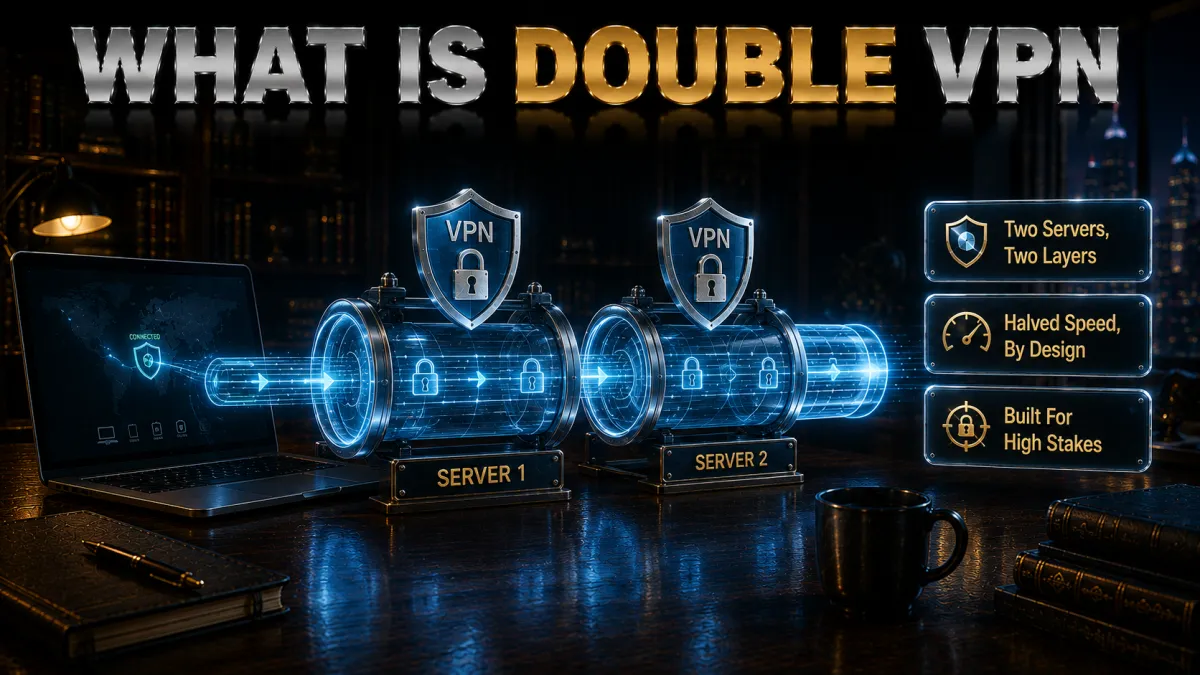
The definition, precisely, because the marketing rarely bothers.
- Two servers in a chain. Instead of your traffic travelling device to VPN server to internet, it travels device to server A to server B to internet, with each hop wrapped in its own encryption layer. The app handles the chaining invisibly; you pick a pair and connect as normal.
- Knowledge is split, and that is the point. Server A knows who you are, your real IP, but sees only encrypted traffic destined for server B; server B knows what you are visiting but sees only server A as the source. Neither server alone can connect you to your browsing, which is the specific security property the whole feature exists to create.
- Layered encryption, not stronger encryption. Your traffic is encrypted once for server B and again for server A, like an envelope inside an envelope. Each layer uses the same strong ciphers a single connection would; the doubling changes who can see what, not how unbreakable any layer is, a distinction the myths section returns to.
- Names vary, mechanics do not. Double VPN, multi-hop, and MultiHop describe the same two-server pattern; some services also market longer chains, which extend the idea with steeply diminishing returns. This page uses the terms interchangeably and treats two hops as the sensible maximum for the technique.
How double VPN works, step by step

The journey of one request, which makes every property above concrete.
- Your device wraps twice. The VPN app encrypts your request for the exit server first, then wraps that parcel in a second encryption layer addressed to the entry server. Both layers exist before anything leaves your device, so no network segment ever sees the contents unwrapped.
- The entry server peels one layer. Server A receives the parcel, removes its layer, and finds only another encrypted parcel addressed onward, learning your IP and nothing else. It forwards without the ability to read further, which is precisely its designed ignorance.
- The exit server peels the second. Server B removes the inner layer, sees the actual request, and forwards it to the destination website under its own address. To the website, you are server B; to server B, you are server A; the chain of ignorance holds at every link.
- The response retraces the path. The reply is wrapped at B, wrapped again at A, and unwrapped fully only on your device, completing a round trip that crossed two servers and four encryption operations. Every one of those steps costs time, which is the next section’s honest subject.
What double VPN genuinely protects against

The real benefits, stated at their actual size.
- Compromise of a single server. If one VPN server is seized, hacked, or secretly monitored, a single-hop user’s activity at that server links their IP to their destinations; a multi-hop user’s does not, because no single server held both halves. This is the core benefit, and for people whose adversaries might actually target servers, it is a substantial one.
- Traffic correlation gets harder. Observers watching traffic enter and exit VPN infrastructure to match patterns face a harder job when entry and exit happen in different data centres or countries. Harder is the honest word rather than impossible; well-resourced correlation attacks remain conceivable against any low-latency system, multi-hop included.
- Jurisdictional separation. Choosing hops in different legal territories means no single country’s legal process reaches both halves of the picture, a consideration that matters to journalists and dissidents dealing with state-level pressure. Pair choice becomes a small act of legal architecture.
- What it does not add. Against everyday threats, snooping WiFi, ISP visibility, advertising trackers, geo-blocks, the second hop contributes nothing a single audited VPN had not already handled. Websites still see a VPN address either way; your provider still must be trusted at the account level; and none of it affects cookies, fingerprinting, or logins, which identify you above the network entirely.
The honest cost: speed, latency, and battery

The price tag the marketing pages whisper.
- Throughput roughly halves. Traffic crossing two servers and two encryption layers commonly loses around half its single-hop speed, sometimes more across continents, a design consequence rather than a defect. Our slow-VPN guide’s advice cannot optimise this away; the second hop simply costs what it costs.
- Latency doubles or worse. Every round trip now crosses two servers, so ping climbs accordingly, which video calls tolerate grudgingly and gaming does not tolerate at all. Latency-sensitive tasks and multi-hop are simply incompatible, and knowing that beats discovering it mid-call.
- Battery and data overhead ride along. Double encryption is double work for your device’s processor, a real if modest tax on phones, and protocol overhead ticks upward too. On a laptop it is invisible; on an ageing phone on mobile data it is noticeable.
- The cost is why targeting matters. Paying this much performance for protection against threats you do not face is the definitional bad trade, which is why the who-needs-it section below is the most useful on the page. Multi-hop is a scalpel priced like one, not a default setting.
Double VPN vs Tor: the real comparison
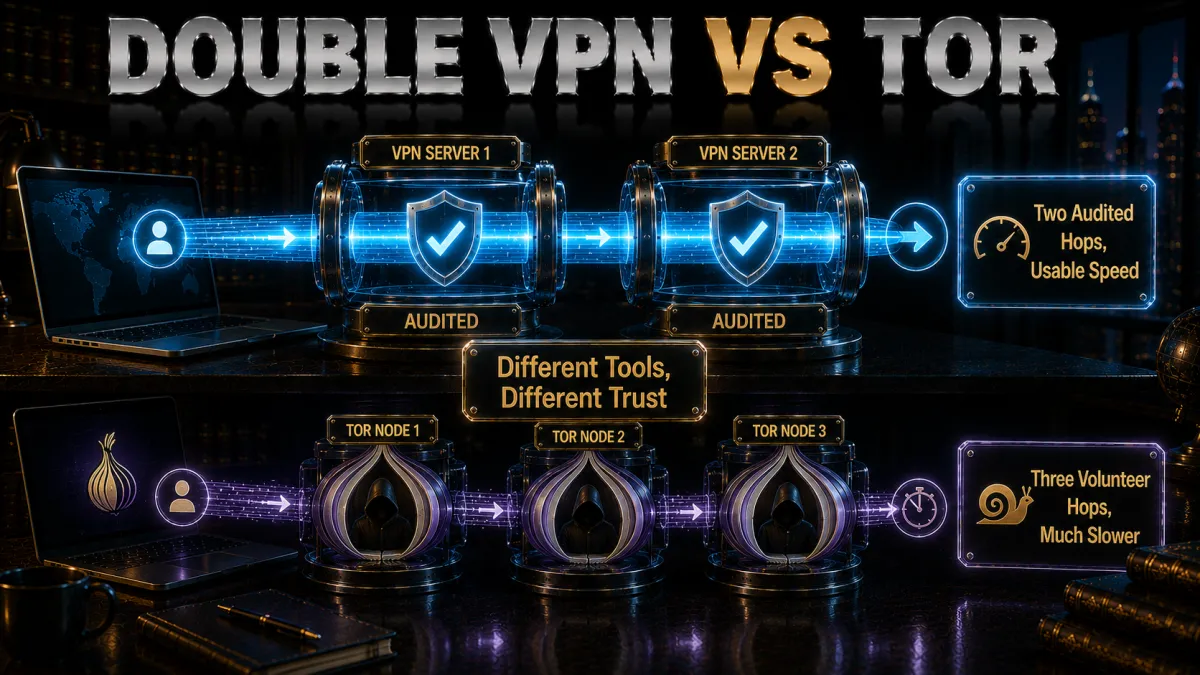
The technique’s closest relative, and the honest differences.
- Tor goes further on the same idea. Tor routes traffic through three volunteer-run relays with layered encryption, no account, and no company, delivering stronger anonymity properties than any commercial two-hop chain can claim. For maximum-anonymity requirements, Tor remains the reference answer, not double VPN.
- Double VPN is faster and friendlier. Commercial servers outperform volunteer relays enormously, apps handle everything, support exists, and streaming or downloading remains feasible, none of which describes Tor. Multi-hop is the usable middle tier between single-hop convenience and Tor’s austerity.
- Trust models differ fundamentally. Double VPN concentrates trust in one audited company running both hops; Tor distributes trust across independent relays with no single operator. Distributed trust is stronger in principle; the audited company is more accountable in practice; which matters more depends on your adversary.
- They can be combined, with care. Onion-over-VPN offerings route Tor through a VPN for users whose networks block Tor entry, a legitimate niche pattern with its own trade-offs. For most readers the simpler decision stands: multi-hop for hardened everyday use, Tor for genuine anonymity requirements, one at a time.
Who actually needs double VPN

The audience question, answered without flattery or fear.
- Journalists protecting sources. Where exposure of a connection pattern could burn a source, the single-server-compromise protection earns its speed price in full, and jurisdictionally separated hops add a legal moat. This is the canonical legitimate user, and the feature was effectively built for them.
- Activists and dissidents under state attention. Adversaries with the resources to pressure or monitor VPN infrastructure are exactly what the split-knowledge design answers. For this audience, multi-hop plus obfuscation plus disciplined habits form a coherent posture our country-specific guides expand on.
- High-stakes professionals, situationally. Lawyers, researchers, and executives handling matters where targeted surveillance is plausible can justify multi-hop for those specific sessions, toggled on for the sensitive work and off for the ordinary. Situational use captures the benefit while dodging the daily cost.
- Most users, honestly: no. If your threats are public WiFi, ISP data collection, and advertising surveillance, a single audited VPN already answers them, and the second hop adds cost without benefit. Skipping multi-hop is not negligence; it is correct sizing, and this site will keep saying so.
How to choose a VPN for multi-hop
The criteria, for the minority who cleared the section above.
- Real multi-hop, properly implemented. The feature must exist as designed server chains or configurable pairs, NordVPN’s Double VPN and Surfshark’s Dynamic MultiHop being the two genuine implementations among our picks. Absence elsewhere is a fact to weigh, not a scandal; plenty of strong VPNs simply serve different needs.
- Pair choice and jurisdiction options. Configurable entry and exit countries let you build the legal separation your situation wants, a flexibility Surfshark’s approach particularly offers. Fixed pairs work too when their geography suits you.
- Audits matter double here. Multi-hop users are precisely those trusting the provider against serious adversaries, so independent no-logs verification and RAM-only infrastructure move from nice-to-have to mandatory. Both genuine implementers among our picks clear the bar.
- The supporting cast completes the posture. Obfuscation for hostile networks, a reliable kill switch, and sealed leak behaviour per our leak guides all still apply; multi-hop extends a sealed tunnel rather than replacing one. A leaky double connection is an elaborate way to be exposed anyway.
The 5 best VPNs for double VPN and hardened privacy in 2026

Ranked for genuine multi-hop implementation first, then the hardened-privacy supporting cast, audits, and value.
1. NordVPN – Best Double VPN implementation
NordVPN ships Double VPN as a proper server category: curated pairs across jurisdictions, one tap to connect, with NordLynx keeping the inevitable multi-hop slowdown as small as the technique allows. Onion-over-VPN sits alongside for the Tor-combination niche, and obfuscated servers cover hostile networks, the complete hardened shelf in one app.
Multiple independent no-logs audits on RAM-only servers in a Panama jurisdiction answer the concentrated-trust question multi-hop raises, which is exactly why it takes first place on this page.
✔ Pros
- Proper Double VPN server pairs, one tap
- Onion-over-VPN option alongside
- Obfuscated servers for hostile networks
- Multiple independent no-logs audits
- Best multi-hop speeds of the group
✘ Cons
- Fixed pairs rather than free pair choice
- Best price needs a longer plan
| Multi-hop | Yes, Double VPN pairs |
| Obfuscation | Yes, dedicated servers |
| Audited no-logs | Yes, multiple audits |
| Jurisdiction | Panama |
| Devices | 10 |
| Money-back | 30 days |
2. Surfshark – Build-your-own MultiHop for less
Surfshark’s Dynamic MultiHop is the flexible take: pick your own entry and exit countries rather than accepting fixed pairs, which makes the jurisdictional-separation strategy genuinely configurable. Camouflage obfuscation and the audited no-logs policy complete the hardened set at the lowest price on this page, across unlimited devices.
Honest placement: multi-hop speeds and app polish trail NordVPN, and the Netherlands base is inside the EU, a consideration the jurisdiction-motivated audience should weigh with their pair choices.
✔ Pros
- Choose your own MultiHop pairs
- Unlimited simultaneous devices
- Lowest price for real multi-hop
- Camouflage obfuscation included
- Audited no-logs policy
✘ Cons
- Multi-hop speeds behind NordVPN
- Netherlands base, inside the EU
| Multi-hop | Yes, Dynamic MultiHop |
| Obfuscation | Yes, Camouflage mode |
| Audited no-logs | Yes, audited |
| Jurisdiction | Netherlands |
| Devices | Unlimited |
| Money-back | 30 days |
3. ExpressVPN – Hardened without the second hop
ExpressVPN offers no multi-hop, and its honest placement here reflects what it offers instead: the market’s most polished single-hop hardening, RAM-only servers that hold nothing to seize, automatic obfuscation for hostile networks, and the strongest reliability record of the five. Its architectural answer to server compromise is servers that forget.
For readers who reached this page needing genuine multi-hop, the top two are the answer; for those who discovered they need hardened-but-single, this is the premium version of that.
✔ Pros
- RAM-only fleet holds nothing to seize
- Automatic obfuscation, best passage record
- Audited no-logs, BVI jurisdiction
- Most reliable connections of the five
- Zero-configuration hardening
✘ Cons
- No multi-hop at all
- Most expensive of the five
| Multi-hop | No |
| Obfuscation | Yes, automatic |
| Audited no-logs | Yes, audited |
| Jurisdiction | British Virgin Islands |
| Devices | 8 |
| Money-back | 30 days |
4. CyberGhost – Privacy essentials, no chains
CyberGhost carries no multi-hop and states its case elsewhere: NoSpy servers under the provider’s own physical control, regular transparency reports, an audited no-logs policy, and the plainest apps of the five. For the ordinary-threat majority this page keeps identifying, that package with a 45-day refund is a perfectly sensible landing.
Users who genuinely need chained hops should look to the top two; the honest spec row below says so directly.
✔ Pros
- NoSpy servers under own control
- 45-day refund, longest here
- Regular transparency reports
- Plainest-language apps of the five
- Audited no-logs policy
✘ Cons
- No multi-hop at all
- No dedicated obfuscation mode
| Multi-hop | No |
| Obfuscation | No dedicated mode |
| Audited no-logs | Yes, audited |
| Jurisdiction | Romania |
| Devices | 7 |
| Money-back | 45 days |
5. IPVanish – The budget single-hop baseline
IPVanish rounds out the list with the fast single-hop essentials, kill switch, own DNS, scramble option, on unlimited connections at a fair price, and no multi-hop in the catalogue. As the budget baseline against ordinary threats it does its job briskly.
Fifth for the standing reasons: US jurisdiction and a lighter audit history, both weighing heavier on a hardened-privacy page than anywhere else on this site.
✔ Pros
- Brisk WireGuard speeds
- Unlimited simultaneous connections
- Scramble option on OpenVPN
- Fair pricing
- Kill switch and own DNS included
✘ Cons
- No multi-hop at all
- US jurisdiction, lighter audit history
| Multi-hop | No |
| Obfuscation | Scramble option |
| Audited no-logs | Policy in place, lighter audit history |
| Jurisdiction | United States |
| Devices | Unlimited |
| Money-back | 30 days |
| Feature | NordVPN | ExpressVPN | Surfshark | CyberGhost | IPVanish |
|---|---|---|---|---|---|
| Multi-hop | Double VPN pairs | No | Dynamic MultiHop | No | No |
| Tor combination | Onion-over-VPN | No | No | No | No |
| Obfuscation | Dedicated servers | Automatic | Camouflage | None dedicated | Scramble |
| Audited no-logs | Multiple audits | Audited | Audited | Audited | Lighter history |
| Devices | 10 | 8 | Unlimited | 7 | Unlimited |
| Money-back | 30 days | 30 days | 30 days | 45 days | 30 days |
Setting up double VPN, step by step
The two implementations among our picks, in practice.
- NordVPN: pick a pair. Open the app, find Double VPN in the specialty-server list, and choose a pair whose geography suits you; the app chains the hops itself. Connection takes marginally longer than single-hop, which is the chain being built.
- Surfshark: build a pair. Under Dynamic MultiHop, select your entry country and exit country separately, save the combination, and connect. The entry is what your network sees; the exit is what websites see; choose each deliberately.
- Verify the exit identity. An IP-check page should show the exit server’s location, confirming the chain terminated where intended. Run the fuller leak suite from our leak guide once per new pair; a leaking double hop defeats its own purpose with extra steps.
- Benchmark the cost on your line. Run a speed test single-hop, then multi-hop on the same pair region, and note the difference; that number is your personal price for the feature. Knowing it turns every future on-or-off decision into arithmetic instead of vibes.
- Save the working setup. Favourite the pair that balances geography and speed for your situation, so the sensitive-session routine becomes one tap. Configuration friction is the enemy of actually using protection when it matters.
When to switch it on, and off

The situational logic that makes the feature worth owning.
- On for the sessions that earn it. Source contact, sensitive research, communications your threat model flags: the sessions where single-server compromise would genuinely matter are multi-hop sessions. Toggle it on for those, deliberately, like putting on specific equipment.
- Off for everything ordinary. Streaming, browsing, shopping, and calls gain nothing from the second hop and pay its full price; the single-hop connection with the kill switch remains the right daily state. The users who benefit most from multi-hop are also the ones disciplined enough not to leave it on.
- Match the pair to the purpose. Jurisdiction-sensitive work wants hops across legal boundaries; latency-sensitive-but-hardened work wants both hops near you. The pair is part of the posture, and changing purposes can mean changing pairs.
- Combine with obfuscation only when networks demand. On hostile networks that block VPNs, obfuscation gets you connected and multi-hop hardens the path, a legitimate stack with an even larger speed bill. Pay it where required; skip it where not.
Alternatives to double VPN
The neighbouring tools, and where each fits instead.
- A hardened single hop covers most needs. Audited no-logs, RAM-only servers, kill switch, sealed leak behaviour: this baseline already answers everyday threats completely, which is why it is this site’s standing recommendation. Multi-hop extends it; it does not replace it.
- Tor for genuine anonymity requirements. Where the requirement is anonymity rather than hardened privacy, Tor’s distributed design outperforms any commercial chain, at Tor’s familiar speed and usability price. The comparison section above holds the details.
- Obfuscation for blocking problems. If the problem is networks that detect and block VPNs, the answer is disguise rather than chaining, per our WiFi-unblocking guide. Multi-hop does nothing for blocking; the tools solve different puzzles.
- Dedicated IPs for trust-friction problems. If services challenge your shared VPN address, the fix is a cleaner address, not more hops. The adjacent features exist because the problems are genuinely distinct, and matching tool to problem is the entire skill this site teaches.
Common mistakes with double VPN
Five ways the feature gets misused into uselessness.
- Running it always-on for no articulated reason. Paying half your bandwidth permanently against threats you cannot name is the definitional bad trade, and it usually ends with abandoning the VPN entirely in frustration. Situational use is what sustainable protection looks like.
- Expecting anonymity from it. Multi-hop hardens the network path while your logins, cookies, and browser fingerprint keep identifying you above it; it is privacy infrastructure, not an identity eraser. Anonymity requirements point at Tor plus disciplined behaviour, a different project entirely.
- Chaining through a leaky client. DNS, WebRTC, or IPv6 leaks expose a double connection exactly as they expose a single one, making the elaborate chain cosmetic. The leak suite validates the setup once per pair; skipping it skips the point.
- Stacking hops past two. Third and fourth hops multiply the performance cost while adding security that only materialises against adversaries already defeated by two, and reliability drops with every link. Two is the technique; more is theatre for almost everyone.
- Choosing providers on hop count instead of audits. An unaudited service offering five hops is strictly worse than an audited one offering two, because every hop belongs to the same operator whose honesty was the question. Verification first, features second, always.
Double VPN myths, corrected
The five claims this feature attracts, against the record.
- Twice the encryption means twice as unbreakable. Single-layer modern encryption is already computationally unbreakable; the second layer changes who sees what, not the mathematics of breaking anything. The benefit is structural, knowledge-splitting, and describing it as stronger encryption misses what it actually does.
- Double VPN makes you anonymous. It narrows what infrastructure observers can assemble while everything above the network, accounts, cookies, fingerprints, continues identifying you normally. Hardened privacy and anonymity are different products, and only one of them is for sale here.
- Everyone serious uses it. Serious users size protection to threats, and most serious threat models are fully answered by an audited single hop with sealed leak behaviour. Permanent multi-hop is more often a misunderstanding than a posture.
- It defeats all surveillance. It specifically defeats single-point infrastructure compromise and raises correlation costs; a sufficiently resourced global observer remains outside any low-latency system’s promises, Tor included. Honest sizing of what the tool does is what keeps its real users safe.
- Slower means broken. The halved speed is the design working, the price of two servers doing two encryption jobs. Judging multi-hop by speed tests is judging a vault door by its weight.
Frequently Asked Questions
What is double VPN in simple terms?
It routes your traffic through two VPN servers instead of one, encrypting it twice, so the first server knows who you are but not what you visit, and the second knows what you visit but not who you are. No single server holds the complete picture, which is the entire point of the design.
What does double VPN protect against?
Specifically, the compromise, seizure, or monitoring of any single VPN server, plus harder traffic correlation and jurisdictional separation between hops. It adds nothing against everyday threats a single audited VPN already handles, and nothing at all against cookies, logins, or phishing, which operate above the network.
Does double VPN slow down internet speed?
Yes, by design: two servers and two encryption layers commonly cost around half your single-hop speed and double the latency, more across continents. The overhead is the price of the architecture rather than a flaw, which is why situational use beats always-on for nearly everyone.
Is double VPN better than Tor?
Different tools: Tor’s three volunteer relays and accountless design deliver stronger anonymity, while double VPN delivers far better speed, usability, and support under one audited company’s responsibility. Maximum-anonymity requirements point at Tor; hardened everyday privacy points at multi-hop; neither replaces the other.
Who actually needs double VPN?
Journalists protecting sources, activists under state-level attention, and professionals facing plausible targeted surveillance, switched on for the sessions that warrant it. If your threats are public WiFi, ISP data collection, and advertisers, a single audited VPN already answers them and the second hop only costs you speed.
Which VPNs have real double VPN?
Among our picks, NordVPN ships curated Double VPN server pairs plus an Onion-over-VPN option, and Surfshark offers Dynamic MultiHop where you choose entry and exit countries yourself. ExpressVPN, CyberGhost, and IPVanish offer no multi-hop, answering hardened-privacy needs through other means instead.
Is double VPN the same as using two VPN apps at once?
No: proper multi-hop is one provider chaining two of its servers inside one app, engineered and supported. Stacking two separate VPN clients on one device creates routing conflicts, kill-switch confusion, and unpredictable leaks, and this site recommends against it entirely.
Does double VPN make me anonymous?
No: it hardens the network path while your browser fingerprint, cookies, and every account you log into continue identifying you above it. Anonymity is a behavioural and tooling project centred on Tor and strict compartmentalisation; multi-hop is privacy infrastructure, valuable and different.
Should I leave double VPN on all the time?
Almost never: the permanent speed price buys protection only against threats most sessions do not face. The sustainable pattern is a hardened single hop as your daily default and multi-hop toggled on deliberately for the specific sessions your threat model flags.
Can I choose which countries my hops go through?
On Surfshark, yes: Dynamic MultiHop lets you pick entry and exit countries separately, which is exactly how the jurisdictional-separation strategy becomes practical. NordVPN offers curated pairs across sensible geographies instead, one tap at the cost of free choice.
Is double VPN legal?
Wherever VPNs are legal, multi-hop is just a routing choice within them, with no separate legal status. The short list of countries restricting VPN use generally applies to any configuration, single or double, and our country guides cover those specifics for travellers.
What is Onion-over-VPN and is it the same thing?
It routes Tor through a VPN, hiding Tor use from your network and adding a hop before the relay chain, a different construction from double VPN’s two commercial servers. NordVPN offers it as a separate specialty category, useful for the specific niche whose networks treat Tor connections as suspicious.
Why does my double VPN connection keep dropping?
Two chained servers double the links that can hiccup, so multi-hop is inherently less stable than single-hop, and distant pairs amplify it. Choose geographically sensible pairs, keep the kill switch on so drops fail safely, and accept that some fragility is part of the architecture’s price.
The Bottom Line
Double VPN is a precision tool that marketing sells as a talisman: it splits knowledge across two servers so no single point can betray you, a genuine and elegant protection for the minority whose adversaries might actually target infrastructure, and a pure speed tax for everyone else. The honest posture writes itself: run a hardened, audited single hop as your daily default, own multi-hop if your threat model includes the sessions that warrant it, toggle it deliberately, verify it with the leak suite, and let Tor handle the jobs that are truly about anonymity. Sizing protection to threats is the skill; the second hop is just one of its instruments.
The five picks in one line each:
- NordVPN ships the best Double VPN implementation, plus Onion-over-VPN, under the strongest audits.
- Surfshark lets you build your own hop pairs on unlimited devices for the least money.
- ExpressVPN answers server compromise with RAM-only architecture instead of chains, premium single-hop.
- CyberGhost serves the ordinary-threat majority plainly, with 45 days to confirm the fit.
- IPVanish holds the budget single-hop baseline briskly across unlimited screens.
Know your adversary before buying your architecture: the refund windows give you a month to test whether the second hop is your scalpel or just your slowdown.
Jyoti VPN Expert leads VPN testing at VPN Expert Guide, covering streaming and regional access, speed and latency testing, and leak checks on Windows, Android and router-level setups. Our guides are built from vendor documentation, provider terms and our own connection testing on a residential line in India, and we publish those measurements in full so readers can check them. Every guide is reviewed before publication and dated so you can see how current it is.
Meet our testing team →Last updated: August 24, 2026