
Proxy vs VPN in 2026: The Real Difference and Which One You Actually Need
Proxies and VPNs both reroute your traffic and hand you a different IP address, which is why half the internet uses the words interchangeably. They should not: one is a plain courier that forwards requests, the other is an armoured tunnel that encrypts everything your device sends. Getting the difference wrong is how people do sensitive things over unprotected connections. This guide explains both tools honestly, compares them head to head, and ranks the five VPNs worth having if the VPN column wins.
What a proxy server actually is
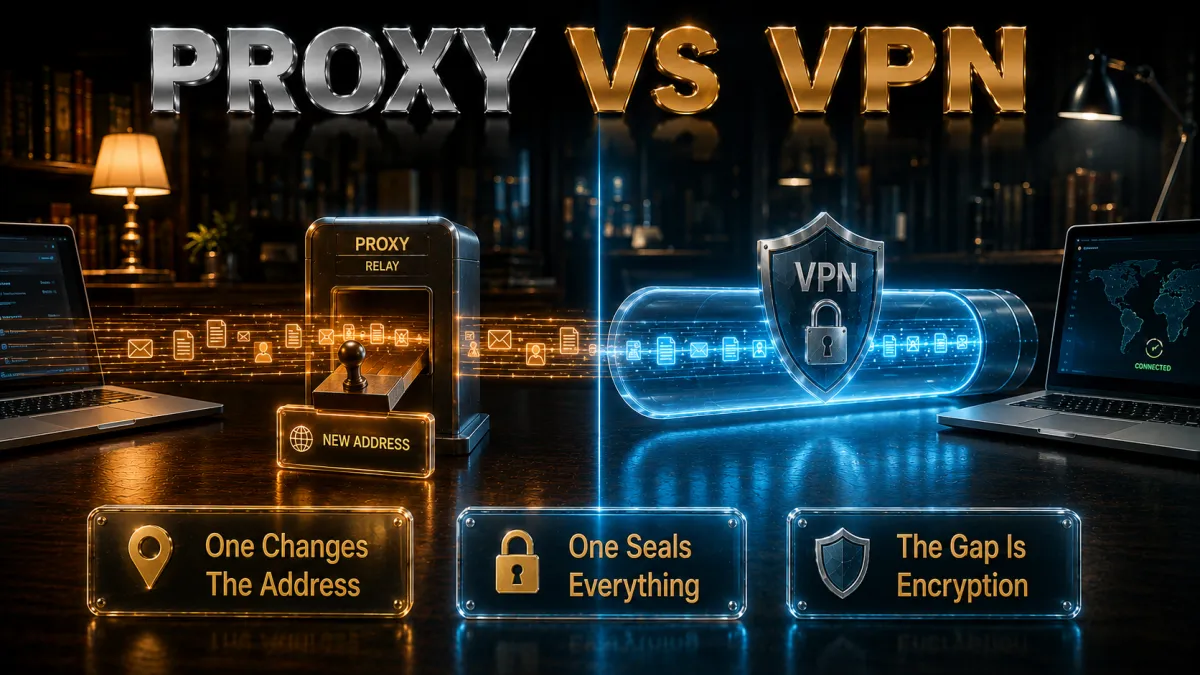
Strip the jargon and a proxy is the simplest rerouting tool there is.
- A middleman that forwards requests. Your app sends its request to the proxy, the proxy passes it to the website, and the site sees the proxy’s address instead of yours. That address swap is the entire product.
- Usually configured per app. A proxy is typically set inside one browser or one program; the rest of your device keeps talking to the internet directly. Coverage is a setting, not a shield.
- No encryption of its own. A plain proxy does not encrypt your traffic. Whatever the connection was, HTTPS or not, the proxy simply relays it, and the proxy operator sits in a position to read anything unencrypted.
- Cheap, fast, and disposable. Because it does so little, a proxy adds minimal overhead and costs little or nothing, which is exactly why it survives for the narrow jobs it suits.
How proxies work, and the types you will meet

The proxy label covers a few different animals, and knowing them prevents most confusion.
- HTTP proxies handle web traffic. They understand browser requests specifically, which makes them common for web-only jobs and useless for anything outside the browser.
- SOCKS proxies forward anything. SOCKS5 relays arbitrary traffic, games, torrents, tools, without understanding it, still without encrypting it. More flexible, equally naked.
- Transparent proxies happen to you. Offices, schools, and some ISPs route traffic through proxies for filtering and caching without asking. If content seems filtered on a network, one of these is often why.
- Residential and datacentre pools are the commercial end. Marketing and scraping tools rotate through large proxy pools to distribute requests. Legitimate industry, entirely irrelevant to personal privacy.
- Web proxies are the ones to avoid. Free browser-based proxy sites are the sketchiest corner of this world: unknown operators relaying your unencrypted traffic, often stuffing ads and worse into pages as they pass.
What a VPN actually is
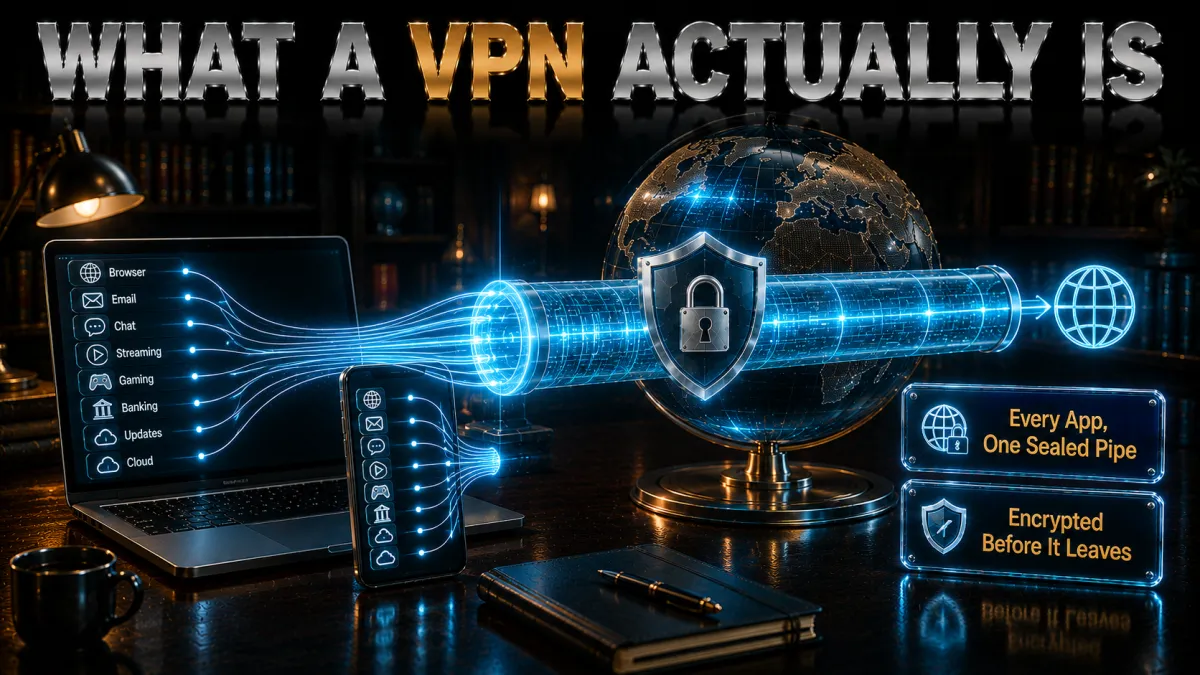
A VPN starts from the same idea, rerouting, and then solves the problems a proxy leaves open.
- An encrypted tunnel for the whole device. The VPN app encrypts everything your machine sends, every browser, app, and background service, and carries it to a VPN server before it touches the wider internet.
- The address swap, plus actual protection. Sites see the server’s address, like a proxy, but the local network, the ISP, and anyone in between see only encrypted traffic. That second half is what a proxy never gives you.
- Run by accountable companies. Good VPNs publish audited no-logs policies, run RAM-only servers, and stake their business on not looking at your traffic. The trust question is real, and it is answerable in a way no free proxy’s is.
- Modern protocols make it cheap to run. WireGuard-class tunnels cost single-digit percentages of speed on nearby servers, which removed the last practical reason to prefer a proxy for everyday use.
The core differences, side by side
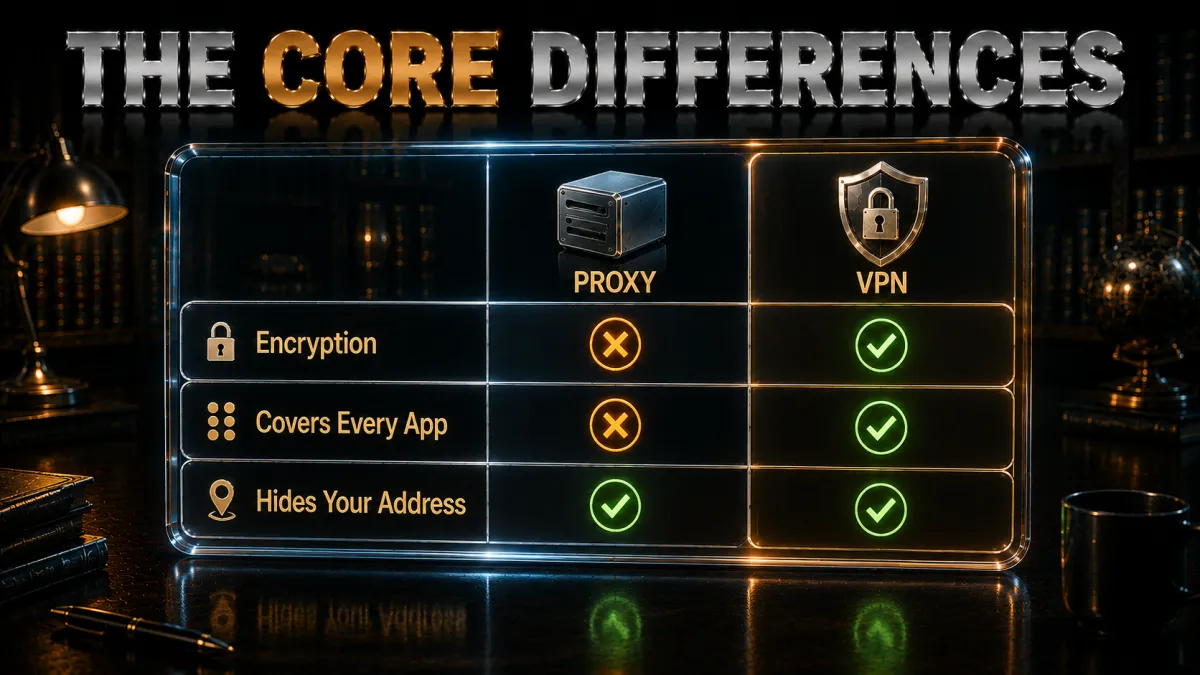
Here is the entire comparison in one table before the detail sections.
| Factor | Proxy | VPN | What it means for you | Winner | Caveat |
|---|---|---|---|---|---|
| Encryption | None (plain) | Full tunnel | Sensitive tasks need a VPN | VPN | HTTPS still helps either way |
| Coverage | Per app | Whole device | Background apps stay exposed on a proxy | VPN | Per-app can be the point |
| Hides IP from sites | Yes | Yes | Both swap your address | Tie | Quality of IPs differs |
| Hides activity from ISP | No | Yes | Only a VPN blinds the network | VPN | DNS setup matters |
| Speed overhead | Minimal | Small | Both are fast; proxy is lighter | Proxy | WireGuard nearly closes it |
| Accountability | Often unknown | Audited firms | You can verify a good VPN’s claims | VPN | Applies to reputable VPNs only |
Security and privacy: where the gap really lives

This is the section that settles most real decisions, so it gets the plainest language.
- A proxy moves your traffic; a VPN protects it. On a proxy, the network you are on, your ISP, and the proxy operator can all see unencrypted traffic. On a VPN, all three see ciphertext. For anything involving logins or money, that is the whole ballgame.
- The operator question cuts hardest against free proxies. Whoever runs the relay sits mid-stream. A reputable VPN answers that with audits, RAM-only fleets, and a business model built on subscriptions. A free web proxy answers it with silence.
- Coverage gaps leak quietly. A proxy set in your browser does nothing for your mail client, your updater, or the app that phones home in the background. VPN coverage is device-wide by design, no inventory required.
- DNS is the classic proxy blind spot. Many proxy setups leave your address lookups going straight to the ISP, announcing every site you visit even while the traffic detours. Good VPN apps route and leak-test DNS as standard.
- HTTPS softens, does not solve. Encrypted websites protect page contents on either tool, but destination metadata, coverage gaps, and non-HTTPS traffic remain exposed on a proxy. Layers help; they do not substitute.
What each tool is actually used for
Both tools have honest jobs; they are just very different jobs.
- Proxies: narrow, technical, low-stakes. Quick location checks of how a page renders elsewhere, routing a single tool’s traffic, caching and filtering on managed networks, and commercial scraping pools. Notice what is missing: anything personal.
- VPNs: the personal-privacy workload. Public Wi-Fi safety, ISP privacy, protecting banking and work sessions, streaming your home library while travelling, covering every device in the house. The everyday list is the VPN list.
- The overlap is smaller than it looks. Both change your apparent location, so both appear in unblock guides. But the moment a task involves an account you care about, the encryption gap disqualifies the proxy.
- Businesses use both, differently. Companies run proxies for traffic management and VPNs for secure remote access, which is a decent mental model: proxies manage traffic, VPNs protect it.
How to choose in one minute
Three questions settle it.
- Does the task involve logins, payments, or personal data? VPN, without exception. This one question resolves the majority of cases.
- Do you need protection or just a different address for one app? Whole-life privacy is VPN territory; a single tool needing a single IP swap is the proxy’s legitimate niche.
- Will you use it on networks you do not control? Cafes, airports, hotels: VPN. The encryption is the point there, and a proxy has none.
- The honest summary. Most people asking this question need a VPN and would get genuine risk from using a proxy in its place. Proxies remain useful for technical users with specific, low-stakes routing jobs, and that is the whole truth of it.
The 5 best VPNs if the VPN route is yours in 2026
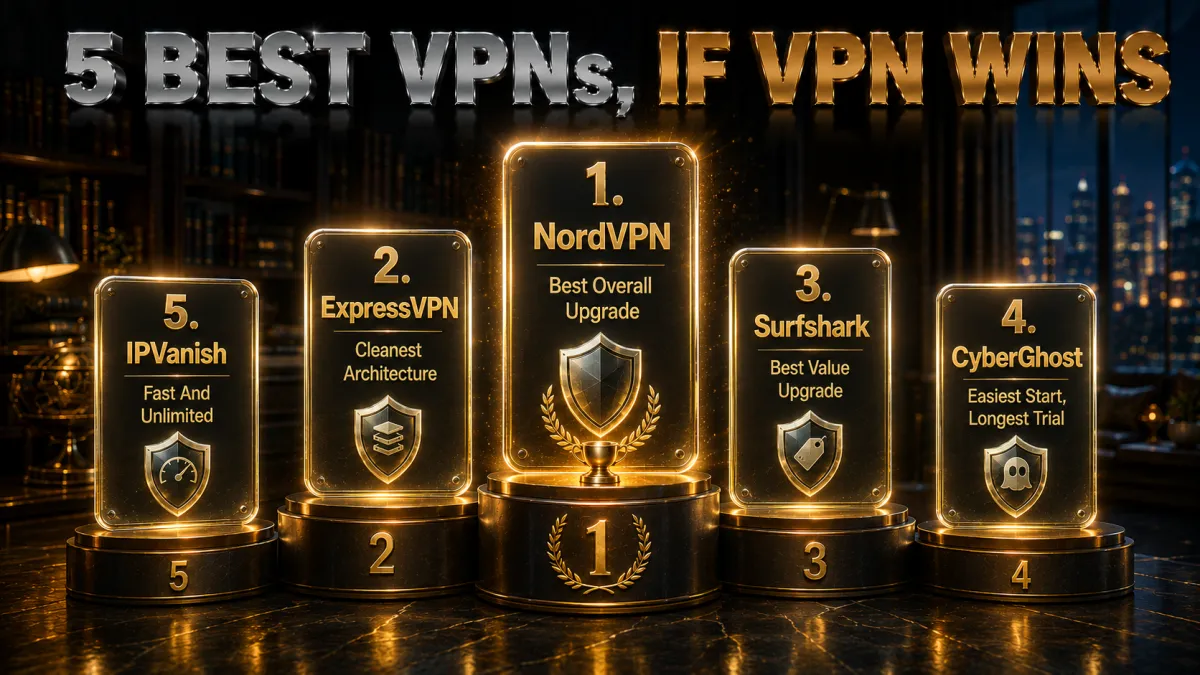
Since proxies need no shopping guide, the ranking below is for the tool most readers of this page actually need, weighted for the exact gaps a proxy leaves: verified trust first, then coverage quality, speed, and value.
1. NordVPN – Best overall
NordVPN is the cleanest answer to everything this comparison flagged against proxies: a no-logs policy verified through multiple independent audits, RAM-only servers, firm DNS and kill-switch protection against exactly the leaks proxy setups suffer, and NordLynx speeds that erase the old performance excuse for choosing a proxy.
Extras widen the gap further: Threat Protection blocks malicious domains device-wide, Double VPN adds a second hop for the cautious, and the Windows, macOS, and mobile apps make whole-device coverage a one-button affair. For the reader graduating from a browser proxy to real protection, this is the default destination.
✔ Pros
- Multiple independent no-logs audits
- Strong DNS and kill-switch leak protection
- NordLynx keeps speeds near-native
- Threat Protection blocks hostile domains
- Double VPN for an extra hop
✘ Cons
- Best price needs a longer plan
- Feature depth means denser menus
| Audited no-logs | Yes, multiple audits |
| Kill switch | Yes, firewall-level |
| DNS leak protection | Yes, built in |
| Jurisdiction | Panama |
| Devices | 10 |
| Money-back | 30 days |
2. ExpressVPN – Cleanest architecture, simplest apps
ExpressVPN embodies the accountability a proxy cannot offer: the entire fleet runs in RAM and wipes on reboot, the no-logs policy is independently audited, and the company operates from the British Virgin Islands. Its one-button apps are the simplest of the five, which suits anyone who wants the proxy’s simplicity with none of its exposure.
Lightway connects near-instantly and survives hostile hotel and airport networks gracefully, with automatic obfuscation when networks interfere. The familiar costs apply: the highest price of the five and an eight-device cap. What you buy is the smoothest, most trustworthy version of the category.
✔ Pros
- RAM-only fleet, audited no-logs
- Simplest apps of the five
- Excellent reliability on hostile networks
- Automatic obfuscation when needed
- BVI jurisdiction
✘ Cons
- Most expensive of the five
- 8-device cap is the tightest here
| Audited no-logs | Yes, audited |
| Kill switch | Yes, Network Lock |
| DNS leak protection | Yes, own DNS on every server |
| Jurisdiction | British Virgin Islands |
| Devices | 8 |
| Money-back | 30 days |
3. Surfshark – Best value upgrade
Surfshark delivers the audited essentials, WireGuard speed, kill switch, DNS protection, CleanWeb domain blocking, at the lowest long-term price of the five, with unlimited simultaneous devices. For someone who was using free proxies precisely because money was the objection, this is the answer that removes it.
Dynamic MultiHop chains any two servers for an extra hop, and the no-logs policy is independently audited. Placed honestly: peak speeds sit a step behind the top two and the Netherlands base is inside the EU. At this price per protected device, the trade is comfortable.
✔ Pros
- Lowest long-term price of the five
- Unlimited simultaneous devices
- Audited no-logs policy
- CleanWeb blocks hostile domains
- Dynamic MultiHop double-hop option
✘ Cons
- Peak speeds behind the top two
- Netherlands base, inside the EU
| Audited no-logs | Yes, audited |
| Kill switch | Yes |
| DNS leak protection | Yes |
| Jurisdiction | Netherlands |
| Devices | Unlimited |
| Money-back | 30 days |
4. CyberGhost – Easiest start, longest trial
CyberGhost is the gentlest possible landing for a first-time VPN user: one connect button, purpose-labelled servers, settings in plain language, and smart prompts on new Wi-Fi. An audited no-logs policy with regular transparency reports and a Romania base handle the trust side.
The 45-day money-back guarantee is the longest of the five, six full weeks to compare life after proxies with no financial commitment. Power users will find fewer dials than NordVPN offers, which is precisely the appeal for everyone else.
✔ Pros
- Simplest interface of the five
- 45-day refund, longest here
- Audited no-logs with transparency reports
- Huge server network
- Purpose-labelled servers
✘ Cons
- Fewer advanced controls
- Speeds good rather than leading
| Audited no-logs | Yes, audited |
| Kill switch | Yes |
| DNS leak protection | Yes |
| Jurisdiction | Romania |
| Devices | 7 |
| Money-back | 45 days |
5. IPVanish – Fast and unlimited
IPVanish is the straightforward workhorse of the five: brisk sustained speeds, unlimited simultaneous connections, kill switch and split tunnelling included, at a fair price. For speed-sensitive users with many devices, it does the job without ceremony.
Fifth place reflects the axis this page cares about most: its US jurisdiction sits inside the major intelligence alliance and its independent audit history is lighter than the four above. Against any proxy it is still a categorical upgrade; against the four above, the evidence file is thinner.
✔ Pros
- Consistently brisk speeds
- Unlimited simultaneous connections
- Kill switch and split tunnelling included
- Fair pricing
- Simple apps everywhere
✘ Cons
- US jurisdiction
- Lighter audit history than the leaders
| Audited no-logs | Policy in place, lighter audit history |
| Kill switch | Yes |
| DNS leak protection | Yes |
| Jurisdiction | United States |
| Devices | Unlimited |
| Money-back | 30 days |
| Feature | NordVPN | ExpressVPN | Surfshark | CyberGhost | IPVanish |
|---|---|---|---|---|---|
| Audited no-logs | Multiple audits | Audited | Audited | Audited | Lighter history |
| Kill switch | Firewall-level | Network Lock | Yes | Yes | Yes |
| Domain blocking | Threat Protection | Limited | CleanWeb | Basic | No |
| Speed | Excellent | Excellent | Strong | Good | Excellent |
| Devices | 10 | 8 | Unlimited | 7 | Unlimited |
| Money-back | 30 days | 30 days | 30 days | 45 days | 30 days |
Advantages and limits: when a proxy is genuinely enough
Fairness demands the proxy’s honest case, so here it is, limits attached.
- It is lighter and often free. For a single low-stakes job, checking how a page looks from elsewhere, routing one tool, a proxy costs nothing and adds near-zero overhead. That is a real advantage inside its lane.
- Per-app routing can be the feature. Technical users sometimes want exactly one program rerouted while everything else stays direct. A SOCKS proxy does that neatly without touching the rest of the system.
- Managed-network proxies serve their owners well. Caching, filtering, and monitoring on corporate networks are legitimate infrastructure, just built for the network’s goals rather than yours.
- The limits are structural, not fixable. No encryption, no ISP privacy, no device-wide coverage, no accountability on free services. These are not missing features awaiting an update; they are what a proxy is.
- The moment stakes rise, the lane ends. Anything with a password crosses out of proxy territory. Keeping that one line in mind makes proxy use perfectly safe, because it keeps proxies away from everything that matters.
Banking and sensitive accounts: the clearest case there is

If one scenario separates the tools with zero ambiguity, it is money.
- Never bank through a proxy. Your session rides unencrypted through an operator you cannot vet, on top of whatever the local network sees. This is the single worst pairing in this whole topic.
- A VPN is exactly the right tool for banking on the road. On hotel or cafe Wi-Fi, the encrypted tunnel protects the session from the network, which is the precise threat those networks pose.
- Expect banks to notice datacentre IPs. Some banks challenge VPN addresses with extra verification. Connect through a server in your own country, or split-tunnel the banking app past the VPN at home; both are routine.
- The same logic covers work accounts, email, and shopping. Anywhere credentials flow, the proxy’s missing encryption is disqualifying and the VPN’s presence is the point. One rule, applied everywhere, ends the confusion.
The free proxy problem, stated bluntly

This section exists because free web proxies remain wildly popular and genuinely risky.
- You are routing your traffic through a stranger. Free proxy sites publish no audits, no ownership, no policies worth the pixels. The operator sees every unencrypted byte, and running relays costs money someone is recouping somehow.
- Tampering is a documented pattern. Injected ads, altered pages, and stripped protections have all been observed across free proxy services over the years. A middleman with no accountability can edit what passes through.
- Credential harvesting is the worst case. Logging into anything through an unknown relay hands over exactly what phishing sites work hard to steal. People do this daily on free proxies without a second thought.
- Even the honest ones are exposed. A well-intentioned free proxy still sends your traffic unencrypted across the local network and ISP. Good faith does not add cryptography.
- The comparison to audited VPNs is not close. One category stakes a subscription business on verified no-logging; the other is anonymous infrastructure with your data in the middle. Price explains the popularity; nothing excuses the risk.
Common mistakes people make with both tools
Five recurring errors cover most of the damage in this topic.
- Treating a proxy as a privacy tool. It changes your address, nothing more. Assuming encryption that is not there is the foundational mistake everything else grows from.
- Logging into accounts over free proxies. The single most dangerous habit here. If a login page is involved, close the proxy first.
- Judging VPNs by proxy-era speed fears. The old wisdom that tunnels are slow died with modern protocols. Test a WireGuard connection on a nearby server before repeating it.
- Running a proxy and VPN together by accident. A leftover browser proxy setting on top of a VPN causes mystery errors and confusing IP results. Clear proxy settings when you switch tools.
- Assuming the browser proxy covers the device. Mail clients, updaters, and background apps bypass it entirely. If whole-device coverage is the goal, only the VPN provides it.
Free options, honestly ranked
Since price drives many proxy choices, here is the honest free landscape.
- Free web proxies: avoid. The risks section above is the full argument. No job that matters belongs on one.
- Free VPNs: mostly the same problem in better clothes. Unaudited free VPN apps monetise somehow, historically through logging and ads, with caps and missing safety features on top. The category shares the proxy’s accountability hole.
- Reputable freemium tiers: acceptable tasters. A limited free plan from an audited provider is a legitimate way to sample the experience; the caps make it a trial, not a tool.
- Refund windows: the real free trial. Every pick above refunds within 30 to 45 days. A month of full, audited protection at zero net cost beats any permanently free option in this space, and it is the route this site honestly recommends.
Related reading:
Frequently Asked Questions
What is the main difference between a proxy and a VPN?
Encryption and coverage: a proxy forwards one app’s traffic and changes your apparent IP address without encrypting anything, while a VPN encrypts everything your whole device sends before routing it through its server. Both swap your address; only the VPN protects the traffic itself from the local network, your ISP, and the relay operator.
Is a VPN safer than a proxy?
Yes, categorically, for anything personal: the encrypted tunnel, device-wide coverage, DNS leak protection, and audited no-logs operators close every gap a proxy leaves open. A proxy is not unsafe for low-stakes single-app jobs; it becomes unsafe the moment logins, payments, or public Wi-Fi enter the picture.
Is a proxy faster than a VPN?
Marginally, in principle, because it does less work, but modern WireGuard-class VPN protocols on nearby servers cost only single-digit percentages of speed, which erased the practical gap. Congested free proxies are routinely slower than a good VPN in real use, so the old speed argument mostly runs backwards now.
Do proxies hide my browsing from my ISP?
No: a plain proxy leaves your traffic unencrypted, so your ISP can still observe it, and many proxy setups leak DNS lookups straight to the ISP as well, announcing every site you visit. Hiding activity from the network you are on is specifically what VPN encryption does and proxies do not.
Are free proxy sites safe to use?
Treat them as unsafe for anything that matters: unknown operators relay your unencrypted traffic, ad injection and page tampering are documented patterns in the category, and logging into any account through one exposes credentials to a stranger. If a task is low-stakes enough for a free web proxy, fine; nothing with a password is.
Can I use a proxy and a VPN at the same time?
Technically yes, and occasionally professionals chain them for specific routing jobs, but for ordinary users the combination adds confusion rather than protection, and a forgotten browser proxy on top of a VPN is a common source of mystery errors. Pick the right single tool for the task; for personal privacy, that is the VPN alone.
Is a SOCKS5 proxy as good as a VPN?
No: SOCKS5 is more flexible than an HTTP proxy because it forwards any traffic type, but it still encrypts nothing and covers only the app configured to use it. It is a routing tool for technical jobs, not a substitute for the encrypted, device-wide, audited protection a VPN provides.
Which is better for streaming, a proxy or a VPN?
A VPN: streaming platforms block known proxy addresses aggressively, free proxies rarely survive contact with them, and video quality suffers on congested relays. Reputable VPNs maintain fresh address pools and the speed for 4K, and platform terms of service apply to location-shifting either way.
Do I need a proxy for anything if I already have a VPN?
Almost certainly not: the VPN covers every personal use case a proxy might have tempted you with, more safely. The remaining proxy jobs are technical niches, single-tool routing, scraping infrastructure, managed-network caching, that ordinary users simply never meet.
Why do banks and websites block proxy and VPN addresses?
Because datacentre address ranges correlate with fraud and abuse in their models, many services challenge or block them defensively. With a reputable VPN the fix is routine: connect through a server in your own country, complete the extra verification once, or split-tunnel that one app past the tunnel.
Is it legal to use a proxy or a VPN?
In most countries both tools are legal, widely used by businesses and individuals alike, and nothing about rerouting is inherently unlawful. Illegal acts remain illegal through either, a minority of countries restrict these tools, and specific networks or services can set their own rules; know the ones that apply to you.
What should I use on public Wi-Fi, a proxy or a VPN?
A VPN, without exception: the threat on shared networks is eavesdropping, and encryption is the answer to eavesdropping. A proxy adds no encryption at all, so it addresses none of the risk. Auto-connect rules on the picks above raise the tunnel the moment an unknown network appears.
How do I check whether my connection is using a proxy right now?
Check your system and browser network settings for configured proxy entries, and compare the IP address a lookup site shows against your expected one. On managed networks, a transparent proxy may be present without any setting on your device; ask the network operator if it matters for your task.
The Bottom Line
Proxy versus VPN is only confusing until the one-line difference lands: both swap your address, but only the VPN encrypts your traffic and covers your whole device, and everything else in this comparison flows from that. Proxies keep their narrow, technical lane, single-app routing, low-stakes checks, managed-network plumbing, and they fail dangerously the moment they are asked to protect anything, which free web proxies are asked to do millions of times a day. The moment logins, money, or public Wi-Fi enter the picture, the VPN is not the better choice; it is the only choice on the table.
The five picks in one line each:
- NordVPN is the best overall: multiply audited, fast, with the strongest leak protection and extras.
- ExpressVPN offers the cleanest architecture and simplest apps at a premium.
- Surfshark is the value upgrade: audited essentials, unlimited devices, lowest price.
- CyberGhost is the friendliest first VPN with the longest refund window at 45 days.
- IPVanish is the fast unlimited workhorse with lighter audit evidence noted honestly.
Clear any leftover proxy settings, install one of the five, switch the kill switch on, and the question this page answers becomes something you never need to think about again: the address swap you wanted, plus the protection the proxy never had.
Jyoti VPN Expert leads VPN testing at VPN Expert Guide, covering streaming and regional access, speed and latency testing, and leak checks on Windows, Android and router-level setups. Our guides are built from vendor documentation, provider terms and our own connection testing on a residential line in India, and we publish those measurements in full so readers can check them. Every guide is reviewed before publication and dated so you can see how current it is.
Meet our testing team →Last updated: August 25, 2026