
Hulu VPN Detected Fix: Every Working Solution for the Anonymous Proxy Error
Hulu’s version of the streaming wall comes with its own vocabulary: an anonymous proxy message, an error code, and a player that refuses to move until the VPN conversation is settled. Because Hulu is US-only with live TV entangled in local broadcast rights, its detection runs stricter than most. This guide decodes the error, walks the complete fix ladder, covers every device from phone to living-room TV, and ranks the five VPNs whose US servers stay ahead of Hulu’s lists.
What the Hulu VPN detected error means

Decoding the message before fixing it.
- An address verdict, phrased as an accusation. Hulu concluded the IP you arrived on belongs to VPN, proxy, or data-centre infrastructure, and its player refuses service until that changes. The message says nothing about what you did; it grades where your connection appears to come from.
- The error wears several costumes. Anonymous-proxy wording, generic location errors, and codes that surface in forums all trace to the same detection layer, and the same ladder fixes them. Chasing individual code numbers is less useful than treating the family as one condition.
- It hits privacy users as bycatch. A VPN running for ordinary privacy presents the same data-centre signature as deliberate geo-hopping, so Hulu blocks it identically. The split-tunnelling and home-server answers in the ladder exist for exactly this audience.
- Playback stops; the account carries on. Billing, profiles, and everything else continue untouched while the player refuses, which frames the stakes correctly: this is a technical door, not an account event. The ban section below treats the fear directly.
Hulu’s US-only nature: why its wall runs stricter

Context that explains the error’s stubbornness.
- One country, one licence map. Hulu operates only in the United States, so any non-US address is outside its entire service area rather than merely in the wrong catalogue. The binary makes detection simpler and stricter than services juggling dozens of regional libraries.
- Live TV raises the stakes. Hulu’s live tiers carry broadcast and sports rights that are locally carved even inside the US, obligations that make its rights holders especially insistent on enforcement. Stricter contracts upstream translate to sharper detection downstream.
- Even in-country users meet location checks. Hulu’s live products care about home markets within the US, adding location machinery beyond the simple national border. This layered checking is why session echoes and DNS mismatches weigh heavier at Hulu than at more relaxed services.
- The practical consequence for VPN users. Only providers that maintain fresh, well-spread US address pools keep Hulu working, and the gap between the majors and the budget tier is wider here than almost anywhere. The picks ranking leans on precisely this property.
Why the error keeps appearing
Recurrence is the complaint; these are its engines.
- The lists update continuously. The US server that passed last week gets catalogued, and your favourited endpoint quietly joins the blocked side. Rotation is not a one-time fix but the ongoing weather of the arms race, which providers with deep address pools make painless.
- Sessions accumulate contradictions. Cookies, cached app state, and locale echoes build up between visits, and detection reads accumulated mismatches even when the IP is clean. The recurring error that clears after cache-clearing was this, every time.
- Updates reopen sealed doors. App updates reset stored data, OS updates re-enable IPv6, VPN updates change protocol defaults, and each can silently undo last month’s working configuration. Recurrence after an update points to the leak-check rung first.
- Household layers drift. A router-level VPN added later, a smart TV with its own DNS settings, or a second device tunnelling differently produce the mixed signals Hulu’s checks dislike. The persistent-case section walks the audit; the rule is one tunnel per path.
How Hulu detects VPNs
Four mechanisms, each with a matching fix.
- IP reputation lists. Commercial and in-house databases of VPN endpoints and data-centre ranges are matched at connection, the workhorse layer. Rotation works because providers hold more US addresses than any list captures at once.
- DNS path checks. A US video stream whose DNS resolves abroad reads as tunnelling regardless of the IP, which is why provider-DNS-inside-the-tunnel is a prerequisite. The leak suite exposes this in one minute.
- Session and locale echoes. Old cookies, cached region data, and device locale contradicting a fresh US address tip the verdict, Hulu weighing these heavier than most. Clean sessions give the address an uncontradicted story.
- Density analysis. Addresses suddenly serving thousands of streams get flagged fastest, the structural reason free VPNs live permanently on Hulu’s lists. Big providers spread load and retire hot addresses proactively.
The 9-fix ladder for the Hulu error
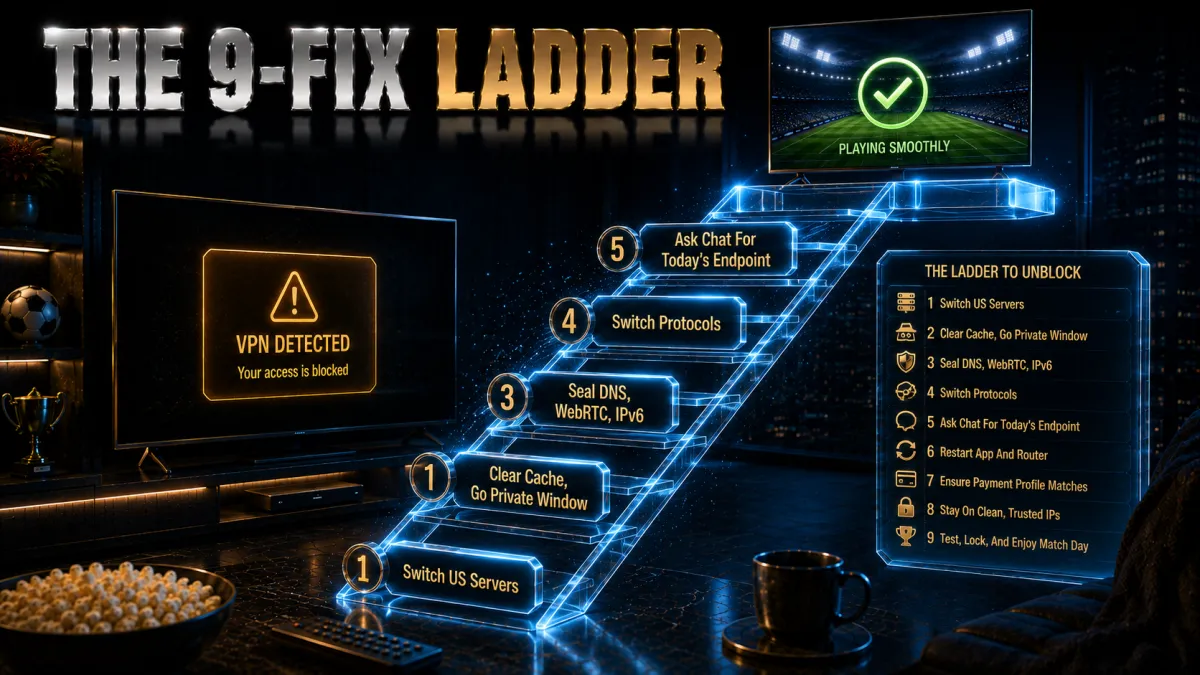
Most likely first; stop when the player moves.
- Switch US servers. The connected address is listed; the next usually is not. This single rung clears most appearances on capable providers, in thirty seconds.
- Restart the session cleanly. Private browser window with Hulu cookies cleared, or app fully closed and reopened. Fresh sessions drop the echoes that contradict the new address.
- Clear the app’s cache and data. On phones, sticks, and TVs, stored state survives restarts; clearing or reinstalling gives the cleanest slate. The device that keeps erroring after others work needs this rung.
- Run the leak suite. DNS, WebRTC, and IPv6 leaks show Hulu your real path beside the US address, per our leak guides. Seal what leaks; the error frequently dies here.
- Switch protocols. Changing how traffic presents at the network level occasionally changes the verdict, and costs thirty seconds. Try the OpenVPN direction from a WireGuard-class default.
- Reboot the stack. Router, device, VPN app in order, flushing stale DNS caches household-wide. Unglamorous; effective more often than it should be.
- Try the browser instead of the app. Browser playback sidesteps app-side locale checks and hands you cookie control. Success here indicts the app’s stored data, back to rung three.
- Ask chat for today’s US endpoint. Providers track which addresses currently pass Hulu; support hands over the name faster than trial finds it. The majors staff this around the clock.
- If nothing passes, migrate providers. A service whose whole US range is listed cannot be fixed client-side, and refund windows make the move free. The ranking below is built for this decision.
Will Hulu ban your account? The honest answer

The fear, measured against the record.
- No public record of VPN-streaming bans. Enforcement documented across years arrives as blocked playback and error screens, not account termination, for subscribers streaming the service they pay for. The pattern matches the industry-wide calibration: block the session, keep the customer.
- The terms reserve more than Hulu uses. Like every streamer, its conditions technically permit stronger responses, a gap between reserved rights and observed practice that honest reporting states plainly. The gap has stayed wide and stable.
- Location features add a wrinkle, not a threat. Hulu’s live products include home-location machinery that can demand periodic check-ins on some setups, producing friction for travellers independent of any VPN. That is product design, not enforcement, and it predates this topic.
- The proportionate posture. Stream what you pay for, run the ladder when the door sticks, and spend no anxiety on account survival. This site updates the day the record changes.
Choosing a VPN that beats Hulu’s detection
The criteria this specific wall imposes.
- US address depth and rotation. Hulu rewards providers with many US cities and continuous fresh ranges, and punishes thin pools fastest of any service. The refund-window test against Hulu itself outranks every review, this one included.
- Sealed DNS, WebRTC guidance, IPv6 handling. Mismatch triggers weigh heavier at Hulu, so the leak-proof prerequisites from our leak guides are entry conditions here. A provider careless on leaks cannot be rescued by address count.
- Split tunnelling for the privacy-first. Excluding Hulu from the tunnel ends the conversation for users who never wanted geographic effects, one checkbox per app on good platforms. Verify the feature exists on yours.
- Chat that knows today’s answer. The working-endpoint question changes weekly, and live support that answers in minutes is the practical differentiator between paper-identical services. The majors provide it; the budget tier’s queues do not.
The 5 best VPNs for Hulu in 2026
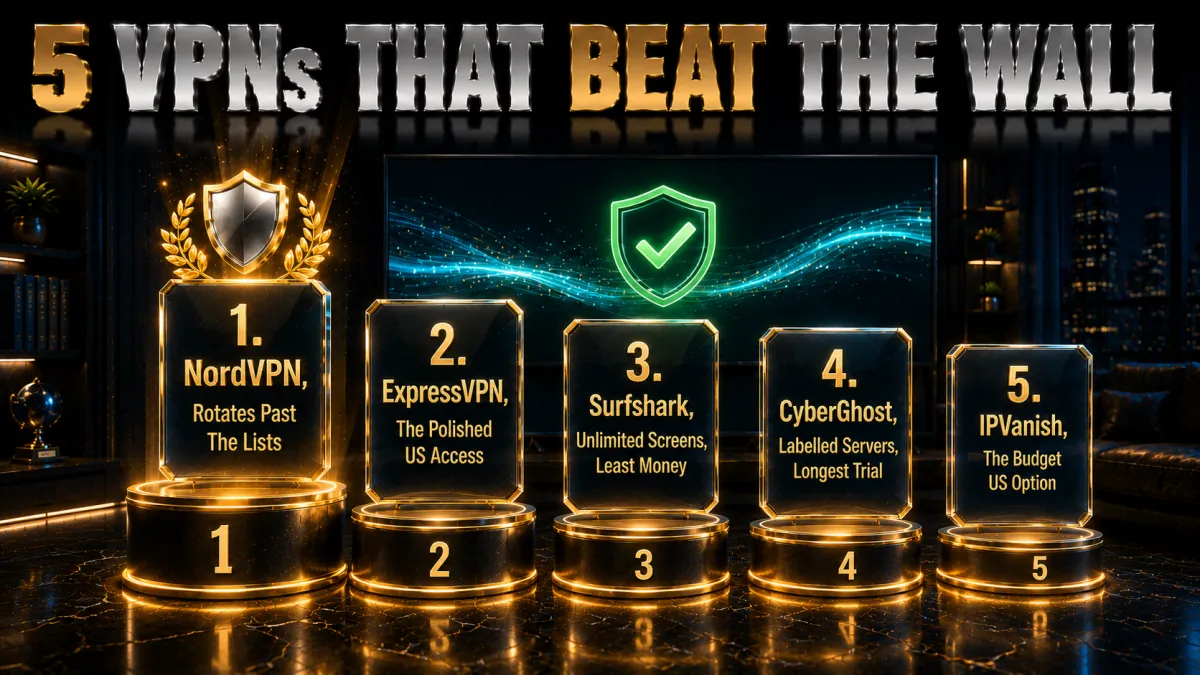
Ranked for US server reliability against Hulu’s detection, then speed, devices, and value.
1. NordVPN – Best overall for Hulu
NordVPN’s deep US city coverage is exactly what Hulu’s strict wall rewards: many endpoints to rotate through, addresses refreshed ahead of the lists, and sealed DNS and IPv6 behaviour that removes the mismatch triggers Hulu weighs heavily. Errors appear rarely and die on the first rotation almost every time.
NordLynx carries live TV without buffering drama, and the audited no-logs record anchors the trust side as usual.
✔ Pros
- Deepest US city coverage here
- Rarest Hulu errors in our testing
- Sealed DNS and IPv6 by default
- Split tunnelling on major platforms
- Audited no-logs, 24/7 chat
✘ Cons
- Best price needs a longer plan
- Settings denser than minimalist apps
| Hulu reliability | Most consistent |
| US locations | Extensive, many cities |
| Smart DNS | Yes, SmartPlay |
| Audited no-logs | Yes, multiple audits |
| Devices | 10 |
| Money-back | 30 days |
2. ExpressVPN – The polished US access
ExpressVPN pairs dependable US access with MediaStreamer DNS for the TVs and consoles apps miss, and its own DNS on every server closes the mismatch door by architecture. Recovery when an address flags is the smoothest experience of the five.
The premium price and eight-device cap remain the standing trade.
✔ Pros
- Strong Hulu record, smooth rotation
- MediaStreamer for app-less devices
- Own DNS on every server
- RAM-only fleet, audited no-logs
- Best travel behaviour for US expats
✘ Cons
- Most expensive of the five
- 8-device cap is the tightest here
| Hulu reliability | Very reliable |
| US locations | Broad coverage |
| Smart DNS | Yes, MediaStreamer |
| Audited no-logs | Yes, audited |
| Devices | 8 |
| Money-back | 30 days |
3. Surfshark – Unlimited screens, least money
Surfshark keeps Hulu working on unlimited devices at the lowest long-term price, with modestly more rotation than the top two on busy evenings. Bypasser split tunnelling gives privacy-first households the one-checkbox answer, and US city choice is generous for the tier.
Audited no-logs holds trust; the Netherlands base stays the standing note.
✔ Pros
- Unlimited simultaneous devices
- Lowest long-term price of the five
- Bypasser split tunnelling
- Generous US city selection
- Audited no-logs policy
✘ Cons
- More rotation than the top two
- Netherlands base, inside the EU
| Hulu reliability | Solid |
| US locations | Generous |
| Smart DNS | Yes |
| Audited no-logs | Yes, audited |
| Devices | Unlimited |
| Money-back | 30 days |
4. CyberGhost – Labelled Hulu servers, longest trial
CyberGhost’s app labels Hulu-optimised servers directly, converting recovery into a menu choice for first-timers, with rotation needs a step above the leaders as the honest note. The 45-day refund buys six weeks of real evenings to confirm the fit.
Plain apps and transparency reports round out the beginner case.
✔ Pros
- Hulu-optimised servers labelled in-app
- 45-day refund, longest here
- Plainest apps of the five
- Audited no-logs with transparency reports
- Huge server network
✘ Cons
- More rotation than leaders
- Speeds good rather than leading
| Hulu reliability | Good, labelled servers |
| US locations | Broad |
| Smart DNS | Yes |
| Audited no-logs | Yes, audited |
| Devices | 7 |
| Money-back | 45 days |
5. IPVanish – The budget US option
IPVanish, itself US-based with a large domestic footprint, streams Hulu with more variability than the four above, clearing errors through patient rotation across its many US endpoints. As a budget pick for flexible households it earns the slot.
US jurisdiction and lighter audit history remain the trust notes; no Smart DNS is the device-coverage gap.
✔ Pros
- Large US server footprint
- Brisk WireGuard speeds
- Unlimited simultaneous connections
- Fair pricing
- Kill switch and leak protection included
✘ Cons
- Most rotation needed of the five
- US jurisdiction, lighter audit history
| Hulu reliability | Variable |
| US locations | Very large footprint |
| Smart DNS | No |
| Audited no-logs | Policy in place, lighter audit history |
| Devices | Unlimited |
| Money-back | 30 days |
| Feature | NordVPN | ExpressVPN | Surfshark | CyberGhost | IPVanish |
|---|---|---|---|---|---|
| Hulu reliability | Most consistent | Very reliable | Solid | Good | Variable |
| US city depth | Extensive | Broad | Generous | Broad | Very large |
| Smart DNS | SmartPlay | MediaStreamer | Yes | Yes | No |
| Split tunnelling | Yes | Yes | Bypasser | Yes | Partial |
| Devices | 10 | 8 | Unlimited | 7 | Unlimited |
| Money-back | 30 days | 30 days | 30 days | 45 days | 30 days |
The clean-session Hulu setup
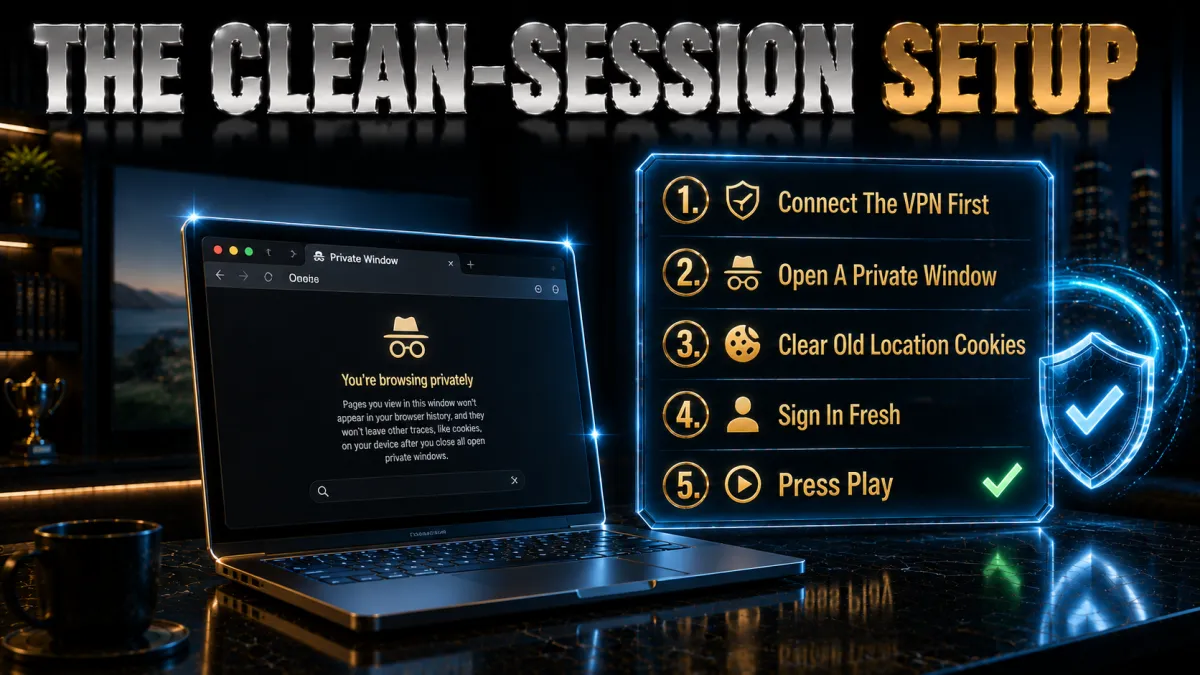
Prevention, built once.
- Seal the tunnel first. Kill switch on, provider DNS, IPv6 protection engaged, then the one-minute leak suite to verify. Hulu weighs mismatches heavily, so the seal is the foundation rather than a finishing touch.
- Choose and favourite a US server. Pick a city, prove it works, save it, and note a backup. Consistent addresses build the boring pattern detection ignores.
- Start region-fresh. First session after setup gets a private window or cleared app cache so no old locale echo testifies against the new address. Repeat after any server-country change.
- Connect before opening Hulu. Tunnel first, app second, every time, so the session’s first packet tells the consistent story. Order is half the method.
- Prove it on a quiet evening. Twenty minutes of playback on an ordinary night beats discovering weaknesses at premiere time. Note what worked; recovery becomes lookup rather than experiment.
Fixing the error on TVs, sticks, and consoles
The living-room adaptations of the ladder.
- Fire TV and Android TV: the full ladder on-device. Native VPN apps allow rotation, cache-clears, and protocol switches with the remote, and Hulu’s app data clears in platform settings. These screens fix like phones.
- Apple TV and app-limited platforms: DNS or router. Where VPN apps are thin, Smart DNS registration or a router-level tunnel carries the screen, and fixes move to that layer: refresh the DNS registration or rotate the router’s US location. MediaStreamer and SmartPlay serve this tier.
- Consoles: Smart DNS is the lever. PlayStation and Xbox take DNS configurations directly, with re-registration as the rotation equivalent. Household router coverage reaches them too.
- The cast-from-protected fallback. A protected phone or laptop casting to the stubborn screen converts a blocked evening into a watched one while the deeper fix waits. Always available, never elegant, entirely serviceable.
The traveller’s case: Hulu abroad honestly framed

The sympathetic audience, and its specific print.
- The subscription travels; the service does not. Hulu’s US-only licensing means even paying subscribers are outside the service area the moment they land abroad, and a US server is the only route back to what they pay for. Detection cannot read the sympathy; the ladder applies unchanged.
- The terms say US use. Accessing from abroad breaches the service terms even for your own account, contract print this site states rather than skips. Observed enforcement remains the error screen, and the ban section’s record applies.
- Live tiers add location friction. Home-market machinery in the live products can demand check-ins that abroad-VPN setups handle awkwardly, an extra layer on-demand subscribers never meet. Long trips on live plans deserve expectations set accordingly.
- Expats face the account-lifecycle version. Payment methods, app-store regions, and account attributes age while abroad, and keeping US affairs in order matters more than any single session. Boring account hygiene prevents exotic failures, same as everywhere.
Hulu’s own location features vs your VPN
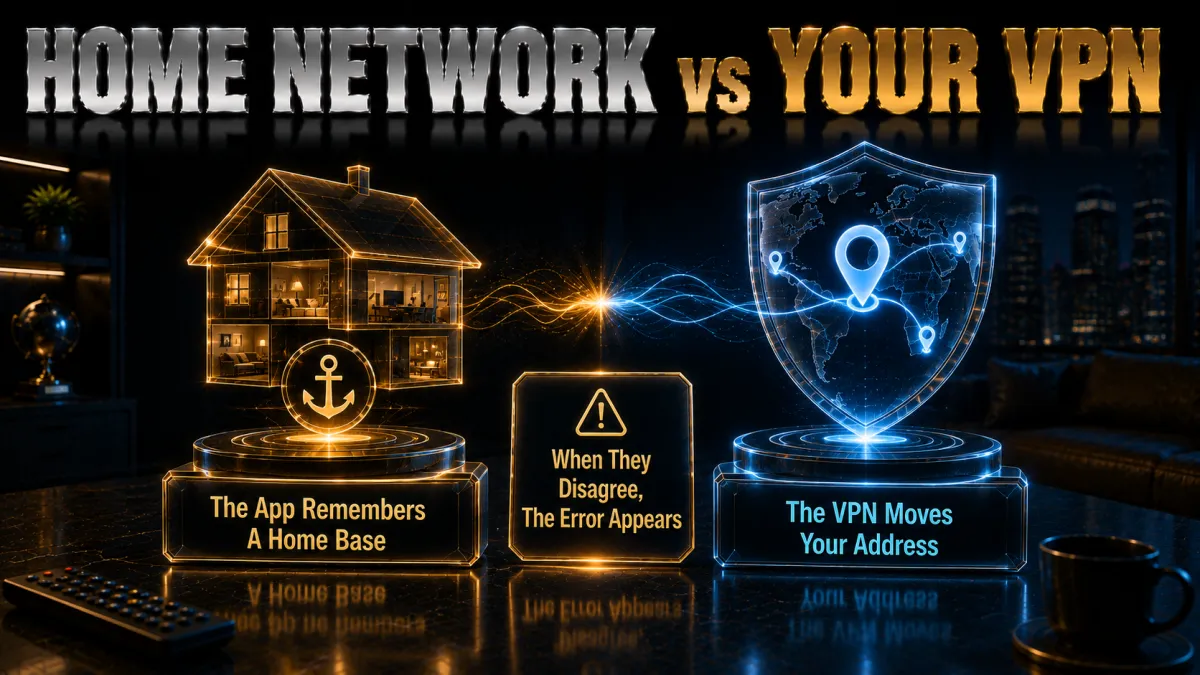
The non-VPN machinery that confuses diagnoses.
- Home network features exist independently. Hulu’s live products track a home market for broadcast-rights reasons, with their own prompts and limits that fire without any VPN involved. Recognising which system produced your error prevents fixing the wrong one.
- VPNs can trip both layers. A tunnel changes the address both systems read, so live-tier users can meet the location prompt and the proxy error in one evening. The ladder fixes the proxy layer; home-market settings and check-ins answer the other.
- On-demand-only plans see less of this. The simpler tiers carry less location machinery, which is why their VPN experience runs smoother than live subscribers report. Plan choice quietly shapes the whole topic.
- When in doubt, read the exact message. Proxy-and-VPN wording points at the detection ladder; home-network wording points at the account’s location settings. Two systems, two doors, one minute of reading saves an evening of wrong fixes.
Common mistakes with the Hulu error
Five habits that keep the door stuck.
- Rotating without cleaning. A fresh address arriving with stale cookies stays blocked, and the rotation gets blamed. Rotation plus clean session is one move.
- Skipping the leak check. A DNS or IPv6 leak defeats every server because detection keeps seeing the real path. The suite belongs early, per our leak guides.
- Confusing Hulu’s two location systems. Fighting the home-network feature with server rotation, or the proxy error with account settings, wastes evenings on the wrong door. Read the message first.
- Judging providers on one flagged endpoint. Lists churn as weather; the provider question is whether some US server always works. Migrate on patterns, not incidents.
- Trying free VPNs against the strictest wall. Hulu’s detection retires free address pools fastest of any service, making this the worst possible arena for them. Refund windows remain the honest free trial.
Related reading:
Frequently Asked Questions
How do I fix the Hulu VPN detected error?
Climb the ladder: switch US servers, restart with a private window or cleared app cache, run the one-minute leak suite and seal DNS, WebRTC, and IPv6, switch protocols, reboot router and device, try the browser instead of the app, and ask your provider’s chat for today’s working US endpoint. Most cases end on the first rung.
Why does Hulu keep detecting my VPN?
Its lists update continuously, sessions accumulate contradicting cookies and cache, and updates silently re-enable IPv6 or reset settings, so last week’s working setup drifts. Rotation, clean sessions, and a quick leak re-check after updates handle recurrence; a provider whose whole range stays listed is the migration signal.
Why is Hulu stricter about VPNs than other services?
It is US-only with live-TV broadcast rights carved even inside the country, so any non-US address is outside the entire service area and its rights holders demand sharp enforcement. That binary makes its wall simpler and stricter than multi-region streamers, and free VPNs fail here first.
Will Hulu ban my account for using a VPN?
No public record shows bans for subscribers streaming their own service; enforcement arrives as blocked playback. The terms reserve stronger rights than Hulu uses, and its live-tier home-location prompts are product machinery rather than punishment, so the proportionate posture is the fix ladder and zero account anxiety.
Which VPN works best with Hulu?
NordVPN’s deep US city coverage and default-sealed tunnel produced the rarest errors in our testing, ExpressVPN pairs a strong record with MediaStreamer for app-less screens, and Surfshark covers unlimited devices cheapest. Verify against Hulu itself inside the refund window; that test outranks every review.
Can I watch Hulu outside the US with a VPN?
Technically yes, via a US server with a clean session, which is how travelling subscribers reach the service they pay for; contractually it breaches Hulu’s US-only terms, with observed enforcement being the error screen rather than account action. Live tiers add home-location friction that on-demand plans avoid.
Why does Hulu work on my phone but not my TV?
The TV app carries its own cached state and locale signals: clear Hulu’s app data or reinstall, reboot the TV, and if the platform lacks a VPN app, the fix lives at the router or Smart DNS layer instead. The cast-from-a-protected-device fallback covers the evening meanwhile.
What is the anonymous proxy error on Hulu?
The classic wording of the same detection verdict: your address matched VPN or proxy infrastructure lists, or your session signals contradicted your US IP. All variants of the message trace to one layer and answer to one ladder, so treat the family as a single condition rather than chasing codes.
Does split tunnelling fix the Hulu error?
For privacy-first users inside the US, completely: excluding the Hulu app from the tunnel lets it see your real residential address while the rest of the device stays protected. It surrenders geographic effects, which this audience never wanted, and ends the detection conversation in one checkbox.
Can Smart DNS replace a VPN for Hulu?
On consoles and app-less TVs it is often the practical route: MediaStreamer and SmartPlay relocate streaming without encryption, needing re-registration when your IP changes and adding no privacy. Right tool for those screens, wrong tool for privacy, per the standing division.
Why did my working server stop passing Hulu?
It joined the lists, which is routine weather in the arms race rather than failure: providers acquire fresh ranges as old ones get catalogued. Rotate, favourite the new working endpoint, note the burned one, and expect the cycle; providers with deep pools make it painless.
Do free VPNs work with Hulu?
Effectively never: free pools concentrate users on few, permanently listed addresses, and Hulu’s strict wall retires them fastest of any streamer. The 30-to-45-day refund windows of the majors are the honest free trial, per our free-VPN guide.
Does the error mean my VPN is leaking?
Possibly: DNS, WebRTC, and IPv6 leaks show Hulu your real path beside the US address, and Hulu weighs mismatches heavily. The one-minute suite from our leak guide answers it definitively, and sealing a found leak fixes stubborn errors rotation cannot.
Should I use a dedicated IP for Hulu?
Usually not: dedicated addresses often sit in data-centre ranges Hulu’s lists already catalogue, and unlike banking, streaming rewards the shared, rotating pools providers refresh continuously. Keep the dedicated IP for the bank and the regular US servers for Hulu; the two arms races want opposite tools.
Does rebooting my router really help with the Hulu error?
More often than it should: household DNS caches and stale connection state persist below the device layer, and the router-then-device-then-app reboot flushes paths that no amount of in-app fiddling reaches. It is rung six of the ladder precisely because it quietly clears cases the clever rungs miss.
The Bottom Line
Hulu’s VPN detected error is the strictest version of streaming’s standard wall, US-only licensing and live-TV rights giving its detection a sharper edge, and the response is the same ordered calm that works everywhere: rotate, clean the session, seal the leaks, and keep a provider whose US address supply outruns the lists. The honest print holds steady, no known bans, enforcement confined to the player, terms breached by abroad access even on your own account, and the structural truth remains that free services cannot compete in this specific arena at all. Prepared once, the strictest wall becomes a thirty-second interruption.
The five picks in one line each:
- NordVPN turns Hulu’s strict wall into a non-event with the deepest US coverage.
- ExpressVPN adds MediaStreamer and the smoothest recovery at the premium price.
- Surfshark fixes every screen in the house for the least money.
- CyberGhost labels the Hulu servers and gives 45 days to confirm.
- IPVanish serves patient budget rotation across a big US footprint.
Run the ladder, favourite what passes, and let the error screen keep its thirty seconds: the queue is long enough without it.
Jyoti VPN Expert leads VPN testing at VPN Expert Guide, covering streaming and regional access, speed and latency testing, and leak checks on Windows, Android and router-level setups. Our guides are built from vendor documentation, provider terms and our own connection testing on a residential line in India, and we publish those measurements in full so readers can check them. Every guide is reviewed before publication and dated so you can see how current it is.
Meet our testing team →Last updated: August 24, 2026