
Best VPN for Streaming 4K in 2026: Tested and Ranked
Which VPNs genuinely hold a smooth 4K stream, for unlocking higher-resolution libraries, beating ISP throttling, and keeping the picture sharp across every screen. An honest, no-hype guide with zero fabricated benchmarks.
Why you need a VPN for 4K streaming

A VPN changes two things for a 4K viewer: which libraries you can reach, and whether your ISP can interfere with high-bitrate video. Before the rankings, here is what it actually does.
- Unlock 4K libraries from other regions. The same show is often available in 4K in one country and only HD in another, and some services reserve their best 4K catalogue for specific regions. A VPN gives your device an IP in the region you want, so you can reach the higher-resolution library you are paying for, which is one of the main reasons 4K viewers install one.
- Beat ISP throttling of video. Some providers quietly slow sustained high-bitrate streaming, which is exactly the traffic 4K generates, so an evening film drops to a soft, blocky picture. Because a VPN encrypts your traffic, the ISP can no longer single out video to throttle, which often restores the steady bandwidth a 4K stream needs to stay sharp.
- Keep your viewing private. Your ISP and, in some cases, the platform can build a detailed picture of what and when you watch. Encrypting the connection hides your streaming activity from your provider, so your viewing habits are not quietly logged or, in some markets, sold, which is a genuine everyday privacy gain.
- Protect every screen on the network. A VPN on your router, or a plan with enough device slots, covers the smart TV, streaming stick, console, and tablets at once, so the whole household streams 4K securely from a single setup. For homes with several 4K screens, that whole-network coverage is both simpler and cheaper than protecting each device alone.
How much speed 4K really needs

The single question that decides whether a VPN works for 4K is speed, so it helps to know roughly what high-resolution video actually demands from your connection.
- 4K needs a sustained, steady stream. High-resolution video needs a consistently high bitrate rather than short bursts, which is why buffering shows up the moment the connection dips. A VPN only suits 4K if it can hold that steady bandwidth, which is exactly why the modern protocol and nearby server matter so much for high resolution.
- Overhead is small on a good VPN. A WireGuard-based protocol such as NordLynx or Lightway adds only a little overhead, so on a healthy connection the drop is small enough that 4K stays sharp. An old protocol is far heavier and can tip a borderline connection into buffering, which is why protocol choice is the first thing to get right.
- Your base connection sets the ceiling. A VPN cannot make your line faster than the plan you pay for, so if your connection is already marginal for 4K, the VPN will not create bandwidth that is not there. Think of it as preserving your speed and beating throttling, not as a speed upgrade, and judge it against your own connection.
- A wired connection removes the weak link. For a TV or console, plugging in with ethernet eliminates the wifi interference that causes most 4K buffering, VPN or not. If a 4K stream struggles even on a nearby server, test it over a cable before blaming the VPN, because the wireless link is often the real culprit.
Beating ISP throttling with a VPN
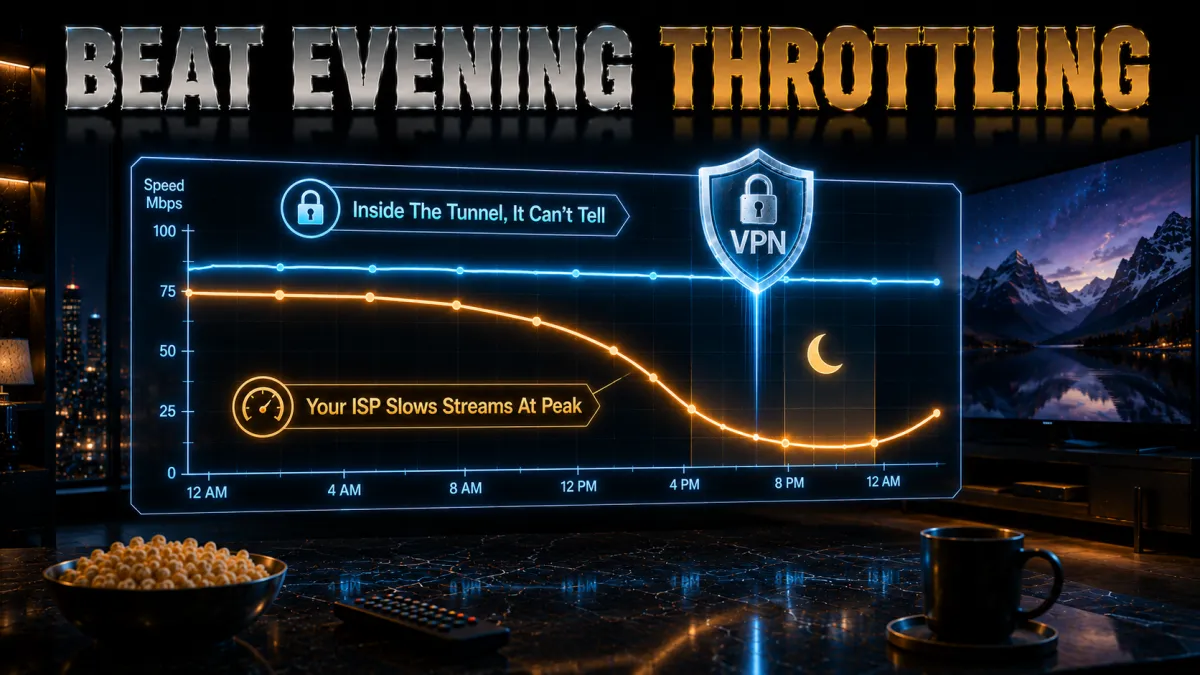
One of the most concrete 4K benefits is undoing the throttling some ISPs apply to sustained video, which a VPN is genuinely good at.
- Throttling targets traffic an ISP can see. A provider can only slow streaming if it can identify that traffic as video, and a VPN encrypts everything into one indistinguishable stream, so the ISP can no longer tell 4K video from anything else. That removes its ability to single out and throttle your high-bitrate viewing while you are connected.
- It often restores full resolution. If a service keeps dropping to HD in the evenings while your speed tests look fine, that pattern usually points to throttling rather than a slow line. Routing the stream through a VPN frequently brings the picture back to full 4K, which is one of the clearest, most testable wins a VPN delivers.
- Pick a nearby server to keep speed. Since a VPN adds a little overhead, the way to undo throttling without losing bandwidth is a close, uncongested server on a modern protocol. A distant node can cost more speed than the throttling did, so start local and only move if a specific library needs another country.
- It is a shield, not a boost. A VPN removes artificial slowdowns but cannot exceed the speed you actually pay for, so it fixes throttling rather than upgrading your plan. If 4K still struggles after ruling out throttling and wifi, the honest answer is that your base connection may simply be too slow for high resolution.
Unlocking 4K libraries in other regions

Reaching the higher-resolution catalogue that a service offers in another country is a top reason 4K viewers use a VPN. A few habits make it reliable.
- Connect to the right country first. A given title may be 4K in one region and HD elsewhere, so pick a server in the country with the resolution you want before opening the app. Choosing the right region is the single most important step, and it is the one people most often skip when a stream refuses to load in high quality.
- Switch servers on a proxy error. Services block specific VPN server addresses, so if one is flagged, moving to another server in the same country usually clears it right away. Treat a proxy warning as a prompt to hop rather than a dead end, because the next server along very often works and loads the 4K library cleanly.
- Use streaming-optimised servers where offered. Providers like CyberGhost label servers for specific platforms, and those are tuned and maintained to keep working against detection, which saves you the trial and error of a plain list. Reaching for a labelled server first is the low-effort route to a 4K stream that just plays.
- Confirm the app is set to allow 4K. Some apps and devices cap resolution in their own settings or require a specific plan tier for 4K, so a stream that plays but looks soft may be a setting, not the VPN. Check the app’s playback settings and your subscription tier alongside the server choice to be sure you are actually getting high resolution.
- Find where the 4K version lives. Check which country offers the title in 4K on your service before you connect.
- Connect to that country. Pick a nearby server in the right region and connect on a WireGuard-based protocol.
- Open the app and start playback. If you see a proxy error, switch to another server in the same country and retry.
- Confirm the resolution. Check the app is playing in 4K, not HD, and that your plan tier allows it.
- Save the working server. Note the server that loads 4K smoothly so you can jump straight to it next time.
4K on TVs, sticks, and consoles
How you get a VPN onto the device you actually watch on shapes the whole 4K experience, and the method depends on what that device runs.
- Android TV, Google TV, and Fire TV run apps. These install a VPN app straight from their store, sign in, and connect, so 4K setup is as easy as on a phone. Any of our picks has a proper TV app for these systems, so you can choose on unblocking and speed rather than compatibility.
- Samsung, LG, and Roku need a workaround. These systems do not run VPN apps, so you protect them with a VPN on your router or a Smart DNS feature, which several top picks include. Smart DNS is especially handy for 4K because it unblocks at full speed without the small overhead of a full tunnel.
- Consoles usually go through the router. A PlayStation or Xbox has no native VPN app, so a router setup is the clean way to give it a 4K stream from another region, and it covers every other device at once. Pick a nearby router server to keep the bitrate high enough for smooth high-resolution playback.
- Prefer a wired connection for 4K. Whatever the device, an ethernet cable removes the wifi interference that causes most high-resolution buffering. For a fixed TV or console, wiring it in is the single most effective step for steady 4K, and it makes the VPN’s small overhead far less likely to matter.
Is a VPN worth it just for 4K?
Before you pay, it is fair to ask whether a VPN genuinely earns its place for high-resolution streaming. Here is the honest case.
- Yes, if you want more 4K libraries. If the higher-resolution catalogue you want lives in another region, a VPN is the straightforward way to reach it, and that access alone justifies the modest cost for many viewers. The same subscription also unlocks content for the rest of the year, not just one film, which spreads the value.
- Yes, if your ISP throttles video. If your evenings are plagued by 4K dropping to a soft picture while speed tests look fine, a VPN that beats throttling pays for itself in restored quality. This is one of the most concrete, testable benefits, so the refund window lets you prove it on your own connection before committing.
- Less so, if your connection is marginal. A VPN cannot create bandwidth, so if your line barely handles 4K without one, adding a tunnel may tip it into buffering. In that case the honest answer is that a faster internet plan, or a wired connection, will do more for your 4K than any VPN can.
- The extras add up. Beyond 4K, the same plan gives you privacy from your ISP, safety on public wifi, and coverage for every device, so you are rarely paying for streaming alone. Weighed as a whole, a low-cost plan with a money-back guarantee is easy to justify for a household that streams regularly.
The 5 best VPNs for streaming 4K in 2026
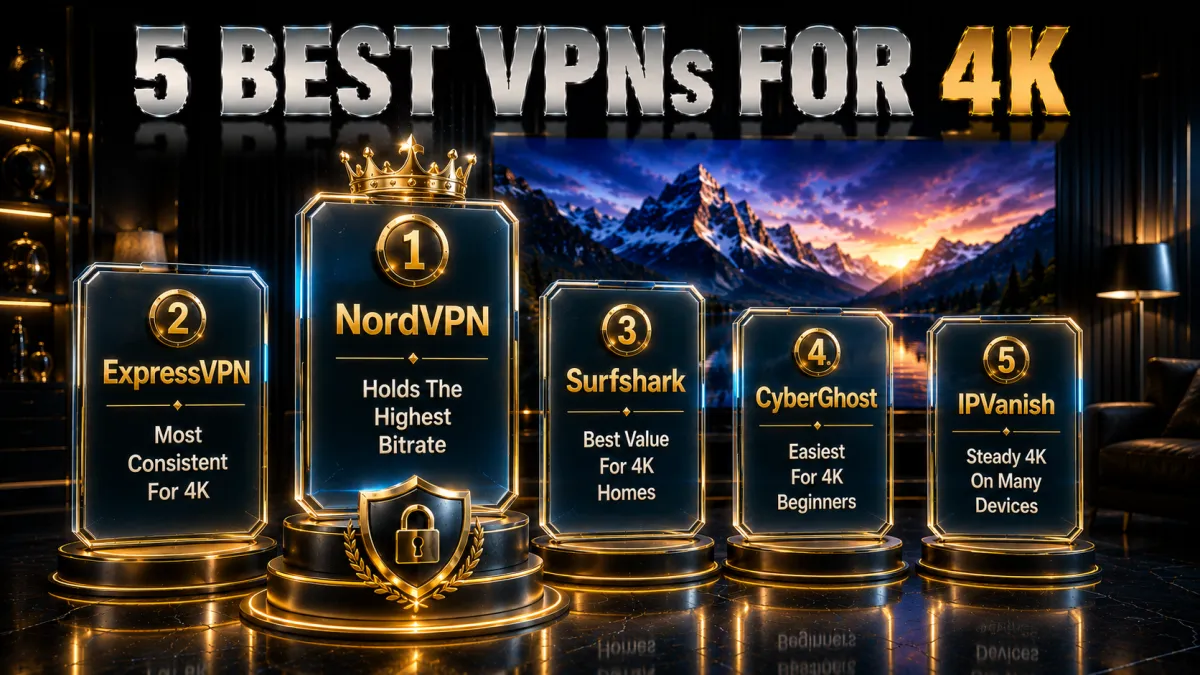
Now that the context is clear, here are the five providers that best balance the speed 4K demands, reliable unblocking, and value across screens. Ratings reflect our established review framework, not one-off benchmarks.
1. NordVPN, best all-round for 4K streaming
NordVPN is our top pick for 4K because high-resolution video is really a bandwidth test, and it passes cleanly. NordLynx, its WireGuard-based protocol, adds so little overhead that the difference between VPN-on and VPN-off is small, and a very large network means you can nearly always find a fast, uncongested server close to you or the library you want. That combination is what keeps a 4K stream sharp instead of dropping to a lower resolution.
It also has the widest reliable unblocking of the five, so the 4K libraries you are paying for actually load rather than throwing a proxy error. SmartPlay handles streaming detection quietly in the background, Threat Protection blocks ads and trackers, and ten simultaneous connections cover the TV, laptop, and a couple of phones at once, which is exactly how households actually watch.
On trust it is the strongest here, with an independently audited no-logs policy, RAM-only servers, and a Panama base outside the major alliances, behind a 30-day money-back guarantee. For 4K in particular, use that window to confirm your specific connection holds a high bitrate on a nearby server before committing, since your home line and ISP matter as much as the VPN.
✔ Pros
- Fast NordLynx protocol holds 4K bitrates
- Widest reliable unblocking
- SmartPlay handles detection automatically
- Ten devices for the whole home
- Audited no-logs, Panama base
✘ Cons
- Best price needs a longer plan
- A few more settings than minimalists want
| Fastest protocol | NordLynx (WireGuard) |
| 4K streaming | Excellent |
| Unblocking | Widest |
| Simultaneous devices | 10 |
| Jurisdiction | Panama |
| Money-back guarantee | 30 days |
2. ExpressVPN, most consistent for 4K
ExpressVPN is the most consistent option for 4K, which matters because a single congested moment is what triggers buffering on high-resolution video. Its Lightway protocol is light and quick to recover, so a brief network blip does not collapse the stream, and servers stay responsive at the busy evening hours when everyone is watching. For a set-and-forget 4K experience, it is the easiest to trust.
It is also one of the strongest for reaching 4K libraries, holding up well against detection on the major services. MediaStreamer, its Smart DNS, is a genuine bonus for 4K because it unblocks at full speed on devices like some smart TVs that cannot run a VPN app, and the standard apps run everywhere from a phone to a router if you prefer whole-home coverage.
On trust it is hard to fault, with RAM-only TrustedServer infrastructure and a British Virgin Islands base outside intelligence-sharing alliances, backed by a long, tested no-logs record. It is the priciest pick and covers eight devices, but a 30-day money-back guarantee lets you confirm it holds a steady 4K stream on your own connection before you commit.
✔ Pros
- Lightway is quick and stable for 4K
- Strong, reliable unblocking
- MediaStreamer Smart DNS for TVs
- Reliable at peak viewing hours
- RAM-only servers, strong audits
✘ Cons
- Costs more than most rivals
- Fewer devices than the value picks
| Fastest protocol | Lightway |
| 4K streaming | Excellent |
| Smart DNS | MediaStreamer |
| Simultaneous devices | 8 |
| Jurisdiction | British Virgin Islands |
| Money-back guarantee | 30 days |
3. Surfshark, best value for 4K households
Surfshark is the best value for 4K because a single subscription covers unlimited devices, so every 4K screen in the house, the TV, tablets, and phones, is protected for one low price. It supports WireGuard, which keeps the bitrate high enough for smooth 4K on a good connection, and it reaches the main streaming services reliably so the libraries you want actually load in high resolution.
The feature set is generous for the price. CleanWeb strips ads and blocks known malicious domains, a Smart DNS option unblocks 4K on devices that cannot run the app, and a kill switch guards against leaks. Its network is not the very largest, so an occasional server switch helps you find the fastest node, but for a house full of 4K screens nothing here stretches further.
The company is based in the Netherlands with an independently audited no-logs policy, outside the Five Eyes. The combination of unlimited devices, solid 4K performance, and the lowest long-term price of the five makes it the obvious value pick, backed by a 30-day money-back guarantee so you can confirm it holds 4K across your household before paying.
✔ Pros
- Unlimited devices for every 4K screen
- WireGuard holds 4K bitrates
- Smart DNS for TVs
- CleanWeb blocks ads and malware
- Lowest long-term price of the five
✘ Cons
- Smaller network than the top two
- Occasional server switching needed
| Fastest protocol | WireGuard |
| 4K streaming | Very good |
| Smart DNS | Yes |
| Simultaneous devices | Unlimited |
| Jurisdiction | Netherlands |
| Money-back guarantee | 30 days |
4. CyberGhost, easiest for 4K beginners
CyberGhost is the friendliest way into 4K streaming for a first-time user. Its apps label servers by streaming service, so instead of guessing you tap the platform you want and connect to a node tuned for it, and a very large network means plenty of fast, nearby options for high-resolution video. For someone who just wants a 4K library to load, that guidance removes the trial and error.
Behind the simple interface the fundamentals hold up for 4K. It runs WireGuard for the bandwidth high resolution needs, includes a kill switch and DNS-leak protection, and is based in Romania, which has no mandatory data-retention law, behind a strict no-logs policy. Its streaming-optimised servers are the least likely to be blocked, which keeps 4K playback smooth rather than dropping to a lower quality.
The standout is the trial: a 45-day money-back guarantee, far longer than the usual 30, which is genuinely useful for 4K because you get weeks to confirm the specific services you watch hold high resolution on your connection before paying. Performance is dependable rather than the outright fastest, a fair trade for how approachable it is.
✔ Pros
- Servers labelled by streaming service
- Very large network for 4K
- WireGuard with a kill switch
- Longest 45-day money-back window
- Romania base, no data-retention law
✘ Cons
- Slower under heavy peak load
- Fewer devices than the value picks
| Fastest protocol | WireGuard |
| 4K streaming | Good, labelled |
| Kill switch | Yes |
| Simultaneous devices | 7 |
| Jurisdiction | Romania |
| Money-back guarantee | 45 days |
5. IPVanish, steady 4K on many devices
IPVanish owns and runs its own server network, which gives it steady, predictable throughput, and predictable bandwidth is exactly what a 4K stream depends on to avoid dropping resolution. It allows unlimited simultaneous connections, so every 4K screen in the house can run on one account without a device cap, which suits a busy household that watches on several screens at once.
The apps are straightforward and functional, with WireGuard, a kill switch, and split tunnelling, and the self-owned infrastructure means your streaming traffic is not passing through a third-party middleman. For viewers who value raw, consistent speed and simple operation over a long feature list, it delivers smooth 4K on a good connection without fuss.
The honest caveats are that it unblocks fewer services than the top picks, so a particular 4K library may need a couple of server tries, and that it is US-based inside the Five and Nine Eyes alliances. An independently audited no-logs policy and a 30-day money-back guarantee balance that, and for steady 4K speed across unlimited devices at a fair price, it remains a strong option.
✔ Pros
- Owns its network for steady 4K speed
- Unlimited simultaneous devices
- WireGuard and split tunnelling
- Simple, uncluttered apps
- Strong long-term value
✘ Cons
- Unblocks fewer services than rivals
- US-based, inside the 9 Eyes alliance
| Fastest protocol | WireGuard |
| 4K streaming | Good |
| Kill switch | Yes |
| Simultaneous devices | Unlimited |
| Jurisdiction | United States |
| Money-back guarantee | 30 days |
4K streaming VPN comparison at a glance
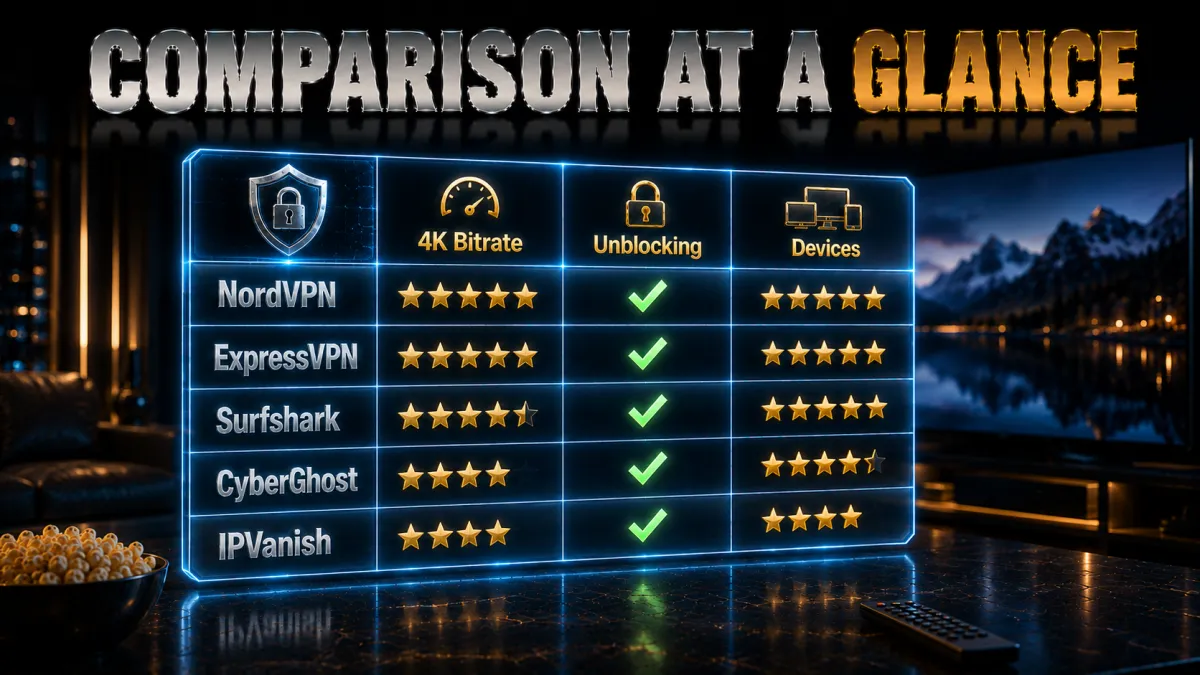
The side-by-side below shows where each provider leads for 4K.
| Feature | NordVPN | ExpressVPN | Surfshark | CyberGhost | IPVanish |
|---|---|---|---|---|---|
| Speed for 4K (WireGuard) | Excellent | Excellent | Very good | Good | Very good |
| Unblocking 4K libraries | Widest | Strong | Strong | Good | Fewer services |
| Smart DNS for TVs | Yes | MediaStreamer | Yes | No | No |
| Server network | Very large | Large | Good | Very large | Extensive |
| Devices per plan | 10 | 8 | Unlimited | 7 | Unlimited |
| Money-back guarantee | 30 days | 30 days | 30 days | 45 days | 30 days |
How to set up a VPN for 4K streaming

Getting a VPN running for smooth 4K takes only a couple of minutes, and a few settings make the difference between crisp and blocky.
- Install the official app. Download it on your streaming device or router from the official store, and sign in.
- Pick the fastest protocol. Choose the WireGuard-based option (NordLynx, Lightway, or WireGuard) so overhead stays low for 4K.
- Connect to a nearby or in-region server. Use a close server for speed, or the country with the 4K library you want.
- Use Smart DNS on a TV that cannot run the app. Set it in the TV network settings to unblock 4K at full speed.
- Wire in and test. Prefer ethernet on a TV or console, then play a 4K title and confirm it holds high resolution.
Should you use a free VPN for 4K?

Free VPNs are tempting, but 4K is the exact workload they handle worst. Here is the honest picture before you install one.
- Crowded servers cannot hold 4K. Free tiers pack users onto a few overloaded servers, and 4K needs steady, high bandwidth, so a free VPN almost always drops the stream to a lower resolution or buffers. For the one workload that most needs speed, free services are the worst fit.
- Data caps vanish in an evening. High-resolution video is data-hungry, and a single 4K film can burn through a free plan’s monthly cap, leaving you unprotected mid-stream. A paid plan removes that ceiling, which is essential for anyone who watches 4K regularly rather than occasionally.
- Weak unblocking defeats the purpose. Streaming services block free VPN addresses quickly, so the 4K library you wanted throws a proxy error just when you try to watch. Paying a little for a provider that actively maintains its IPs is the difference between reliably reaching high resolution and constantly fighting it.
- Privacy is often the hidden cost. Running high-bandwidth servers is expensive, and free apps frequently recoup it by logging and selling your activity or bundling trackers. A reputable low-cost plan with an audited no-logs policy and a refund window is the genuinely safe budget choice for 4K.
Common 4K streaming VPN mistakes
Most people who feel a VPN ruined their 4K made one of these avoidable errors. Fix them and the picture changes completely.
- Leaving an old protocol selected. A legacy protocol adds enough overhead to tip 4K into buffering, and many people never change the setting. Switching to WireGuard, NordLynx, or Lightway is usually a one-tap fix that restores the bitrate 4K needs, so check it before blaming the VPN.
- Choosing a distant server for no reason. A faraway node adds latency and can cut your bandwidth below what 4K needs, so default to the nearest fast server. Only connect to a distant country when a specific 4K library requires it, and expect to lose some headroom when you do.
- Streaming 4K over weak wifi. Buffering blamed on the VPN is frequently the wireless link, since 4K is demanding. Wiring a TV or console in with ethernet removes that variable and often fixes what looked like a VPN problem, so rule out wifi before anything else.
- Forgetting the app’s own quality setting. Some apps cap resolution or require a higher plan tier for 4K, so a soft picture may be a setting rather than the VPN. Check the app’s playback quality and your subscription before assuming the tunnel is at fault.
- Using a free VPN for 4K. Free services rarely hold the bandwidth 4K needs and often cannot unblock, so they fail at exactly this task. A cheap paid plan with a refund window is the sensible budget route to smooth high resolution.
How to choose a VPN for 4K streaming
With the basics covered by all five picks, the right choice comes down to how you weight these factors for high-resolution viewing.
- Speed on a modern protocol first. Because 4K is a bandwidth test, prioritise a provider with fast WireGuard-based protocols and a large network of nearby servers, since that is what holds a high bitrate. Treat network size and protocol together as your real 4K performance test rather than trusting a single headline number.
- Reliable, current unblocking. If reaching 4K libraries in other regions is the goal, choose a provider with a strong, actively maintained record against detection, because a service that unblocks only sometimes will fail you at 4K just as at HD. Streaming-optimised servers are a genuine plus here.
- Smart DNS for a TV that cannot run apps. If you watch on a Samsung, LG, or Roku set, a provider with Smart DNS unblocks 4K at full speed without a full tunnel, which is ideal for high resolution. It is worth checking for this feature specifically if your main 4K screen is one of those brands.
- Enough device slots for your screens. A 4K household runs several screens at once, so unlimited connections or a high device limit, or a router setup, saves you juggling. Match the plan to how many screens you actually stream on rather than just one.
- A real money-back guarantee. A 30 to 45-day refund window lets you confirm that your specific services hold 4K on your own connection before committing, which is the only benchmark that matters. Use it to test real 4K playback in the evening, not just a daytime speed number.
Which services stream in 4K with a VPN
Not every platform or plan offers 4K everywhere, so it helps to know what to expect before you judge the VPN.
- 4K often needs a premium tier. Several major services reserve 4K for their higher-priced plans, so a stream that plays in HD may be a subscription limit rather than the VPN. Confirm your plan includes 4K before troubleshooting, because no VPN can unlock a resolution your subscription does not offer.
- Regional 4K catalogues vary. The same platform can offer a title in 4K in one country and only HD in another, which is exactly where a VPN helps by placing you in the region with the higher resolution. Checking where the 4K version lives tells you which server country to connect to.
- Device support matters too. Some apps only serve 4K to certain certified devices or apps, so an older stick or browser may cap you at HD regardless of the VPN. Watching on a supported 4K-capable device is part of getting the resolution you are paying for.
- Test the exact service you care about. Because support differs by platform, plan, region, and device, the reliable way to know is to test your specific services during the refund window. If they hold 4K on a nearby server, you have the right setup; if not, you can adjust or move on at no cost.
Related reading:
Frequently Asked Questions
Can a VPN really stream 4K without buffering?
Yes, on a good connection with a fast VPN. Because 4K is a bandwidth test, use a WireGuard-based protocol and a nearby server to keep overhead low, and wire your TV or console in where possible. A VPN cannot exceed the speed you pay for, so a marginal connection may still struggle.
Which is the best VPN for 4K streaming in 2026?
NordVPN is our top pick for its fast NordLynx protocol, widest unblocking, and large network. ExpressVPN is the most consistent and adds MediaStreamer for TVs, Surfshark is the best value with unlimited devices, CyberGhost is the friendliest for beginners, and IPVanish offers steady speed on unlimited connections.
Will a VPN slow down my 4K stream?
A good VPN on a modern protocol and a nearby server adds only a little overhead, small enough that 4K stays sharp on a healthy connection. Speed loss grows with distant servers or old protocols, so pick a close server and WireGuard, and prefer a wired connection for the steadiest bitrate.
Can a VPN stop my ISP throttling 4K video?
Often, yes. If your ISP slows sustained streaming, a VPN encrypts your traffic so it can no longer identify and throttle video, which frequently restores full 4K. If a service keeps dropping to HD in the evenings while speed tests look fine, throttling is the likely cause and a VPN is worth testing.
How do I watch 4K on a Samsung or LG TV with a VPN?
Those TVs do not run VPN apps, so use a Smart DNS feature, which unblocks 4K at full speed without a full tunnel, or install the VPN on your router to cover the TV. NordVPN, ExpressVPN, and Surfshark all offer Smart DNS, which is ideal for high-resolution streaming on those brands.
Are free VPNs good enough for 4K?
No. Free VPNs crowd users onto slow, overloaded servers that cannot hold the bandwidth 4K needs, cap your data, and rarely unblock, so they fail at exactly this task. A low-cost paid plan with a money-back guarantee is the sensible route to smooth high resolution.
How much internet speed do I need for 4K with a VPN?
4K needs a steady, high bitrate rather than short bursts, and a VPN adds a little overhead on top, so a comfortable margin above the service’s minimum helps. Your base plan sets the ceiling, so if your line barely handles 4K without a VPN, adding one may tip it into buffering.
Which server should I use for 4K?
Usually the nearest fast, uncongested server, or a server in the country whose 4K library you want. Distance adds latency and can cut bandwidth below what 4K needs, so start local and only move to another country when a specific high-resolution library requires it.
Does a VPN work for 4K on a smart TV or Fire TV?
Yes. Android TV, Google TV, and Fire TV run a VPN app directly, so 4K setup is as easy as on a phone. For TVs that cannot run an app, use Smart DNS or a router setup. A wired connection helps the most for steady high-resolution playback.
Will every service stream 4K through a VPN?
Not always. Some services reserve 4K for premium plans, certified devices, or specific regions, so a stream may play in HD due to a subscription or device limit rather than the VPN. Confirm your plan and device support 4K, then test your specific services during the refund window.
Can I stream 4K on multiple screens at once with one VPN?
Yes. Surfshark and IPVanish allow unlimited simultaneous connections, so every 4K screen runs on one plan. NordVPN allows ten and ExpressVPN eight, and installing the VPN on your router covers every device at once, which is the simplest way to secure a whole 4K household.
Is a VPN worth it just for 4K streaming?
If you want to unlock higher-resolution libraries or beat ISP throttling, yes, because both deliver a visibly better picture and the same plan protects the rest of your devices too. A money-back guarantee lets you confirm it holds 4K on your own connection before paying anything.
The Bottom Line
Choosing a VPN for 4K comes down to one thing above all: speed, because high-resolution video is a bandwidth test and everything else follows from holding a steady, high bitrate. All five picks pair a fast modern protocol with reliable unblocking, so the right one depends on whether you prioritise raw speed, value across many screens, or a long refund window to test your own services.
Whichever you choose, the setup that pays off is the same: connect to a nearby server on a WireGuard-based protocol, wire your TV or console in where you can, and confirm the service’s own 4K setting is on.
- NordVPN is the safest all-round choice, with the fastest protocol, widest unblocking, and smooth 4K on any screen.
- ExpressVPN is the consistency pick, with stable 4K and MediaStreamer for TVs that cannot run an app.
- Surfshark is the value winner, covering unlimited 4K screens for the lowest price with Smart DNS included.
- CyberGhost is the easiest for first-timers, with servers labelled by service and the longest 45-day refund.
- IPVanish is the steady-speed pick, running its own network for consistent 4K across unlimited devices.
Here is the practical move: pick your provider for the priority that matters most, install it on your streaming device or router, connect to a nearby server on a WireGuard-based protocol, and play a real 4K title in the evening during the refund window. If it holds high resolution without buffering and unlocks the libraries you want, you have found your 4K streaming VPN, and the money-back window means it cost you nothing to be sure.
Jyoti VPN Expert leads VPN testing at VPN Expert Guide, covering streaming and regional access, speed and latency testing, and leak checks on Windows, Android and router-level setups. Our guides are built from vendor documentation, provider terms and our own connection testing on a residential line in India, and we publish those measurements in full so readers can check them. Every guide is reviewed before publication and dated so you can see how current it is.
Meet our testing team →Last updated: September 2, 2026