
What Is a VPN? How It Works, What It Hides and When You Need One
A VPN, or virtual private network, sends your internet traffic through an encrypted tunnel to a server run by someone else, and that server then forwards it to the websites and apps you use. When the tunnel is working correctly, it hides the destinations of your traffic from the local network and internet provider, and websites see the server’s IP address instead of yours. It also moves a lot of trust onto the service provider. This guide explains how a VPN works, what it hides and what it does not, the main types and protocols, and how to decide whether you need one.
What is a VPN?

VPN stands for virtual private network. It is virtual because the connection is created in software on top of the ordinary internet, rather than over a cable of its own. It is private because the traffic inside it is encrypted, so the networks it crosses cannot read it. And it is a network because your device joins the server’s network as if it were plugged in there.
When you connect, the data you send appears to come from the server rather than from your internet service provider. As EFF’s guide to choosing a VPN explains, this masks your IP address, which matters because an IP address gives a rough idea of where you are and can be used to identify you.
The server can belong to a commercial privacy service, a non-profit, your employer, or even a computer you run at home. The technology is the same in each case; what changes is who runs the server, and therefore who you are trusting with your traffic.
How does a VPN work?
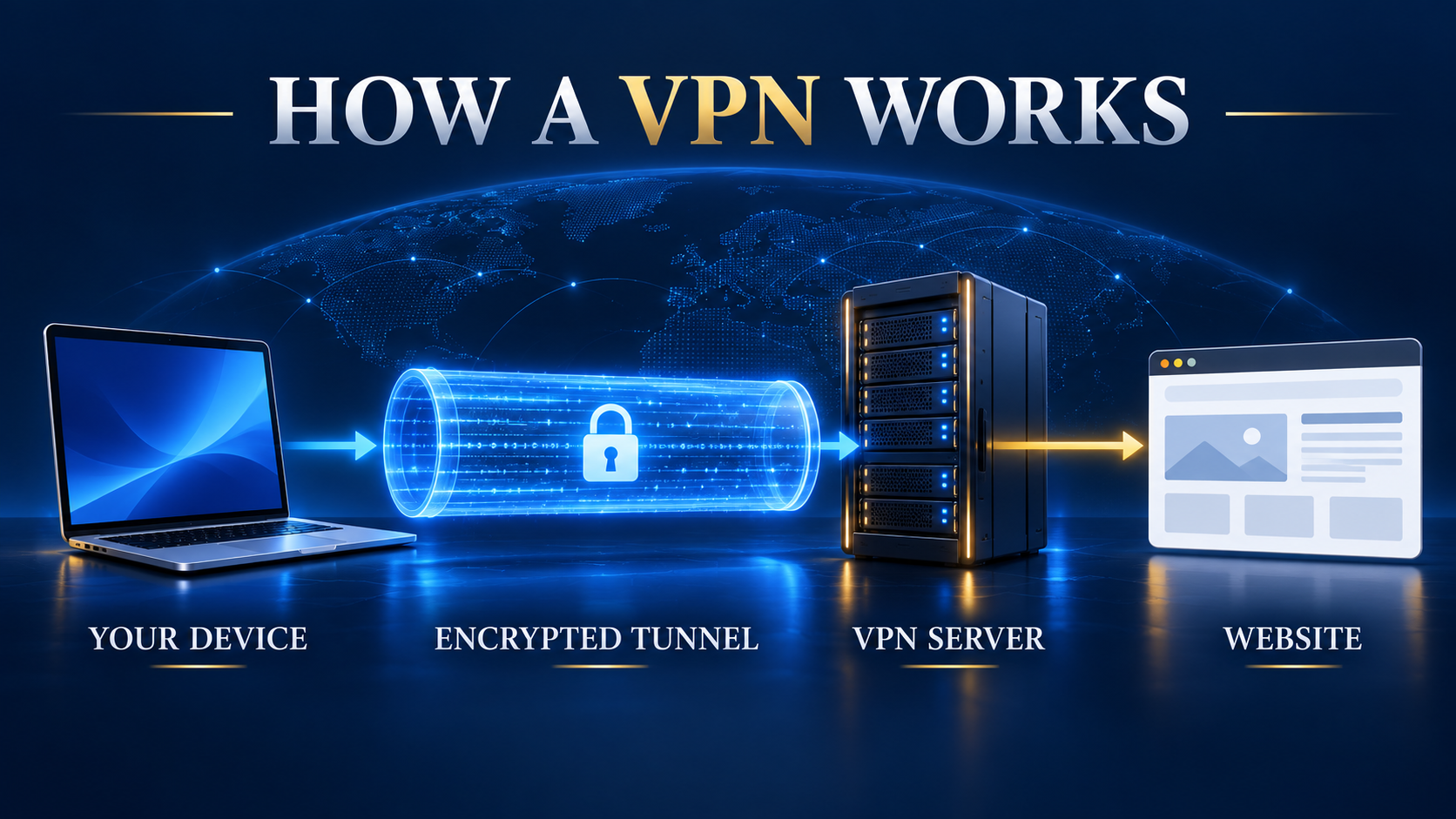
Every encrypted connection follows the same basic steps, whichever app or protocol you use.
- 1. You start the connection. You open a connection app, or use the connection client built into your operating system with a profile from your provider or employer.
- 2. Your device and the server agree on keys. They prove who they are to each other and set up the encryption keys for the session. This handshake is what turns an ordinary connection into a private tunnel.
- 3. Your traffic is wrapped and encrypted. Each packet your device sends is encrypted and placed inside another packet addressed to the server. Anyone on the path sees only encrypted traffic going to that server.
- 4. The server unwraps it and forwards it. The server decrypts the packet and sends it to the website or app you asked for. To that site, the request comes from the server’s IP address.
- 5. Replies come back the same way. The website answers the server, which encrypts the reply and sends it back through the tunnel to your device.
Because all of your device’s traffic takes this route, the encrypted connection also affects things you might not think about, such as DNS lookups, the step that turns a name like example.com into an address. If you are new to that idea, our explainer on what DNS is and why it matters covers the basics.
Who can see your browsing activity?

An encrypted tunnel changes who can see what, rather than making your activity invisible. Most websites already use HTTPS, which protects the content of pages, your logins and your messages. HTTPS can still leave network metadata visible, such as connection times, traffic volume and often the destination domain, depending on DNS and browser settings. A correctly configured tunnel hides destination information from the local network and your ISP, but the service provider then becomes the network operator you must trust.
Visibility by network participant
| Who could look | Without a VPN (on HTTPS sites) | With a VPN switched on |
|---|---|---|
| Wi-Fi owner (café, hotel, office) | The domain names you visit and when, plus page and file sizes. Not the pages, logins or messages on HTTPS sites | That you are connected to a VPN, but not where your traffic goes |
| Your internet provider (ISP) | The same metadata: domain names, times and sizes | That you are using a VPN; your browsing is inside the encrypted tunnel |
| Websites and apps you use | Your real IP address and its rough location | The server’s IP address and location. Some sites can tell it belongs to a VPN |
| Your service provider | Nothing, because you are not using it | Network metadata about your connections; HTTPS still protects page contents |
| Accounts you are signed in to | Everything you do in the account | Still everything you do in the account; a VPN changes nothing here |
| Cookies, trackers and fingerprinting | Can follow you across sites | Can still follow you across sites |
Based on EFF’s and the FTC’s guidance; see the Sources section below. On narrow screens, scroll sideways to see every column.
Why the provider still matters
The key row is the service provider. The US Federal Trade Commission puts it plainly: a connection app does not make you anonymous, it shifts trust from your network to the service provider. Choosing a service is therefore mostly about choosing whom to trust.
Limits of encrypted connections
Marketing adverts often promise far more than the technology delivers. These are the limits to keep in mind.
- It does not make you anonymous. Companies can still track you through GPS, cookies, tracking pixels and browser fingerprinting, and sites can use anything you tell them, such as your email address. For stronger anonymity, see our comparison of VPN and Tor.
- It does not protect accounts you are signed in to. Google, Facebook or your bank still see everything you do while logged in, and your browser still keeps its history.
- It does not stop malware or phishing. A VPN encrypts traffic in transit. It does not check the files you download or the links you click.
- It cannot stop the provider logging. A service provider can keep records of the sites you visit, and providers can receive law enforcement requests just as ISPs do. A “no-logs” claim is a promise, not a guarantee.
- It is not bulletproof on hostile networks. The TunnelVision attack showed that someone controlling a local network can push traffic outside the encrypted tunnel without breaking the connection. EFF’s write-up on TunnelVision explains why keeping your connection app updated matters.
Common uses for private connections
EFF says these services are useful in a few situations, and most everyday reasons fit one of them.
- Untrusted Wi-Fi. On a network where you do not know who runs it, a trusted VPN keeps the Wi-Fi owner from seeing which sites you visit. Our guide to using a VPN on public Wi-Fi covers the practical steps.
- Privacy from your internet provider. Your ISP can see the domains you visit; with a VPN, it sees only the connection to the server. Our guide on hiding your browsing from your ISP explains the options.
- Getting around network blocks. On a school or office network, or in a country that blocks some sites, a VPN can make you appear to connect from somewhere else. It does not always work, and some countries restrict VPNs.
- Seeing content from another region. Because sites see the server’s location, a VPN can show you what is available elsewhere. Many streaming services try to block VPN addresses, and their terms may forbid it.
- Reaching your work or home network. This is the original purpose of VPNs: connecting to an office network while travelling or working from home, or to your own home network from abroad.
Personal, remote-access and site-to-site networks
The word VPN covers three different set-ups. The consumer apps advertised online are only one of them.
- Personal (consumer) VPN. You subscribe to a VPN service and connect your devices to its servers. This is what most people mean by “a VPN”, and it is the type this guide focuses on.
- Remote-access VPN. An employer gives staff a VPN profile or app so their laptops and phones can reach internal systems securely from home or on the road.
- Site-to-site VPN. Two offices link their networks with VPN gateways or routers, so computers in each location can talk to each other as if they were on one network.
Business VPNs have their own considerations. The UK National Cyber Security Centre’s VPN guidance is written for organisations and notes that individuals usually use these tools for different reasons. It also points out that an organisation may not need this type of connection at all if it has fully adopted a zero-trust approach to its network.
VPN protocols in plain English
A protocol is the set of rules a VPN uses to set up the tunnel and encrypt your data. Most connection apps pick one for you, so you rarely need to change it, but knowing the names helps you spot a weak set-up.
| Protocol | What it is | Where you will meet it | Our take |
|---|---|---|---|
| WireGuard | A newer, deliberately small VPN protocol that sends encrypted IP packets over UDP and uses modern cryptography | Many consumer VPN apps, routers and Linux | A common modern choice. The UK NCSC calls it promising but not yet proven for enterprise use |
| OpenVPN | An open-source VPN built on the SSL/TLS standard, with certificate or password sign-in | Consumer VPN apps and business networks | A long-standing, flexible option that is still widely used |
| IKEv2/IPsec | IPsec is an open standard that protects data at the network layer; IKE sets up its keys | Built into many operating systems, including Apple devices, and common on company networks | The protocol the NCSC recommends for organisations, because clients from different vendors work together |
| PPTP | An old protocol with broken encryption | Old routers and legacy settings | Avoid it. EFF says traffic over PPTP can be easily decrypted |
Descriptions come from each protocol’s official documentation and from NCSC and EFF guidance, listed in the Sources section below.
Choosing a modern protocol
The NCSC says TLS and IPsec are the most widely used families of VPN protocol, and that, all else being equal, there is very little difference in risk between them. The WireGuard project describes its protocol as simple, fast and modern, and it is now common in consumer apps. Our explainer on what the WireGuard protocol is goes deeper.
If an app or router offers PPTP, do not use it. EFF warns that traffic over PPTP can be easily decrypted, and the NCSC notes that it has fallen out of use because of security concerns.
Built-in clients on Windows, Android and Apple devices
You do not always need to install anything. The major operating systems include a connection client, but it needs server details from somewhere: your employer, a VPN service, or your own server.
- Windows 11. Go to Settings, then Network & internet, then VPN, then Add VPN. Microsoft’s guide says you need a VPN profile first, either one you create from a provider’s settings or one from your company.
- Android. Go to Settings, then Network & internet, then VPN. A VPN you add manually can be set to stay on all the time, while a VPN set up through an app does not get that always-on option. Google’s Android help page adds that Pixel 7 and later phones and the Pixel Tablet include a built-in VPN by Google at no extra cost in countries where it is offered.
- iPhone, iPad and Mac. Apple devices support industry-standard protocols such as IKEv2 without extra apps, and VPN providers can ship their own apps through Apple’s Network Extension framework.
Built-in clients are usually free, reliable and updated automatically, but they have fewer options than a provider’s own app. In practice, most people using a consumer VPN install the provider’s app, which configures everything for them.
Do you need a VPN?

Start with what you want to protect and from whom. If none of the uses above apply to you, you can skip a VPN; the NCSC makes the same point for organisations.
- You probably benefit from one if you often use Wi-Fi you do not trust, you do not want your ISP to see the sites you visit, you need to reach a work or home network remotely, or you want to appear to be in another location.
- You probably don’t need one if you mostly browse at home on HTTPS sites, your concern is malware or scams, or you want to stop companies tracking you, which takes browser settings and tracker blockers rather than a VPN.
- Look elsewhere if you need strong anonymity. Because of the way Tor is designed, no single Tor server can see your browsing data.
Choosing a trustworthy provider
Because a service provider can see so much, the checks that matter are about trust rather than features.
- Privacy policy. Read what it collects and whether it shares or sells data. EFF warns that a provider may log your data if its policy does not rule it out.
- Independent audits. Published third-party security audits are a good sign, though nothing guarantees practices stay the same after the audit.
- Business model. Ask how a free VPN pays its bills. The FTC notes that many free VPN apps sell advertising or share your information with third parties.
- Protocols. Look for WireGuard, OpenVPN or IKEv2/IPsec, and avoid any service that still relies on PPTP.
- App permissions. A connection app needs access to your traffic, but it should not ask for your text messages or contacts.
- Reputation. Search news coverage of the company. Being listed in an app store is not proof of trustworthiness.
If cost is a concern, our guide to the best free VPN for daily use covers free options and their limits.
Getting connected step by step
Getting started with a consumer VPN takes a few minutes.
- 1. Pick a provider using the checks above, and sign up on its website or in its app.
- 2. Install the app on each device you want to protect. Most providers cover Windows, macOS, Android and iPhone.
- 3. Connect to a nearby server for the best speed, or a server in another country if you need a different location.
- 4. Turn on the kill switch if the app has one, so traffic stops rather than leaking if the VPN drops.
- 5. Check that it works. Look up your IP address with the VPN on and off. If your real address or your ISP’s DNS still shows, our guide to fixing a VPN IP leak walks through the fixes.
Is using a VPN legal?
Using a VPN is legal in many countries, but not everywhere, and some governments restrict or ban VPNs. Using a VPN does not make an illegal activity legal, and streaming services may block VPN connections under their own terms. If you are in India, our guide to whether a VPN is legal in India explains the local rules and safe use.
Related reading:
Frequently Asked Questions
What does the abbreviation mean?
VPN stands for virtual private network. It is a private, encrypted connection that runs over a public network such as the internet, between your device and a server.
What does a VPN do in simple terms?
It encrypts the traffic between your device and a server, then sends it on to the internet from that server. When the VPN is working correctly, your internet provider and the local Wi-Fi owner cannot see the sites reached through it, and websites see the server’s IP address instead of yours.
Does an encrypted tunnel make me anonymous?
No. EFF and the US Federal Trade Commission both say a VPN does not make you anonymous. It shifts trust from your internet provider to the service provider, and websites can still identify you through logins, cookies, tracking pixels and browser fingerprinting. Tor is designed for stronger anonymity.
Can my internet provider see that I use a VPN?
Usually yes. Your provider and the network router may see that you are connected to a VPN, but the data inside the tunnel is encrypted, so they cannot see the sites you visit.
Is a VPN the same as a proxy?
Not quite. Both make your traffic appear to come from another server, but a VPN encrypts all of your device’s traffic between you and the server, while a proxy usually handles only one app or browser and does not have to encrypt anything.
Do I need a VPN at home?
Not always. Most websites already use HTTPS, which protects the content of your browsing. A VPN at home mainly helps if you want to hide the sites you visit from your internet provider, appear to be in another location, or reach your work or home network remotely.
Are free services safe to use?
Some are, but be careful. The FTC notes that many free VPN apps make money by selling in-app advertising or by sharing your information with third parties. Read the privacy policy and check the app’s permissions before you install one.
Is it legal to use a VPN?
In many countries using a VPN is legal, but the rules differ from country to country and some restrict or ban VPNs. Anything illegal without a VPN is still illegal with one, and a streaming service’s terms may forbid using a VPN to change your region.
Sources
Official guidance and documentation checked on 6 October 2026 (IST).
Privacy and consumer guidance
- EFF Surveillance Self-Defense: Choosing the VPN that is right for you
- EFF Surveillance Self-Defense: Understanding and circumventing network censorship
- EFF: A wider view on TunnelVision and VPN advice
- US Federal Trade Commission: The market for VPN apps
Protocols and standards
- UK NCSC: Virtual private networks (device security guidance)
- NIST SP 800-77 Rev. 1: Guide to IPsec VPNs
- WireGuard: official project site
- OpenVPN community: how-to guide
Built-in VPN clients
- Microsoft Support: Connect to a VPN in Windows
- Android Help: Connect to a virtual private network (VPN) on Android
- Apple Platform Deployment: VPN overview
The Bottom Line
A VPN is an encrypted tunnel between your device and a server, and that server becomes your front door to the internet. When the tunnel works correctly and traffic stays inside it, the local network and internet provider generally see the encrypted connection rather than the sites reached through it; websites see the server’s IP address instead of yours.
It does not make you anonymous, stop malware or hide what you do in accounts you are signed in to, and it shifts trust to the service provider, which can see connection metadata while HTTPS still protects page contents. That makes the provider’s trustworthiness the most important choice you make.
If you use untrusted Wi-Fi, want privacy from your ISP, need another location or must reach a work network, a VPN from a provider with a clear privacy policy and modern protocols is worth having. If not, free tools such as HTTPS-only mode and encrypted DNS may cover what you need. This article is general information, not legal or security advice for your specific situation.
Saurabh VPN Expert writes and reviews VPN guides for VPN Expert Guide, covering privacy, streaming, regional access, and device setup. Our articles draw on provider documentation and published product information, with updates when important details change.
Meet our testing team →Last updated: October 9, 2026