
Best VPN for Multiple Devices in 2026: Device Limits, Routers and Family Sharing
Choosing the best VPN for multiple devices starts with your active connections and sharing rules. Phones, laptops, tablets, TVs and consoles add up fast, and providers count them differently. This guide explains how VPN device limits work, what counts as a device, how a router gets around the limit and which providers let you share one account with your family. It compares the device rules of eight VPNs, with five in detail, using only the providers’ own pages, checked on 10 October 2026. No invented speed tests or scores.
How VPN device limits work
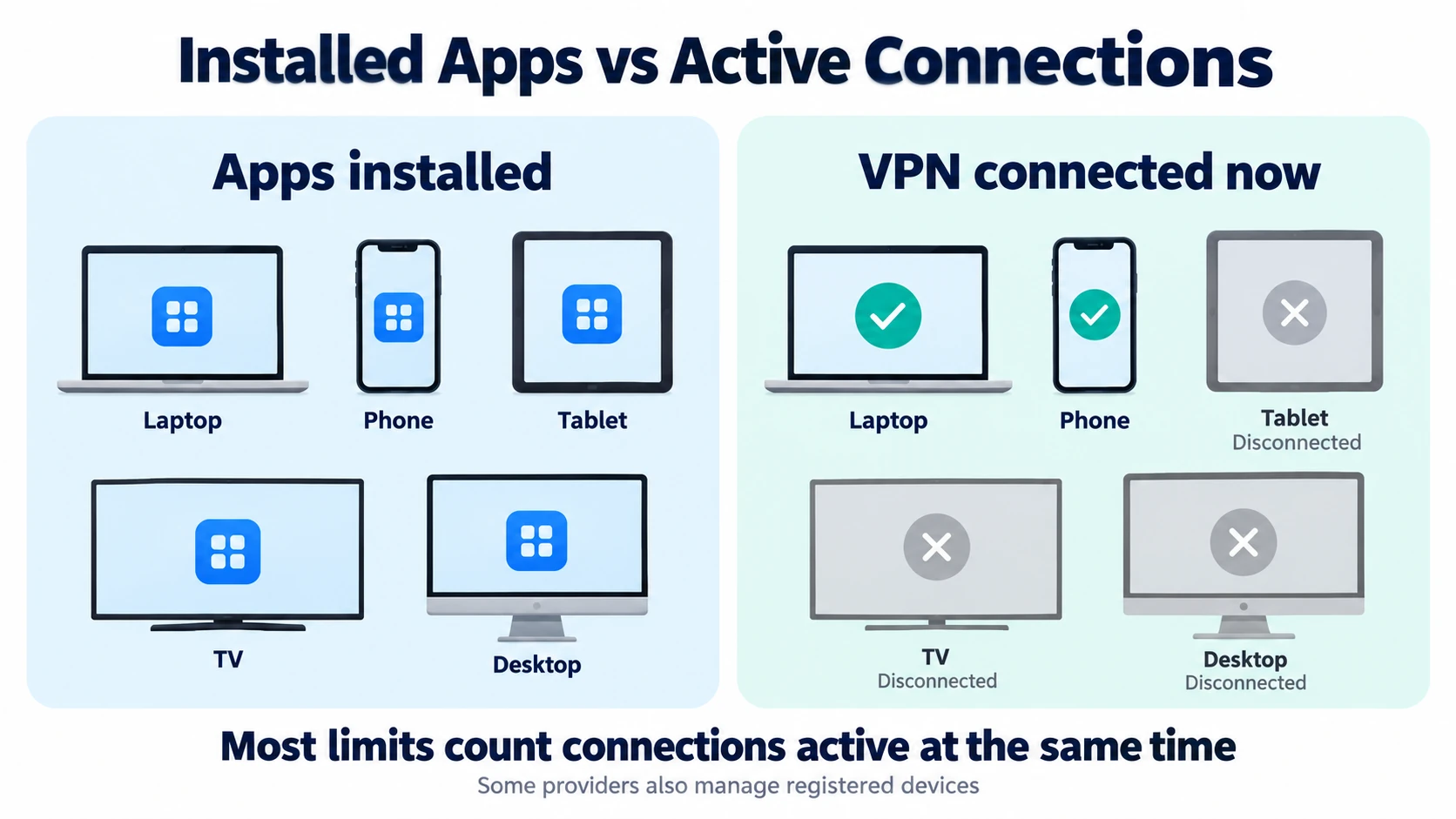
First, a VPN’s device limit is almost always about simultaneous connections: how many devices can be connected to the VPN at the same moment, not how many have the app installed. CyberGhost, for example, lets you install its app on any number of devices but connect only 7 at once. If you are new to VPNs, our guide to what a VPN is and what it hides covers the basics first.
- Installs are usually free. Most providers let you install the app everywhere and only count devices that are connected. Mullvad is different: it allows its account on up to 5 devices, and you can see each device’s name in the app or on its website.
- Every connection counts. Phones, tablets, laptops, TVs and streaming sticks all use a slot while connected. ExpressVPN says its limit applies regardless of platform, virtual machines included.
- One device, one connection. A desktop VPN app protects the whole computer, so other user accounts on that computer don’t need their own slot. NordVPN notes that several users on one computer can’t run its app at the same time.
- A router counts once. When the VPN runs on your router, every device behind it shares a single VPN connection. NordVPN says a router uses only one of its 10 device slots.
How many devices should your VPN cover at once?
Therefore, before you compare limits, count what will be connected at the same time on a busy evening, not everything you own.
- Count each person’s devices. A phone and a laptop each is common, and a tablet adds one more. Four people can easily need eight or more connections.
- Add TVs and consoles. A TV or streaming stick running its own VPN app uses a connection slot. Games consoles generally need a VPN router or a shared computer connection, so count that upstream VPN connection rather than each console separately.
- Think about travel. A phone and laptop away from home use their own connections, even if the home network is on a router.
- Leave headroom. If you are close to the limit now, pick a plan with spare slots or an unlimited one, because devices tend to multiply.
As a rough guide, one person with a phone, laptop and tablet fits in any paid plan here. A family of four with TVs and consoles is where 10-device plans get tight and unlimited plans or a router make life easier.
What to look for in a VPN for multiple devices
However, the headline number is only part of the picture. These details also decide whether a VPN works for a busy household.
- The real limit. Check whether the number depends on the plan. ExpressVPN’s limit changes from 10 to 12 to 14 devices as you move up its plans, while Surfshark’s is unlimited on all of them.
- Sharing rules. Some providers welcome family sharing and some forbid it. This matters more than the number if several people will use one login.
- Apps for your devices. Make sure there are apps for the TVs and streaming sticks you own, such as Fire TV, Apple TV or Android TV, so you don’t need a router for them.
- Router support. A router covers every device on your network with one connection. Look for setup guides for your router’s firmware, or a ready-made VPN router.
- A refund window. Install the app on all your devices during the money-back period. Most refunds here are for direct purchases only, not App Store or Google Play subscriptions.
Prices vary by country and change often, so they aren’t in this guide. Our guide to the cheapest VPN plans and their renewal prices compares current costs.
Compare VPN limits for multiple devices
For comparison, here are the device rules of eight well-known VPNs side by side, listed alphabetically. Device limits, router support and sharing terms were rechecked on 10 October 2026. Refund summaries apply to direct purchases where noted; check the linked terms for exclusions.
| VPN | Devices connected at once | Router connection | Sharing with others | Money-back (direct purchase) |
|---|---|---|---|---|
| CyberGhost | 7 (install on any number) | Manual OpenVPN on compatible routers | Friends or family allowed; account holder responsible | 45 days (14 days on monthly plans) |
| ExpressVPN | 10, 12 or 14, by plan | Router connection protects all devices behind it | Household sharing described | 30 days, first-time users |
| IPVanish | Unlimited (unmetered) | Router options listed | Personal use only; multiple-party use prohibited | 30 days on yearly and two-year plans |
| Mullvad | 5 | Router with WireGuard covers every device on the network | Not stated | 14 days (not for cash or crypto) |
| NordVPN | 10 | Router uses 1 slot | Sharing with trusted family or friends is allowed | 30 days |
| Private Internet Access | Unlimited | Router shares 1 VPN connection | Personal use; resale and non-personal use count as abuse | 30 days, new users |
| Proton VPN | 10 on paid plans (1 on Free) | OpenVPN or WireGuard client; Free plan supported | Duo: 2 accounts; Family: up to 6 | 30 days |
| Surfshark | Unlimited | Router setup guides; most app features unavailable | Family sharing allowed | 30 days, website purchases |
Official sources for this table are listed in Sources below. On narrow screens, scroll sideways to see every column.
Best VPN for multiple devices: five options to consider
For a focused shortlist, these five either have no device cap or a high one, plus apps or router options that suit a household. They are listed alphabetically, not ranked, and there are no scores or overall winner. We checked each fact against the providers’ own pages on 10 October 2026, and we did not run speed tests.
ExpressVPN – a device limit that grows with the plan
First, ExpressVPN’s limit depends on the plan you choose at checkout: Basic allows 10 devices at the same time, Advanced 12 and Express Pro 14. Its support pages say the count applies regardless of platform, virtual machines included. If you need more than 14, ExpressVPN suggests a second subscription, sharing the connection from a Windows computer or setting up a VPN router, which protects every device on your network under one VPN connection.
ExpressVPN also lists apps for Windows, Mac, Linux, Chromebook, Android, iOS, Amazon Fire tablets, Fire TV, Apple TV (tvOS), Chromecast with Google TV and Android TV devices, plus setup guides for devices such as PlayStation, Xbox, Nintendo Switch, Samsung TVs and LG TVs. For a VPN-encrypted connection on devices without a VPN app, use a compatible VPN router or computer connection sharing. MediaStreamer is Smart DNS and does not provide VPN encryption.
On the router side, its Aircove routers are no longer sold. The current home router is Fortify, which pairs GL.iNet hardware with the Advanced plan, and the older ExpressVPN router app no longer receives security updates. Its multiple-device page says one subscription can be shared with your household, within the plan’s active connection limit.
✔ Pros
- Apps for most phones, computers and streaming sticks
- Higher plans raise the limit to 12 or 14 devices
- Official guide for sharing a VPN connection from Windows
- Household sharing is described on its own site
✘ Cons
- Basic plan stops at 10 devices
- Aircove routers are retired, and the router app no longer gets security updates
- 30-day refund is for first-time users and doesn’t cover App Store or Google Play billing
| Devices at once | 10 (Basic), 12 (Advanced), 14 (Express Pro) |
| Beyond the limit | Second subscription, Windows connection sharing or a VPN router |
| Router | Fortify (current); app on some Asus, Linksys and Netgear models; manual setup on others |
| TV and streaming apps | Fire TV, Apple TV (tvOS), Chromecast with Google TV, Android TV |
| Money-back | 30 days for first-time users (not App Store or Google Play) |
IPVanish – unmetered connections for one person’s devices
IPVanish says it offers unmetered connections, so you can connect as many devices as you own to the VPN at the same time, from any location where the service is supported. Check the current plan and terms before buying; an unlimited connection allowance does not waive account-use restrictions.
However, IPVanish has a strict account rule. Its Terms of Service grant a personal, private, non-commercial license and prohibit other people from accessing the service through your account. Although its router page describes household use, that does not grant permission to share your login. So, ask support to clarify your intended use if these pages appear to conflict. That makes IPVanish a fit for one person’s many devices, rather than a shared family login. It lists apps for Windows, Mac, Linux, Android, iPhone, Apple TV and Fire Stick, plus a Chrome VPN and router options. It also offers a 30-day money-back guarantee on yearly and two-year plans.
✔ Pros
- No cap on simultaneous connections
- Apps for Apple TV and Fire Stick as well as computers and phones
- No bandwidth limit stated
- Router options for devices without an app
✘ Cons
- Multiple-party use of one account is prohibited
- Money-back guarantee covers yearly and two-year plans
- Router setup is a manual job
| Devices at once | Unmetered (as many devices as you own) |
| Account rule | Personal use; multiple-party or non-individual use prohibited |
| TV and streaming apps | Apple TV, Fire Stick |
| Other platforms | Windows, Mac, Linux, Android, iPhone, Chrome extension, routers |
| Money-back | 30 days on yearly and two-year plans |
NordVPN – 10 devices plus a well-documented router route
NordVPN lets you connect up to 10 devices to one account at the same time. Its support page adds a condition: devices connected to the same server must use different VPN protocols, so spread extra devices across servers. If you have more devices, NordVPN says a router uses only one device slot while the VPN protects every device connected to that network.
In practice, the app protects the whole device, so every user account on a shared computer is covered by one connection, though NordVPN says several users on one computer can’t run the app at the same time. NordVPN has apps for Windows, macOS, Linux, Android, iOS, Android TV and Apple TV (tvOS), plus Chrome, Firefox and Edge extensions, and router guides for firmware such as ASUS, DD-WRT, OpenWRT, GL.iNet, pfSense and TP-Link. All plans come with a 30-day money-back guarantee.
✔ Pros
- 10 devices on every plan
- Router counts as one device slot
- Long list of router firmware guides
- Apps for Android TV and Apple TV
✘ Cons
- 10 is a hard limit for app connections
- Devices on the same server need different protocols
- Most ISP-supplied routers can’t run it, by NordVPN’s own account
| Devices at once | 10 |
| Router | Counts as 1 slot; guides for ASUS, DD-WRT, OpenWRT, GL.iNet, pfSense, TP-Link and more |
| TV and streaming apps | Android TV, Apple TV (tvOS) |
| Limit reached | Disconnect a device and wait 10 minutes before reconnecting |
| Money-back | 30 days on all plans |
Private Internet Access – unlimited connections and clear router guides
Private Internet Access (PIA) allows an unlimited number of simultaneous connections on one subscription, on any mix of routers, computers and mobile devices. For homes with many devices, PIA suggests a router setup so everything behind the router shares a single VPN connection.
PIA has apps for Windows, Mac, Linux, iOS and Android, plus Fire Stick, Android TV boxes and Apple TV, and router guides for DD-WRT, OpenWRT, AsusWRT, pfSense and FreshTomato.
If your router can’t run a VPN, its help centre explains how to share the VPN connection from a Windows PC or a Mac. Its terms of service treat abuse of the unlimited device allowance, such as resale or non-personal use, as a reason to contact you and possibly limit the account. The 30-day money-back guarantee covers purchases made on PIA’s website by new users.
✔ Pros
- No cap on simultaneous connections
- Router guides for five firmware families
- Official steps for sharing from Windows or a Mac
- Apps for Fire Stick, Android TV and Apple TV
✘ Cons
- Resale or non-personal use can lead to limits
- No refund for App Store, Google Play, gift-card or deal-site purchases
- Router setup uses OpenVPN config files
| Devices at once | Unlimited |
| Router | DD-WRT, OpenWRT, AsusWRT, pfSense, FreshTomato |
| TV and streaming apps | Fire Stick, Android TV boxes, Apple TV |
| Account rule | Abuse of unlimited devices (resale, non-personal use) may be limited |
| Money-back | 30 days, website purchases by new users |
Surfshark – unlimited devices with family sharing allowed
Surfshark’s Starter, One and One+ plans all allow an unlimited number of devices to connect at the same time. Its support page explicitly allows sharing a subscription with your family. However, an unlimited allowance does not mean unlimited household internet capacity; simultaneous downloads still share your broadband connection.
There is a fair-use rule. Surfshark’s terms say it can limit an immoderate number of simultaneously connected devices, aimed at resellers and similar abuse, and its antivirus allows only five connections per account. Surfshark covers Windows, macOS, Linux, Android, iOS, Apple TV, Fire TV, Android TV and routers, with Chrome, Firefox and Edge extensions. Its router guide notes that a router setup loses most of the app features, can be slower and needs firmware with an OpenVPN or WireGuard client. Website purchases have a 30-day money-back guarantee.
✔ Pros
- Unlimited devices on every plan
- Family sharing is explicitly allowed
- Apps for Apple TV, Fire TV and Android TV
- Router guides for many firmware types
✘ Cons
- Fair-use policy can limit an immoderate number of devices
- Antivirus is limited to 5 connections
- Router setup loses most app features
| Devices at once | Unlimited (Starter, One, One+) |
| Account rule | Family sharing allowed; Fair Usage Policy for abuse |
| TV and streaming apps | Apple TV, Fire TV, Android TV |
| Router | Needs firmware with an OpenVPN or WireGuard client |
| Money-back | 30 days, website purchases |
Other VPNs with lower device limits
Three more well-known services are worth knowing about, even though their limits are lower or their sharing works differently.
- Proton VPN. Paid plans allow 10 devices at the same time and the free plan allows 1. Proton also sells Duo (2 accounts) and Family (up to 6 accounts) plans that include Proton VPN, which suits families who would rather not share one login.
- CyberGhost. CyberGhost allows 7 devices at the same time, wherever you bought the subscription. You can share the account with friends or family, but you remain responsible for everything done with it.
- Mullvad. Mullvad allows 5 devices per account and can’t sell extra slots. Its suggestion is a second account, or a router with a WireGuard client to cover every device on your home network.
VPN routers for households with multiple devices
If you have more devices than slots, or devices with no VPN app, there are two official workarounds. A router covers your whole home network, and connection sharing turns a computer into a mini VPN hotspot. Our step-by-step guide on how to install a VPN on a router covers the router route in detail.

VPN routers for multiple devices
- First, check your router. It needs a VPN client supported by your provider, commonly OpenVPN or WireGuard. VPN passthrough alone is not enough. NordVPN warns that routers from internet providers probably don’t support VPN configurations.
- Next, find your provider’s guide. NordVPN, PIA and Surfshark publish guides for common firmware such as DD-WRT, OpenWRT and AsusWRT, and Mullvad documents WireGuard on a router.
- Alternatively, buy a ready-made VPN router. ExpressVPN’s current option is Fortify, which pairs GL.iNet hardware with its Advanced plan. NordVPN points to partner routers that come pre-configured.
- If the router can’t do the job, share from a computer. ExpressVPN’s Windows guide shows how to share the VPN connection through Windows, and PIA documents the same idea for Windows and macOS.
- Meanwhile, keep the apps on devices that travel. Phones and laptops leave the home network, so give them their own app connection.
However, a router only covers traffic routed through its VPN connection. Local Wi-Fi still needs its own strong password, and devices using another network need their own VPN connection. A VPN browser extension may cover browser traffic rather than the whole device.
There are trade-offs, too. Surfshark notes that you lose most of the features found in its apps, managing the connection is less convenient and speeds might drop. If streaming on a TV is the goal, our guide to the best VPN for smart TVs explains the app and router options device by device.
Sharing a VPN account across multiple devices
Sharing a login is the cheapest way to cover a household, but providers treat it very differently. Read the rules before you hand out your password.
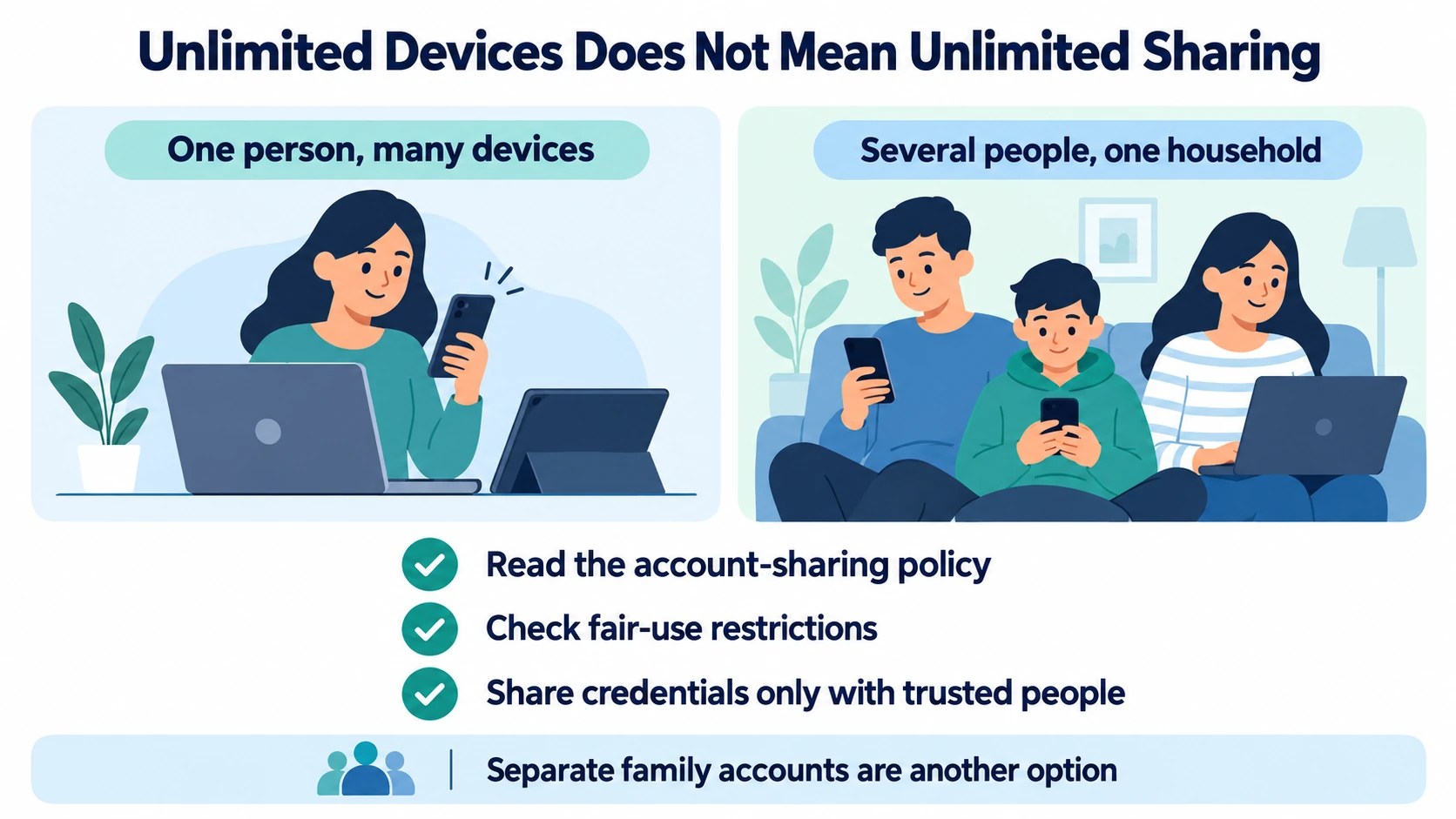
- Explicitly allowed. Surfshark allows family sharing; ExpressVPN describes household sharing; CyberGhost allows friends or family within its 7-device limit. NordVPN says you can share with trusted family or friends within its 10-device limit.
- Personal use only. IPVanish’s Terms of Service prohibit account sharing. PIA’s terms treat resale and non-personal use of its unlimited devices as abuse.
- Separate accounts. Proton’s Duo and Family plans give each person their own account, which keeps logins and settings apart.
- You stay responsible. Whoever owns the account is accountable for how it is used, so share it only with people you trust.
Choosing the best VPN for multiple devices in your household
Start with how many people will use the account, then how many devices, then which TVs and consoles you need to cover.
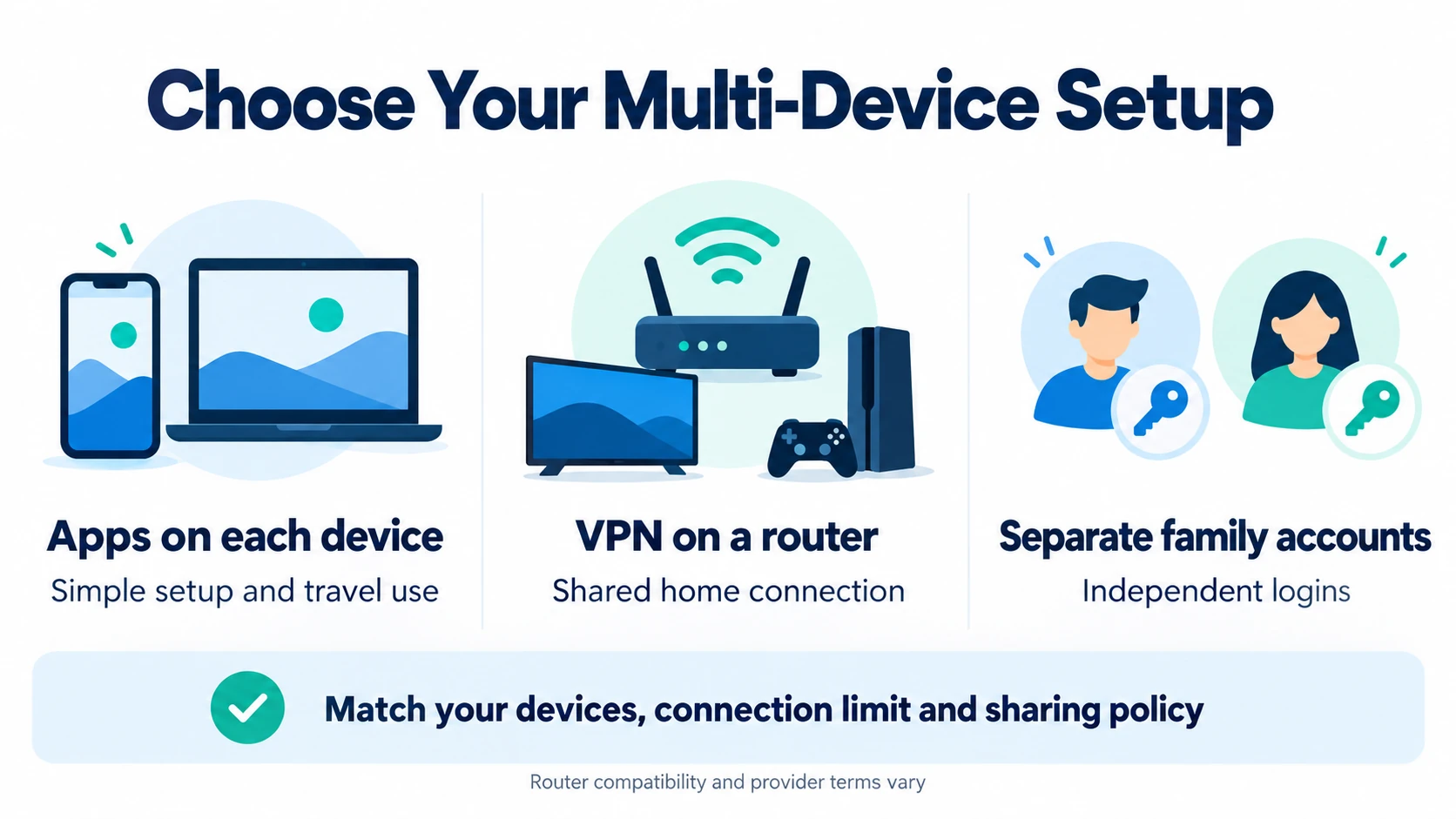
- A family sharing one login: Surfshark, which allows unlimited devices and says family sharing is fine.
- No device cap and a router project: Private Internet Access, with unlimited devices and guides for five router firmware types.
- One person with many devices: IPVanish, with unmetered connections for personal use.
- Apps on most TVs and streaming sticks: ExpressVPN, with 10, 12 or 14 devices depending on the plan.
- Up to 10 devices plus a router later: NordVPN, where a router uses just one slot.
- Separate accounts for each person: Proton’s Duo or Family plans.
If you are torn between the two biggest names, our NordVPN vs Surfshark comparison looks at more than device limits.
Fixing VPN connection limits across multiple devices
If a new device refuses to connect, you have probably used every slot. These steps clear it up on most services.
- Disconnect a device you aren’t using. ExpressVPN and NordVPN both ask you to disconnect a connected device first.
- Wait before reconnecting. NordVPN’s help page says to wait 10 minutes after the limit warning, and not to press Connect repeatedly, which can trigger the wait again.
- Remove old devices from your account. CyberGhost lets you remove connected devices in your online account, and Mullvad shows device names in the app and on its website.
- Consider a compatible VPN router. Devices routed through it share one connection. Check firmware support and setup instructions before buying hardware.
- Contact support if the count looks wrong. ExpressVPN asks you to contact its support team if you see the warning with fewer devices connected than your plan allows.
Related reading:
Frequently Asked Questions
Which VPN is best for multiple devices?
Surfshark and Private Internet Access advertise unlimited simultaneous connections, subject to their fair-use or abuse rules. IPVanish advertises unmetered connections, while its current Terms of Service prohibit allowing other people to access its services through your account. Check the current terms for any plan before sharing credentials. Among capped services, ExpressVPN’s Express Pro plan allows 14 devices, and NordVPN and Proton VPN’s paid plans allow 10.
Can a VPN router protect multiple devices through one connection?
Usually, yes. NordVPN says a router uses only one device slot while protecting every device on the network, and PIA and ExpressVPN describe the devices behind a router as sharing a single VPN connection. Mullvad also says a router lets you go beyond its five-device limit.
Can a family share a VPN across multiple devices?
It depends on the provider. Surfshark explicitly allows family sharing, ExpressVPN describes household sharing, CyberGhost allows friends or family within its seven-device cap, and NordVPN says you can share with trusted family or friends within its ten-device limit. IPVanish prohibits account sharing; PIA treats resale and non-personal use as abuse. Read current terms before sharing credentials.
What happens if I go over the device limit?
As a result, the next device may not connect until a slot is free. Disconnect an active connection or remove an old registered device where your provider offers that option. NordVPN advises waiting 10 minutes after a Session Limit Reached warning. IPVanish’s current Terms of Service prohibit sharing account access with other people, so check the provider’s current rules if you use more than one person’s devices.
Does a VPN for multiple devices slow down with more connections?
Even with an unlimited allowance, speeds are not guaranteed to stay unchanged. Devices in the same home share the available broadband and Wi-Fi capacity, while a VPN router also has processing limits. Surfshark does not impose a bandwidth cap, but network conditions and the server still matter. We did not run speed tests for this guide.
How many devices does NordVPN allow?
Up to 10 devices at the same time on one account. NordVPN adds that devices on the same server need different protocols, and that a router counts as one of the 10 slots while protecting everything connected to it.
How many devices does ExpressVPN allow?
It depends on the plan: 10 devices on Basic, 12 on Advanced and 14 on Express Pro, regardless of device type. For more, ExpressVPN suggests a second subscription, sharing a Windows connection or a VPN router.
Can a VPN for multiple devices protect a smart TV or games console?
Yes, through a VPN router or by sharing the VPN connection from a computer. Surfshark lists smart TVs and consoles without native VPN support as a reason to use a router, and both ExpressVPN and PIA publish steps for sharing a VPN connection from a Windows PC.
Is a family plan better for a VPN for multiple devices?
By contrast, a family plan gives each person their own account. Proton’s Duo covers two accounts and Family covers up to six; each account may connect up to 10 devices. A shared login is simpler; however, it gives everyone the same credentials, and account holders remain responsible for use.
Can a VPN extension protect multiple devices?
Do not assume it does. A browser extension may protect only browser traffic. Use the provider’s device app for broader coverage, or route the device through a compatible VPN router. Check the extension’s current features and connection-count rules.
Can Proton VPN Free protect multiple devices through a router?
Yes. Proton’s router guide says router connections work on Proton Free and count as one connection, regardless of the devices behind the router. For that setup to work, the router needs a supported OpenVPN or WireGuard client. Devices outside that router’s network are not covered by its tunnel.
Does Smart DNS count as an encrypted VPN connection?
No. ExpressVPN describes MediaStreamer as Smart DNS and says it does not encrypt the connection. On a TV or console without a VPN app, use a VPN router or share a computer’s VPN connection when VPN encryption is your goal.
Sources
Device limits, router support and account-sharing rules rechecked on 10 October 2026 (IST) using official provider pages. Other app details were originally checked on 8 October. Plan terms can change; check the linked documentation and checkout terms before purchasing.
Device limits and plans
- ExpressVPN: How many devices can connect at the same time
- ExpressVPN: Available subscriptions
- ExpressVPN: VPN for multiple devices
- IPVanish Help: How many connections IPVanish allows
- IPVanish Help: Limits
- NordVPN Help: How many devices can I use with NordVPN?
- NordVPN Help: What features NordVPN has n
- NordVPN: Can I share my Nord Account?
- NordVPN: Pricing
- PIA Help: How many devices can I use at the same time?
- PIA: Download apps
- Surfshark Help: How many devices can I use with Surfshark?
- Surfshark: VPN for multiple devices
- CyberGhost Help: How many devices can I use at the same time?
- CyberGhost Help: Can I share a CyberGhost account?
- Proton VPN: Plans explained
- Proton VPN: Pricing
- Mullvad: FAQ
- Mullvad: Pricing
Apps, routers and connection sharing
- ExpressVPN: Supported devices and platforms
- ExpressVPN: Router FAQ
- ExpressVPN: Aircove FAQ
- ExpressVPN: Share a VPN connection from Windows
- IPVanish: VPN apps for all devices
- IPVanish: Features
- NordVPN: Download apps
- NordVPN Help: Setting up a router with NordVPN
- NordVPN Help: Session limit reached error
- PIA Help: Using PIA on a router or streaming device
- Surfshark Help: How to set up a router with Surfshark
- Surfshark Help: Router setup guides
- Surfshark Help: Routers that are not supported
- Mullvad: WireGuard on a router
- Proton VPN: Router support, connection counting and limitations
- CyberGhost: Manual router setup with OpenVPN
- IPVanish: Router support
- IPVanish: Terms of Service and account-sharing restriction
Terms and refunds
- ExpressVPN: 30-day money-back guarantee
- ExpressVPN: Refund policy
- NordVPN: Money-back guarantee and free trial
- PIA: Terms of service
- PIA Help: Am I eligible for a refund?
- PIA: Money-back guarantee
- Surfshark: Terms of service (Fair Usage Policy)
- Surfshark Help: Refund policy
- CyberGhost: Money-back guarantee
The Bottom Line
Ultimately, the best VPN for multiple devices depends on two things: how many devices will be connected at once and whether several people will share the login. As of 10 October 2026, Surfshark, Private Internet Access and IPVanish had no device cap, ExpressVPN allowed 10 to 14 devices by plan, and NordVPN allowed 10, with a router counting as one slot.
Practical move:
- CyberGhost: 7 active connections; friends and family can share within that limit.
- ExpressVPN: 10, 12 or 14 devices by plan; household sharing is described.
- IPVanish: unmetered connections, but its current terms prohibit account sharing.
- Mullvad: 5 registered devices; a router can serve more devices on the home network.
- NordVPN: 10 devices; a router uses one slot; sharing with trusted people is allowed.
- Private Internet Access: unlimited connections, with restrictions on resale and non-personal use.
- Proton VPN: 10 devices on paid plans and one on Free; Duo and Family provide separate accounts.
- Surfshark: unlimited devices and family sharing, subject to fair-use terms.
Finally, count your devices and check the sharing rules. Then install the app on each device during the refund window to confirm it covers your household. This article is general information and does not include invented speed or performance results.
Saurabh VPN Expert writes and reviews VPN guides for VPN Expert Guide, covering privacy, streaming, regional access, and device setup. Our articles draw on provider documentation and published product information, with updates when important details change.
Meet our testing team →Last updated: October 14, 2026