
VPN vs VPS: What’s the Difference and Which Do You Need? (2026)
VPN vs VPS is a comparison of two different tools: an encrypted connection and a rented virtual computer. This guide explains what each one is, compares them side by side, shows when you need one, the other or both, and explains how self-hosting a VPN on a VPS really works. Everything is based on official documentation from standards bodies, hosting providers and the VPN projects themselves. No invented test results.
VPN vs VPS: what each one is

Although the two terms differ by one letter, they describe different things and often cause confusion. The NIST glossary definition of a VPN describes a virtual network built on top of existing networks that provides a secure way to send data between them. A VPS is something else entirely: a computer you rent, not a connection you use.
- A VPN is a connection. An app on your device creates an encrypted tunnel to a VPN server, and your traffic travels through it before it reaches the wider internet.
- A VPS is a server. A hosting company splits a powerful physical machine into virtual machines and rents you one, with its own operating system, storage and public IP address.
- They solve different problems. A VPN protects and reroutes traffic from devices you already own. A VPS gives you a place to run software that is online all the time.
- They can work together. Because a VPS is a full server, you can install VPN server software on it and use it as your own private VPN. In other words, that is the overlap most people searching “VPN vs VPS” are curious about.
VPN vs VPS: how the encrypted connection works
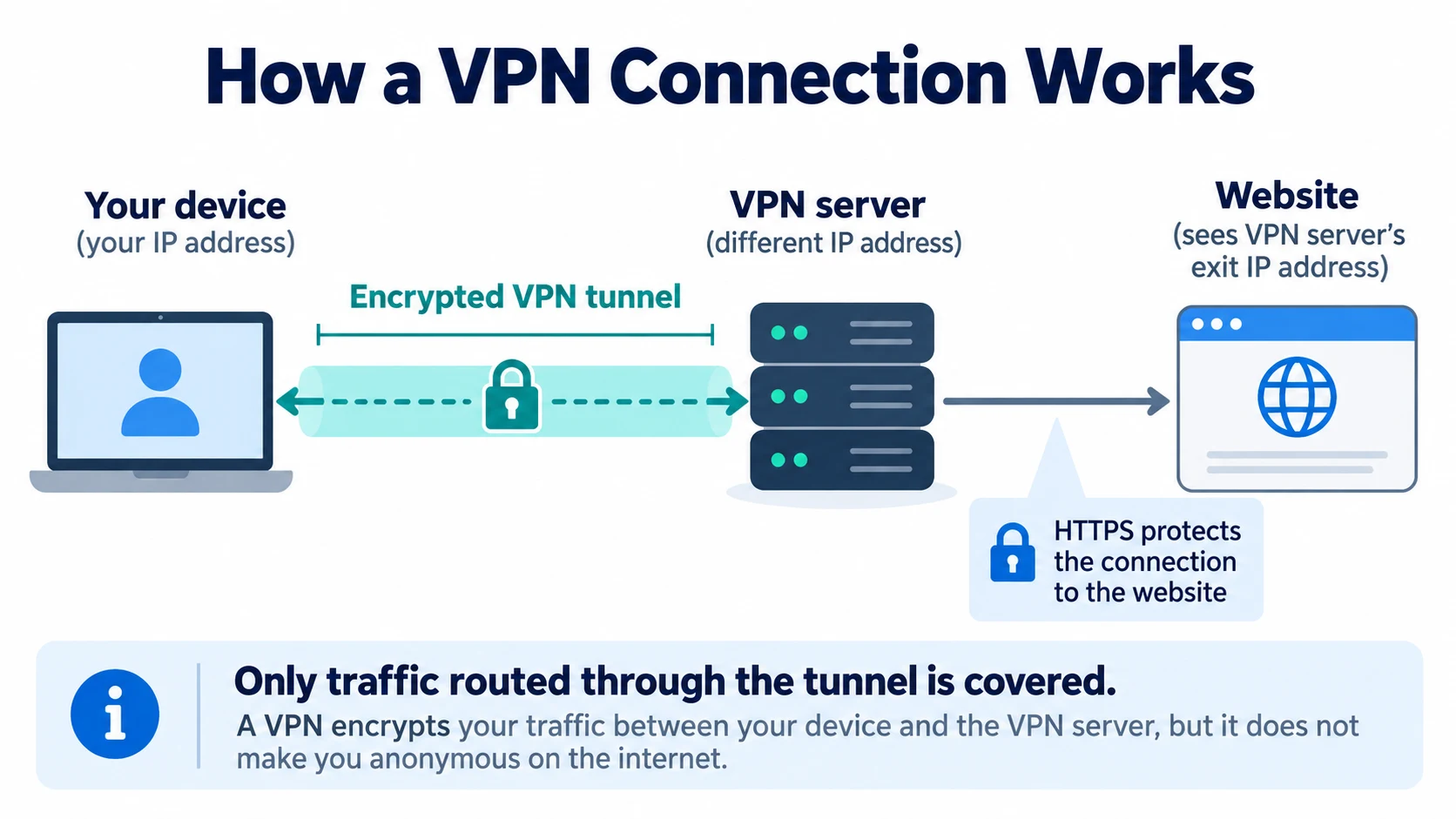
A VPN has two parts: a client app on your device and a server run by the VPN provider. If you want the full background, our guide to what a VPN is and how it works covers the basics in more depth.
- The client encrypts your traffic. The VPN app encrypts traffic routed into the tunnel before it leaves your phone or computer and sends it to the VPN server through a tunnel.
- The server forwards it. The VPN server decrypts the traffic and sends it on to the website or service, then passes the replies back to you through the tunnel.
- Websites see the server’s IP address. Your internet provider and the Wi-Fi network you use see encrypted traffic going to the VPN server, while sites see the server’s address instead of yours.
- Protocols do the heavy lifting. Common VPN protocols include WireGuard, OpenVPN and IKEv2/IPsec. They define how the encryption and the connection work.
With a commercial VPN, the provider runs all of this for you: the servers in different countries, the apps, the updates and the support. Your trust moves from your internet provider to the VPN company, which is why its logging policy matters.
VPN vs VPS: how the virtual server works
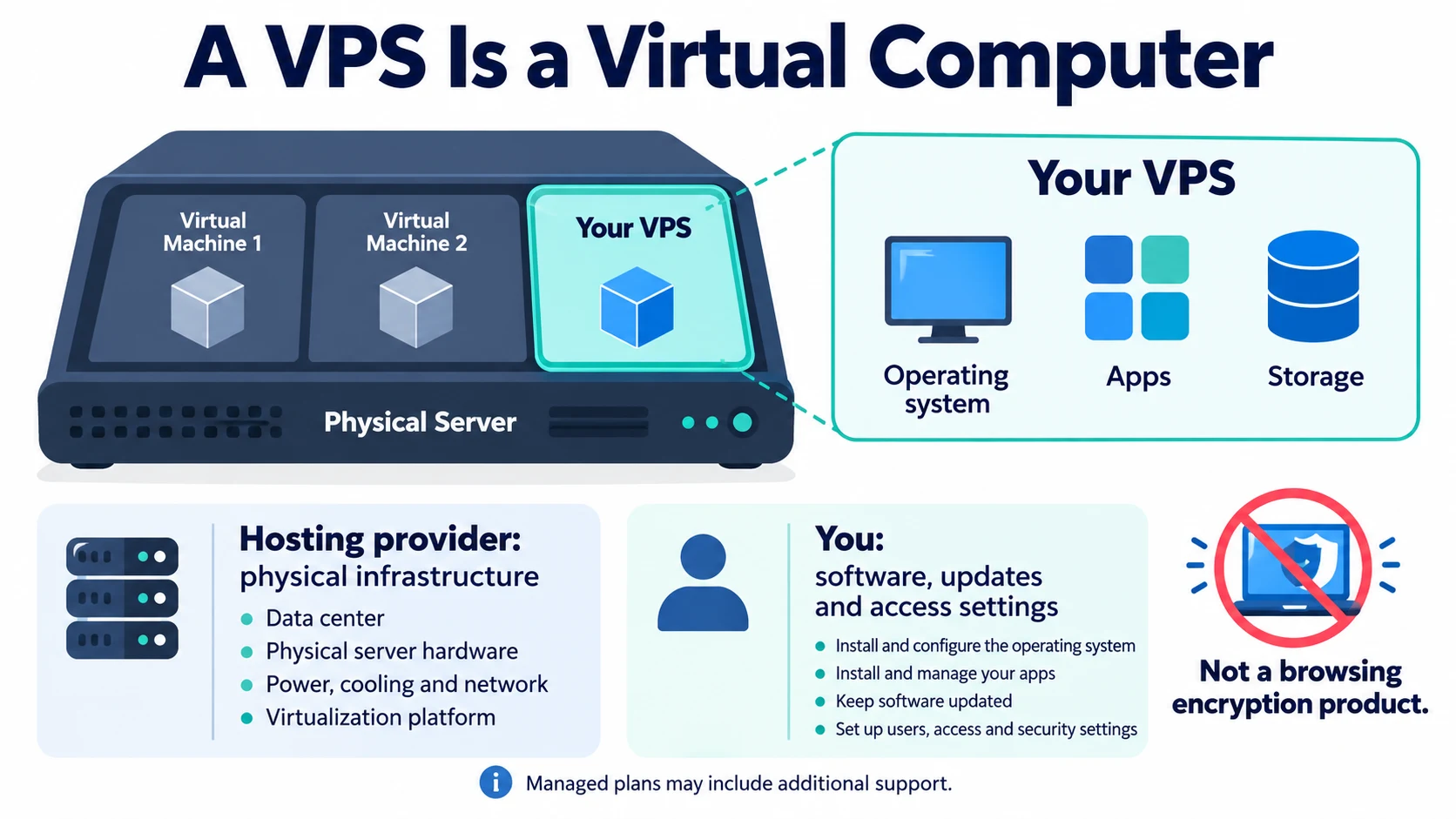
By comparison, a VPS is a slice of a physical server that behaves like a separate machine. The AWS explainer on virtual private servers describes it as virtual because it uses only a portion of the underlying hardware, while you still get access to your own dedicated resources on it.
- It runs what you install. Hosting providers pitch VPS plans for websites, web apps, databases and test environments. Amazon Lightsail calls its instances virtual private servers, and DigitalOcean provides VPS hosting through Droplets, its Linux-based virtual machines.
- You manage the software. AWS’s shared responsibility model says the customer looks after the guest operating system, including updates and security patches, plus the firewall configuration. Unless you pay for managed hosting, the same applies to most VPS plans.
- It lives in one place. First, you choose a region when you create the server, and it stays there. Hosting providers publish their available regions in their current location directories. Therefore, moving to another location means creating another server.
- It has its own public IP address. On Lightsail, the default public IP changes every time you stop and restart the instance, so you attach a static IP if you need a fixed address.
- Data transfer is part of the plan. Every Lightsail plan includes a data transfer allowance, with both incoming and outgoing traffic counted, and DigitalOcean plans include an allowance of free outbound transfer. Going over can cost extra.
VPN vs VPS at a glance
This VPN vs VPS table compares a commercial VPN service, a plain VPS and a VPN you host yourself on a VPS. In other words, it summarises how each one works rather than ranking them.
Responsibilities and features compared
| Question | VPN service (commercial) | VPS (virtual private server) | Your own VPN on a VPS |
|---|---|---|---|
| What it is | An encrypted connection from your device to a provider’s VPN server | A rented virtual machine you control | VPN server software you install on a rented VPS |
| Main job | Protect your traffic on untrusted networks and change the IP address sites see | Run websites, apps, databases or other software | Provide an endpoint for you and invited users |
| Encrypts your browsing? | Yes, for traffic routed through the tunnel between your device and the server | No, not on its own. It only does so if you install VPN software on it | Yes, between your devices and your server |
| Who runs it | The VPN provider runs the servers and apps | You manage the operating system, updates and security; the host runs the hardware | You, including updates, firewall and keys |
| Server locations | Usually many countries, switchable in the app | One chosen region per server | One location per server; another location means another server |
| IP address sites see | The VPN server’s address, usually shared with other customers unless you buy a dedicated IP | The server’s own public IP (for things you host on it) | Your server’s IP, tied to your hosting account |
| Who you trust | The VPN provider and its logging policy | The hosting company | The hosting company, plus your own setup skills |
| Data and billing | A subscription, with terms set by the provider | A plan that includes a data transfer allowance; extra transfer can cost more | Same as a VPS: VPN traffic counts toward the server’s transfer allowance |
| Setup effort | Install an app and sign in | Choose a plan, create the server and configure it yourself | Moderate: tools like Outline and Algo automate much of it |
Reading the comparison
On narrow screens, scroll sideways to see every column.
Therefore, the VPN vs VPS decision comes down to responsibility. A commercial VPN is a finished service, while a VPS is raw infrastructure. However, a self-hosted VPN gives you control of the server, but every job the VPN company would normally do, from patching to choosing locations, becomes yours.
VPN vs VPS: when you need one or both
Start with the problem you want to solve rather than the technology. These are the common cases.
- You need a VPN if you want to protect your traffic on public Wi-Fi, keep your browsing hidden from your internet provider, or appear to connect from another country while traveling. A commercial VPN app does this with the least effort.
- You need a VPS if you want to host a website, run a web app or database, keep a bot or small game server online, or build a test environment. A VPN can’t do any of those things.
- You might want both if you run a VPS and want a stable address to allowlist for admin access. Our guide to whether a dedicated IP VPN is worth it explains when a fixed VPN address helps with allowlists like this.
- You might want a VPN on a VPS if you are comfortable with Linux, want a private endpoint that no one else shares, and accept that you’ll maintain it. The next sections explain how that works.
VPN vs VPS: self-hosting explained
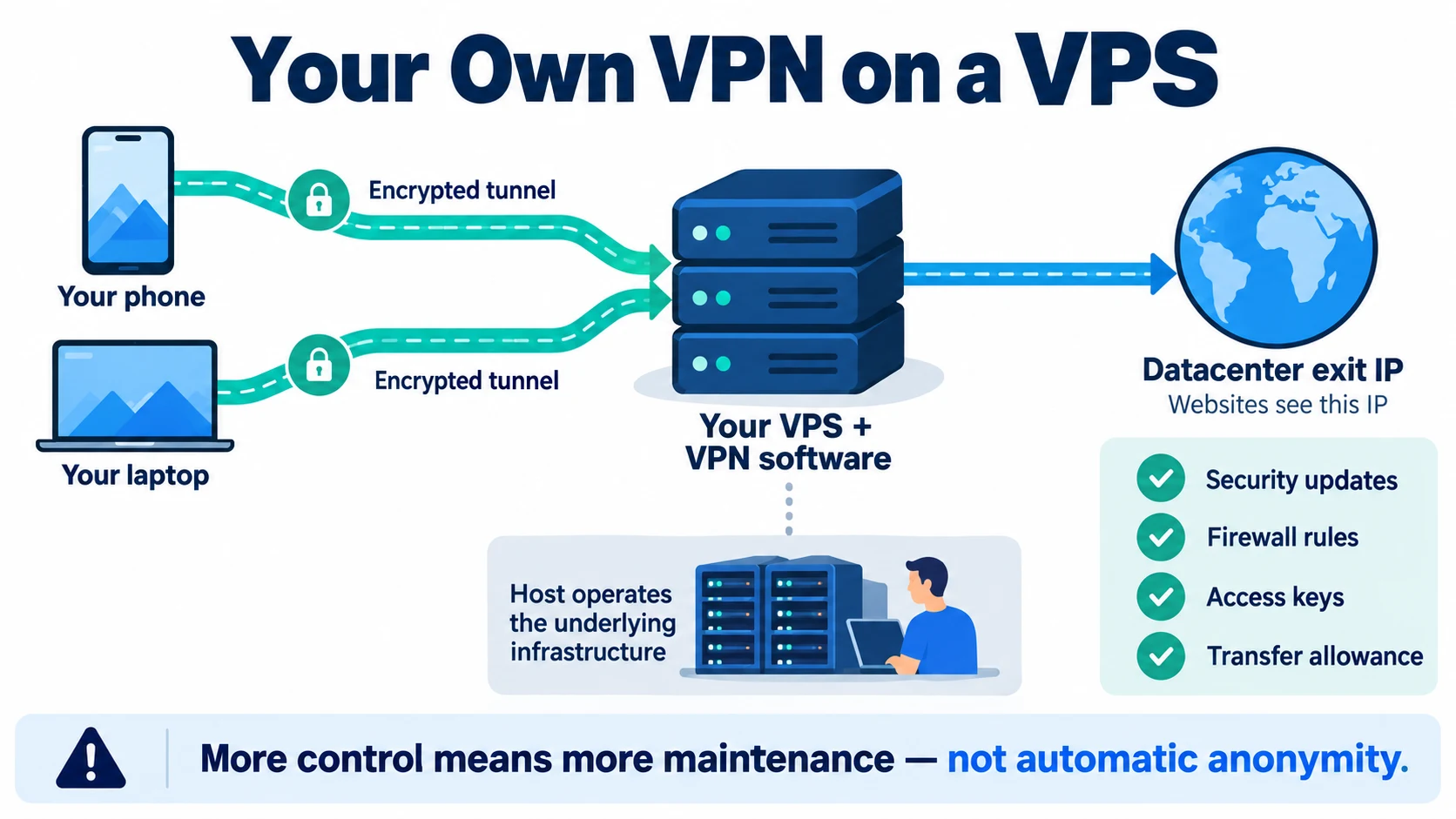
Yes. Because a VPS is a full server, you can install VPN server software on it and connect your devices to it with a VPN app. Several of the tools below use WireGuard, and our explainer on the WireGuard protocol covers how it works. These are four well-documented ways to do it, from the most manual to the most automated.
- WireGuard, set up by hand. WireGuard describes itself as a simple, fast and modern VPN. You generate key pairs, configure the server interface and add each device as a peer. Official WireGuard apps are listed for Windows, macOS, Android and iOS, and DigitalOcean’s tutorial shows the extra step of enabling IP forwarding so traffic can reach the internet through the server.
- OpenVPN. OpenVPN calls itself a full-featured SSL VPN that uses certificates and supports many client authentication methods. The open-source community edition is configured by hand. The commercial OpenVPN Access Server is free for up to two connections, and DigitalOcean offers it as a 1-Click App.
Tools that automate deployment
- Outline. Outline lets you create a VPN server from its Outline Manager desktop app on cloud providers such as DigitalOcean, AWS or Google Cloud, or on your own Linux server. You then share access keys with your devices or people you trust. Outline is open source, says it is designed to resist blocking, and lists security audits by Radically Open Security and Cure53.
- Algo. Algo VPN from Trail of Bits is a set of Ansible scripts that sets up a personal WireGuard and IPsec VPN on providers including DigitalOcean, Amazon Lightsail, Amazon EC2, Vultr, Microsoft Azure, Google Compute Engine, Hetzner Cloud and Linode. It generates WireGuard config files and QR codes for your devices.
Whichever route you choose, the result is the same: a VPN with one server in one location, run by you. In contrast, that is very different from a commercial VPN app, and it’s worth knowing the trade-offs before you start.
How self-hosting a VPN on a VPS works, step by step
This is an overview of the process, not a full tutorial. Follow the official guide for the tool you pick, because commands and options change between versions.
- Pick a hosting provider and a region. Choose a provider your tool supports and a region close to where you want your traffic to appear. Check the plan’s data transfer allowance, because all your VPN traffic passes through the server.
- Create the server and lock down access. Most guides start from a fresh Ubuntu LTS server. Restrict SSH so only your own IP address can reach it; Lightsail’s firewall guide gives exactly this example for port 22.
- Install the VPN server. Run Algo or Outline Manager to set everything up, or follow a WireGuard or OpenVPN guide by hand. In addition, a manual setup needs IP forwarding and firewall rules so client traffic can reach the internet.
- Connect your devices. Import the configuration file or scan the QR code in the WireGuard app, or use the Outline Client or OpenVPN client, depending on the tool.
- Check it and keep it updated. Confirm that websites see your server’s IP address and that DNS isn’t leaking, then keep the server patched. Algo turns on automatic security updates by default, but you still own the server.
VPN vs VPS: self-hosting trade-offs
Running your own VPN on a VPS gives you control, but it isn’t a privacy upgrade by default. These are the points that matter most.
- Privacy works differently. Your traffic leaves from an IP address that only you use and that is linked to your hosting account and billing details, so it doesn’t blend in with other users. Algo’s FAQ says plainly that its goal is confidentiality of network traffic, not anonymity, and its README says it doesn’t claim to provide anonymity or censorship avoidance.
- You trust the host instead of a VPN company. The hosting company runs the hardware and network your server sits on. However, a self-hosted VPN removes the VPN provider from the picture, not the need to trust someone.
- One server, one location. A commercial VPN app lets you switch between countries in seconds. With your own VPS you get one region per server, and every extra location is another server to pay for and maintain.
- Maintenance is your job. Algo’s developers say that once your server is deployed it is yours to maintain, and they have no access to it. Similarly, the same applies to any self-hosted setup: security updates, keys and firewall rules are up to you.
- Streaming is hit and miss. Netflix’s help page says VPN apps can make your device look like it is connecting from somewhere else and cause its “VPN or proxy” error. With a single server IP, you have no other address to try if a service blocks it.
- Features are basic. Commercial VPN apps often include extras such as a kill switch, split tunneling and many server locations. A self-hosted server gives you the tunnel, and anything else depends on the client app and your own configuration.
VPN vs VPS: choosing by your goal

Most people asking “VPN or VPS?” either want privacy for everyday browsing or want somewhere to host a project. Match your goal to the right tool.
- Everyday privacy on public Wi-Fi and from your ISP: a commercial VPN. It is the simplest option and includes apps, locations and maintenance.
- Hosting a website, app, bot or game server: a VPS. A VPN can’t host anything for you.
- A private VPN endpoint that only you use, for secure Wi-Fi and a consistent IP: a self-hosted VPN on a VPS, if you’re happy to maintain a Linux server.
- Getting around censorship: look at tools built for it. Outline says it is designed to resist blocking, while Algo says it isn’t built for censorship avoidance.
- Anonymity: neither a VPS nor a VPN makes you anonymous on its own. Our guide to the difference between a VPN and Tor explains where Tor fits.
Related reading:
Frequently Asked Questions
Is a VPS the same as a VPN?
No. A VPS is a virtual private server, a rented virtual machine that runs whatever software you install, such as a website or an app. A VPN is an encrypted connection that carries your device’s traffic to a VPN server. In other words, they share letters, not a purpose, although you can turn a VPS into a VPN server by installing VPN software on it.
Can I use a VPS as a VPN?
Yes. You can install VPN server software such as WireGuard or OpenVPN on a VPS, or use a tool like Outline or Algo to set it up for you, then connect your devices with a VPN app. Therefore, you become the VPN operator, so you are responsible for the server’s security updates, firewall and keys.
Is a self-hosted VPN more private than a commercial VPN?
Not automatically. You no longer trust a VPN company, but you now trust the hosting company, and your traffic leaves from a single IP address that only you use and that is tied to your hosting account. Specifically, Algo’s own documentation says its goal is confidentiality, not anonymity. A self-hosted VPN is good for securing public Wi-Fi and for privacy from your internet provider, not for blending in with other users.
Do I need a VPN to connect to my VPS?
Usually not. Administrative connections over SSH are already encrypted, as OpenSSH’s documentation says. What matters more is limiting who can reach the server: Amazon Lightsail’s firewall guide, for example, suggests allowing SSH only from the IP address of the computer that needs it. Some people add a VPN or a dedicated VPN IP to make that allowlist easier to manage.
Does a VPS hide my IP address?
Only if you route your traffic through it. However, renting a VPS doesn’t change the IP address your phone or laptop uses to browse. If you install a VPN on the VPS and connect to it, websites see the server’s IP instead of yours, but that IP belongs to a data center and is linked to your hosting account.
Is a VPN on a VPS good for streaming?
It is a gamble. Netflix, for example, shows a ‘You seem to be using a VPN or proxy’ error when it detects one, and says VPNs aren’t supported for live events or on its ad-supported plans. With a self-hosted server you have one IP address, so if a service blocks it you can’t simply switch to another server as you can in a commercial VPN app.
Is a VPN or a VPS easier to set up?
A commercial VPN is easier: you install an app, sign in and connect. By comparison, a VPS needs you to pick a plan and region, create the server and configure it. Self-hosting a VPN on a VPS sits in between if you use a tool such as Outline Manager or Algo, which automate most of the server setup.
Which costs more, a VPN or a VPS?
It depends on the plan, and prices change often, so we don’t quote them here. Keep in mind that a VPS bill is based on the server plan and its data transfer allowance, and VPN traffic passes through the server, so heavy use can use up the allowance. A commercial VPN subscription covers the servers, apps and maintenance for you.
Sources
Official documentation and project pages checked on 8 October 2026 (IST). They support the explanations, table and FAQs above.
Definitions and standards
- NIST Computer Security Resource Center glossary: virtual private network (VPN)
- NIST Computer Security Resource Center glossary: virtual machine (VM)
- AWS: What is a VPN (virtual private network)?
- AWS: What is a VPS (virtual private server)?
- AWS: Shared Responsibility Model
VPS hosting documentation
- Amazon Lightsail User Guide: What is Amazon Lightsail?
- Amazon Lightsail FAQs (instances, static IPs and data transfer allowances)
- Amazon Lightsail User Guide: Create and attach a static IP
- Amazon Lightsail User Guide: Control instance traffic with firewalls
- DigitalOcean Docs: Droplets
- DigitalOcean: VPS hosting
- DigitalOcean Docs: Bandwidth billing
- DigitalOcean Docs: Regional availability
Self-hosted VPN software
- WireGuard: official project site
- WireGuard: Quick Start
- WireGuard: Installation (clients for each platform)
- DigitalOcean tutorial: How to set up WireGuard on Ubuntu 22.04
- OpenVPN: Community 2.x How-To
- OpenVPN Access Server: pricing and free tier
- DigitalOcean Marketplace: OpenVPN Access Server 1-Click App
- Outline: official site
- Outline: Get started (Outline Manager and Client)
- Algo VPN on GitHub (Trail of Bits)
- Algo VPN FAQ on GitHub
- OpenSSH: project home page
Streaming services
The Bottom Line
A VPN is a connection that protects and reroutes your traffic. A VPS is a rented virtual server that runs software you choose. They answer different questions: “how do I keep my browsing private?” versus “where do I host my project?”
Practical move:
- Want privacy with no maintenance: use a commercial VPN app.
- Want to host something: rent a VPS and keep its operating system patched.
- Want your own VPN endpoint: run WireGuard, OpenVPN, Outline or Algo on a VPS, and accept one location, one IP tied to your account and the upkeep.
- Watch the data allowance: VPN traffic flows through the server, so check how your host counts transfer before you rely on it.
Hosting plans, VPN tools and their features change over time, so check the official pages linked in Sources before you decide. This article is general information based on official documentation, and does not include invented test results or prices.
Saurabh VPN Expert writes and reviews VPN guides for VPN Expert Guide, covering privacy, streaming, regional access, and device setup. Our articles draw on provider documentation and published product information, with updates when important details change.
Meet our testing team →Last updated: October 10, 2026