
Best VPN for Qatar in 2026: Privacy, Calls, Streaming & Travel
Which VPNs genuinely work in Qatar, for reaching home content, keeping internet calls stable, and staying private on a filtered network. An honest, no-hype guide with zero fabricated benchmarks.
Why people in Qatar use a VPN
Qatar has fast internet, widespread mobile use, busy public WiFi, and a large expat population that wants privacy and stable access to everyday services. Before the rankings, here is what a VPN actually does for people living in or visiting Qatar.
If you also compare VPNs by country, see our USA VPN and UK VPN guides for privacy and travel use cases.
- Access home streaming and content. Expats and travellers often want the shows, sport, and news from their home country, which are geo-locked away when you are abroad. A VPN gives your devices an IP in your home region, so the services you already pay for keep working as if you never left, which is one of the most common everyday reasons people here install one.
- Voice and video calls over the internet. Some internet calling has historically been restricted or unreliable on local networks, which matters when your family is in another country. Routing calls through a VPN can restore a stable connection for staying in touch, though reliability varies by network and app, so it is worth testing during a refund window rather than assuming.
- Privacy on shared and public networks. Whether on hotel wifi, a compound network, or mobile data, a VPN encrypts everything your device sends so the connection cannot be read by others on the same network. For people handling work and personal accounts on the move, that everyday encryption is a genuine and low-effort security upgrade.
- A stable, private work connection. Remote workers and business travellers use a VPN to secure sensitive logins and, where allowed, to reach tools and services from home. Combined with a provider that offers obfuscation, it helps maintain a dependable connection on networks that otherwise interfere, which keeps work moving without drama.
VPNs, internet calls, and staying in touch

For many people in Qatar the deciding factor is whether they can reliably video-call family back home. A VPN can help, with some honest caveats worth understanding.
- Why calls can be unreliable. Some internet calling services have faced restrictions or throttling on local networks, which can make a video call to family drop or stutter. This is the specific frustration a VPN is meant to solve, by routing your call traffic through a server where it is not being interfered with, so the connection behaves normally again.
- How a VPN restores them. By encrypting and rerouting your traffic, a VPN hides which app you are using, so a network cannot single out and limit a specific calling service. Connecting to a nearby server before you start the call usually gives the best result, keeping latency low enough for smooth voice and video rather than a laggy, broken connection.
- Reliability varies, so test it. Whether a VPN improves calls depends on your network, the app, and the server you pick, so treat it as something to confirm rather than a guarantee. Use the money-back window to try voice and video calls on a couple of servers, and keep the one that gives the clearest, most stable connection for your situation.
- Obfuscation helps most here. On networks that actively interfere with VPNs, a provider with obfuscation, which disguises VPN traffic as ordinary browsing, connects more dependably than one without. This is why the top picks that offer obfuscation tend to be the safest bet for keeping calls working in a filtered environment.
Is using a VPN legal in Qatar?

This is the question that worries most people, and the honest answer is nuanced rather than a simple yes or no.
- VPNs are widely used, but the law is nuanced. Using a VPN for legitimate privacy and security is common in Qatar, and reputable providers operate normally, but the legal environment treats the tool by how it is used rather than granting a blanket right. Read the situation as a grey area, not a green light, and behave accordingly.
- The activity matters more than the tool. A VPN does not make anything that is illegal locally acceptable, and using one to access prohibited content or services can carry real penalties regardless of the encryption. The safe approach is to use a VPN for privacy, home content, and calls, and never as cover for activity that breaks local law.
- Respect service terms too. Streaming platforms have their own rules about regional access, which govern your account separately from any law. Staying within both local law and each service’s terms keeps your access smooth and your accounts in good standing, and avoids problems that have nothing to do with the VPN itself.
- When in doubt, be cautious. Because rules can change and enforcement varies, treat region-hopping and sensitive access carefully, and favour a reputable audited provider over a free or unknown app. If you are ever unsure whether something is allowed, the responsible choice is to err on the side of caution rather than risk it.
Getting a stable connection on a filtered network

The single biggest difference between a VPN that works well in Qatar and one that frustrates you is whether it can connect reliably on a network that interferes with VPNs.
- What obfuscation does. Obfuscation disguises your VPN traffic so it looks like ordinary secure web browsing, which lets it slip through networks that try to detect and block VPNs. On a filtered connection this is the feature that decides whether you get a stable tunnel or a connection that keeps dropping, so it matters more here than raw speed.
- Which providers do it best. NordVPN and Surfshark offer dedicated obfuscation modes, and ExpressVPN applies it automatically when needed, which is why those three tend to be the most dependable in a filtered environment. Providers that lean less on obfuscation can still work on moderate networks, but they are a bigger gamble where interference is heavy.
- Pick a nearby server first. Once you have obfuscation sorted, the closest uncongested server usually gives the best mix of stability and speed, so start local and only move if a node struggles. A Middle Eastern or European location is the natural default, keeping latency sensible for streaming and calls alike.
- Keep the kill switch on. On a network that interferes with VPNs, the tunnel can drop more often, and a kill switch stops your real connection being exposed during a reconnect. Leaving it on turns an occasionally flaky connection into a safe one, which matters most when privacy is the whole reason you are using a VPN.
Streaming your home content in Qatar
Reaching home libraries is one of the top reasons expats and travellers install a VPN in Qatar. A few habits make it reliable rather than hit and miss.
- Connect to your home country server. To test a home library, pick a server in that country before you open the app. Availability still depends on your account, location rules, and the streaming service, so use the refund window to test your own services instead of assuming every app will work.
- Switch servers on a proxy error. Streaming services block specific VPN server addresses, so if one is flagged, moving to another server in the same country usually clears the block right away. There is no need to give up after a single error, because the next server along often works, so treat a warning as a prompt to hop rather than a dead end.
- Use a nearby, uncongested server for quality. High-resolution video needs steady bandwidth, so a server that is close and not overloaded keeps the picture sharp and the buffering away. A distant or busy node is the usual cause of a stuttering stream, and moving to a quieter one fixes it more often than not.
- Try streaming-optimised servers. Providers like CyberGhost label servers for specific services, and those are tuned and maintained to keep working against detection, which saves you trial and error. When a provider offers them, reaching for a labelled server first is the low-effort route to a stream that just plays.
Privacy and everyday security
Beyond access, a VPN is a straightforward way to keep your everyday activity private on the varied networks you use across Qatar.
- Encryption on every network. Compound wifi, hotel connections, cafes, and mobile data all carry your traffic, and a VPN wraps it in strong encryption so none of them can read your logins, messages, or activity. For people who handle work and personal accounts on the move, that consistent protection is a real and low-effort upgrade.
- A no-logs provider matters. A VPN only protects you if it does not keep its own records, so favour a provider whose no-logs policy has been checked in an independent audit rather than simply claimed. Several of our picks have been through exactly that kind of review, which is part of why they rank where they do.
- Jurisdiction is part of privacy. Where a provider is legally based affects how exposed your data is, so a company headquartered offshore with an audited policy gives your information a friendlier legal home. It is a factor worth weighting alongside speed, especially if privacy is your main reason for using a VPN.
- Encrypted DNS closes a gap. Using your provider’s private or encrypted DNS stops the requests that reveal which sites you visit from leaking outside the tunnel. It is a small setting most people never touch, but it meaningfully tightens the privacy a VPN gives you on any network.
Server choice and speed in the region

Which server you pick shapes both your speed and how reliably you can stream or call, so it is worth getting right for the region.
- Nearby servers are faster. A Middle Eastern or nearby European location keeps latency low and preserves more of your bandwidth, which matters for smooth streaming and clear calls. Start with the closest uncongested server and only reach further when a specific home library requires a particular country.
- Match the server to the task. For home content, connect to your home country; for privacy and speed, connect nearby; for calls, a close server usually works best. Thinking about what you actually want before you connect avoids the common mistake of sitting on a distant server that adds lag for no reason.
- Larger networks help. A provider with many servers gives you more nearby alternatives when one is busy at peak hours, which is a genuine advantage in a region where everyone comes online in the evening. The ability to hop to a quieter node is often what separates a smooth experience from a frustrating one.
- Modern protocols reduce the cost. A WireGuard-based option such as NordLynx or Lightway adds far less overhead than older protocols, so the speed you lose to the VPN is small on a good provider. If a connection feels heavy, check the protocol first, because that single setting is the most common self-inflicted slowdown.
The 5 best VPNs for Qatar in 2026
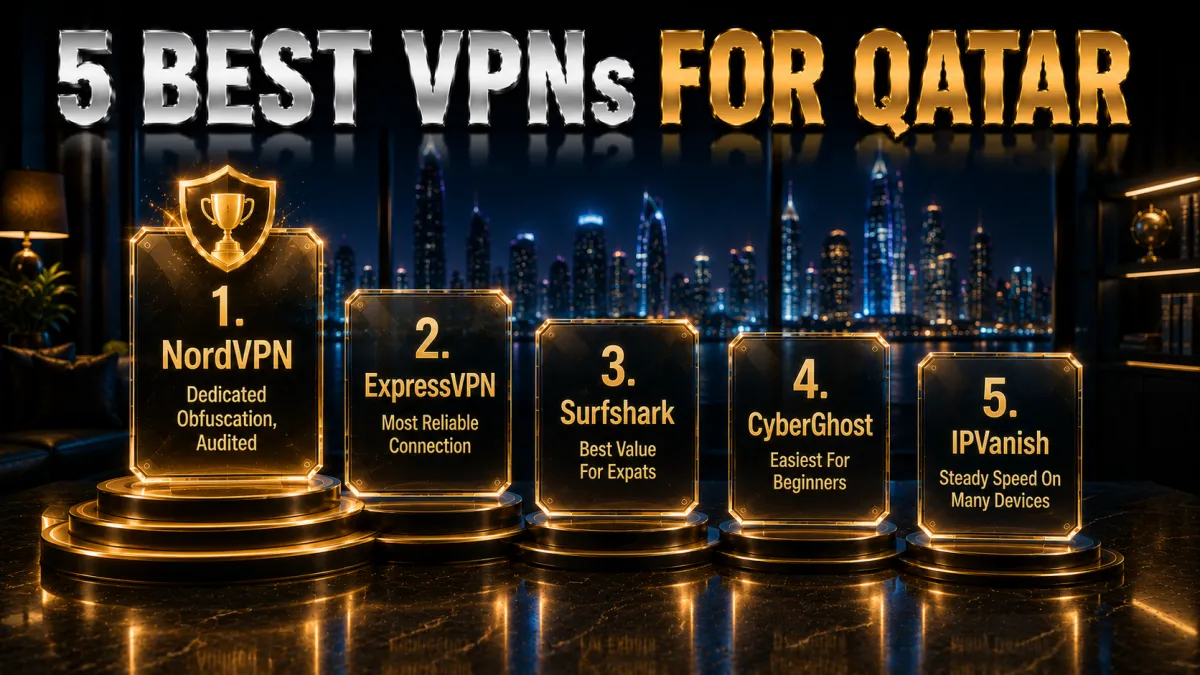
Now that the context is clear, here are the five providers that best balance reliable access on filtered networks, nearby speed, and honest privacy credentials for Qatar. Ratings reflect our established review framework, not one-off benchmarks.
1. NordVPN, best all-round for Qatar
NordVPN is our top choice in Qatar because it combines reliable access with genuine privacy. It offers obfuscated servers that disguise VPN traffic as ordinary secure browsing, which helps it connect on filtered networks where a plain VPN can struggle, and a large network with nearby Middle Eastern and European locations keeps speeds high for streaming and calls. NordLynx, its WireGuard-based protocol, adds very little overhead.
For an expat or traveller in Qatar the value is broad. It reliably reaches home streaming libraries, supports voice and video calls over the internet, and Threat Protection blocks ads and malicious domains at the system level. A kill switch keeps your real IP from leaking if the tunnel drops, and one subscription covers ten devices, enough for a phone, laptop, and tablet at once.
On trust it is the strongest here, with an independently audited no-logs policy, RAM-only servers, and a Panama base outside the major surveillance alliances, behind a 30-day money-back guarantee. As always in the region, use a VPN responsibly and within local law, and treat the refund window as your chance to confirm it connects dependably on your own network.
✔ Pros
- Obfuscated servers for filtered networks
- Nearby Middle East and Europe locations
- Reliable streaming and calls
- Threat Protection and kill switch
- Audited no-logs, ten devices
✘ Cons
- Best price needs a longer plan
- A few more settings than minimalists want
| Obfuscation | Yes, dedicated servers |
| Fastest protocol | NordLynx (WireGuard) |
| Kill switch | Yes |
| Streaming | Excellent |
| Simultaneous devices | 10 |
| Money-back guarantee | 30 days |
2. ExpressVPN, most reliable connection
ExpressVPN is the smoothest option for users who want something that simply connects and stays connected in Qatar. Its apps apply obfuscation automatically when a network needs it, so you rarely have to change a setting, and its Lightway protocol reconnects quickly and holds steady as you move between wifi and mobile data. For a less technical user, it is the easiest to set up and forget.
It is also one of the most dependable for reaching home streaming services and for voice and video calls, holding up well at busy hours. Network Lock, its kill switch, and split tunnelling are all present, and the apps run on everything from a phone to a router, so you can protect the whole household from one connection if you prefer.
On trust it is hard to fault, with RAM-only TrustedServer infrastructure and a British Virgin Islands base outside intelligence-sharing alliances, backed by a long, tested no-logs record. It is the priciest pick and covers eight devices, but a 30-day money-back guarantee lets you confirm it connects reliably on your specific network before you commit. Use it within local law.
✔ Pros
- Automatic obfuscation, no fiddling
- Lightway reconnects fast
- Reliable streaming and calls
- Network Lock kill switch
- RAM-only servers, strong audits
✘ Cons
- Costs more than most rivals
- Fewer devices than the value picks
| Obfuscation | Automatic |
| Fastest protocol | Lightway |
| Kill switch | Network Lock |
| Streaming | Excellent |
| Simultaneous devices | 8 |
| Money-back guarantee | 30 days |
3. Surfshark, best value for expats
Surfshark is the best value in Qatar because one subscription covers unlimited devices, so an expat household can protect every phone, laptop, and tablet for a single low price. It offers a Camouflage obfuscation mode that disguises VPN traffic to help it get through filtering, and WireGuard keeps connections quick for streaming and calls across its Middle East and Europe servers.
The feature set is generous for the money. CleanWeb strips ads and blocks known malicious domains, a kill switch guards against leaks, and rotating IP and multi-hop options add margin for the privacy-minded. It reliably reaches the main home streaming services, so a family can watch on different screens at once without buying multiple plans.
The company is based in the Netherlands with an independently audited no-logs policy, outside the Five Eyes, which is a genuine plus. Its network is not the very largest, so an occasional server switch helps, but the mix of unlimited devices, obfuscation, and the lowest long-term price of the five is hard to beat, backed by a 30-day money-back guarantee. Use it responsibly and within local law.
✔ Pros
- Unlimited devices on one plan
- Camouflage obfuscation mode
- CleanWeb blocks ads and malware
- Netherlands base, outside Five Eyes
- Lowest long-term price of the five
✘ Cons
- Smaller network than the top two
- Occasional server switching needed
| Obfuscation | Camouflage mode |
| Fastest protocol | WireGuard |
| Kill switch | Yes |
| Streaming | Very good |
| Simultaneous devices | Unlimited |
| Money-back guarantee | 30 days |
4. CyberGhost, easiest for beginners
CyberGhost is the friendliest entry point for a first-time user in Qatar. Its apps label servers by purpose, including streaming-optimised locations, so you tap what you want and connect without decoding a list, and a very large network gives you plenty of nearby options. For someone installing their first VPN, that guidance removes almost all of the guesswork.
Behind the simple interface the fundamentals are sound. It runs WireGuard for efficient speed, includes a kill switch and DNS-leak protection, and is based in Romania, which has no mandatory data-retention law, behind a strict no-logs policy with optional in-house NoSpy servers. It reliably unblocks major home streaming services, which is a common reason expats want a VPN here.
The honest caveats are that CyberGhost leans less on dedicated obfuscation than the top picks, so on the most aggressively filtered networks it may connect less reliably, and that access is a privilege controlled by local rules. Its standout is the trial: a 45-day money-back guarantee, the longest here, giving you weeks to confirm it works on your own network before paying. Use it within local law.
✔ Pros
- Servers labelled by purpose
- Very large nearby network
- Reliable home streaming
- Longest 45-day money-back window
- Romania base, no data-retention law
✘ Cons
- Less obfuscation than the top picks
- Slower under heavy peak load
| Obfuscation | Limited |
| Fastest protocol | WireGuard |
| Kill switch | Yes |
| Streaming | Good, labelled |
| Simultaneous devices | 7 |
| Money-back guarantee | 45 days |
5. IPVanish, steady speed on many devices
IPVanish owns and operates its own server network, which gives it steady, predictable speed and tight control over routing, and it allows unlimited simultaneous connections so every device in an expat home can run on one account. For users who value fast, no-nonsense performance over a long list of extras, it delivers the essentials reliably across its network.
The apps are straightforward and functional, with WireGuard, a kill switch, and split tunnelling. It handles everyday privacy and access well once connected, and its self-owned infrastructure means your traffic is not passing through a third-party middleman, which some privacy-minded users prefer even if they never think about it.
There are two honest caveats to weigh in Qatar. IPVanish does not emphasise dedicated obfuscation, so on heavily filtered networks it may connect less reliably than the top picks, and it is based in the United States inside the Five and Nine Eyes alliances, which the privacy-focused will want to factor in. An audited no-logs policy and a 30-day money-back guarantee help, and as always, use a VPN responsibly and within local law.
✔ Pros
- Owns its network for steady speed
- Unlimited simultaneous devices
- WireGuard and split tunnelling
- Simple, uncluttered apps
- Strong long-term value
✘ Cons
- Less obfuscation than the top picks
- US-based, inside the 9 Eyes alliance
| Obfuscation | Limited |
| Fastest protocol | WireGuard |
| Kill switch | Yes |
| Streaming | Good |
| Simultaneous devices | Unlimited |
| Money-back guarantee | 30 days |
Qatar VPN comparison at a glance
The side-by-side below shows where each provider leads for Qatar.
| Feature | NordVPN | ExpressVPN | Surfshark | CyberGhost | IPVanish |
|---|---|---|---|---|---|
| Obfuscation for filtering | Dedicated | Automatic | Camouflage | Limited | Limited |
| Nearby server network | Very large | Large | Good | Very large | Extensive |
| Streaming and calls | Excellent | Excellent | Very good | Good | Good |
| Jurisdiction | Panama | BVI | Netherlands | Romania | United States |
| Devices per plan | 10 | 8 | Unlimited | 7 | Unlimited |
| Money-back guarantee | 30 days | 30 days | 30 days | 45 days | 30 days |
How to set up a VPN in Qatar
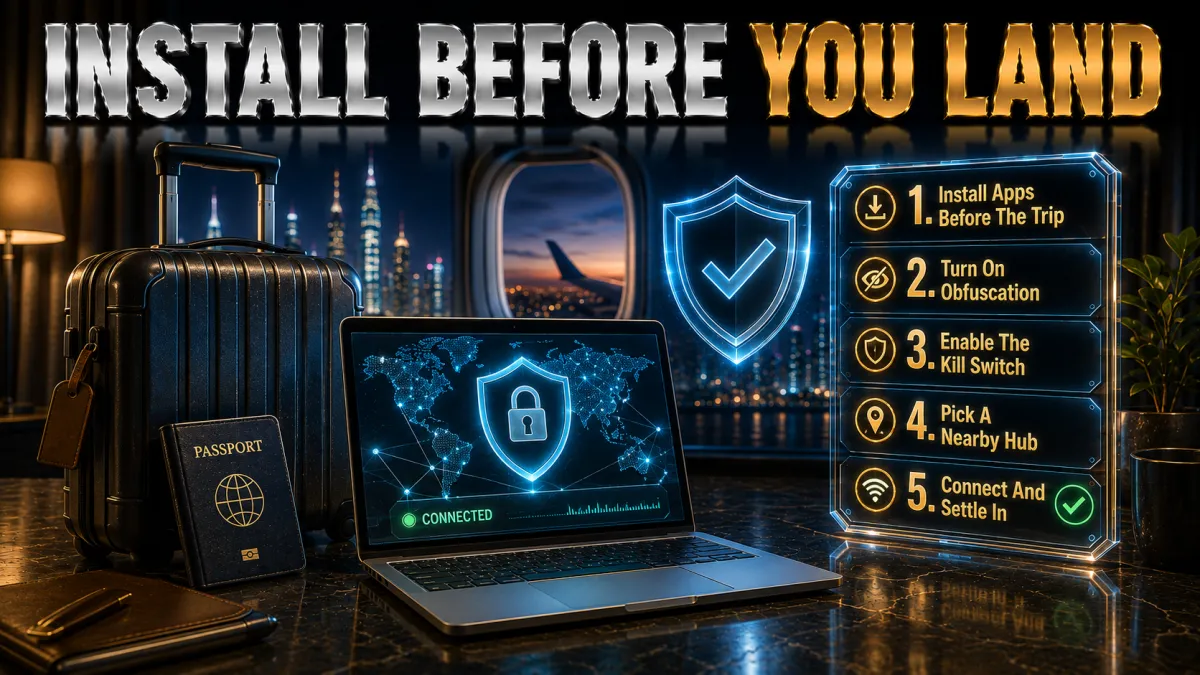
Getting a VPN running on any device takes only a couple of minutes, though it helps to install it before you need it.
- Install the app early. Download the official app from your device’s app store and sign in; doing this on a reliable connection avoids hassle later.
- Turn on obfuscation if offered. Enable the obfuscation or camouflage setting if normal VPN mode struggles on filtered networks. If normal mode is stable, keep the simpler setting.
- Pick a fast protocol. Choose the WireGuard-based option (NordLynx, Lightway, or WireGuard) for the best speed and battery life.
- Connect to a nearby server. Use a Middle East or Europe server for everyday use, or your home country for streaming.
- Enable the kill switch. Turn it on so your real connection is never exposed if the tunnel drops.
Best VPN use on mobile in Qatar
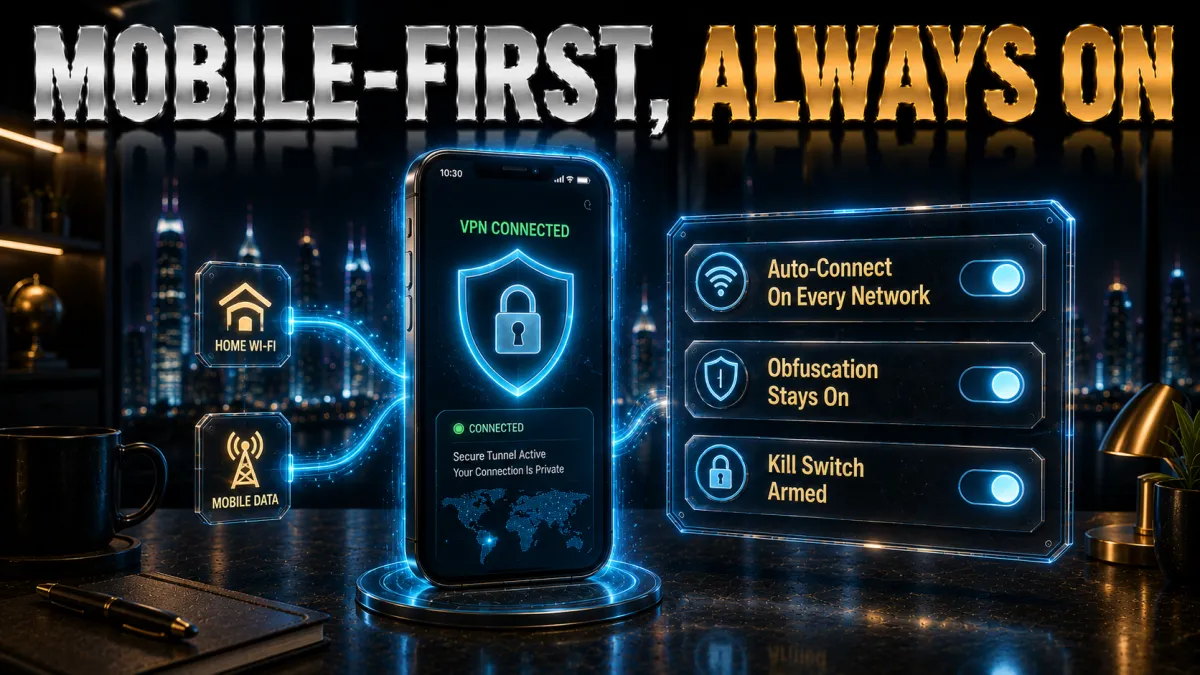
Most people in Qatar use a VPN mainly on a phone, so a clean, efficient mobile app and sensible settings matter more than anything.
- Use a WireGuard-based protocol. On a phone, a modern protocol keeps speeds high and battery drain low, which matters for calls and streaming on the move. It is the single most important setting, so choose it and leave the rest of the protocol menu alone unless a network forces a change.
- Turn on auto-connect for untrusted wifi. The best apps bring the tunnel up automatically when you join an unknown network, which is exactly when you are most exposed and least likely to remember. Setting this once means your phone is protected before you have even opened the browser.
- Enable obfuscation for stability. On mobile networks that interfere with VPNs, an obfuscation setting is what keeps the connection dependable, so switch it on if calls or streaming keep dropping. It costs a little overhead but buys a stable connection where it counts.
- Keep the kill switch on. Mobile signal flickers as you move, so a kill switch that cuts traffic during a brief drop stops your real IP being exposed. Leaving it on turns an occasionally flaky connection into a reliably private one throughout the day.
Work, remote access, and business travel
For remote workers and business travellers, a VPN is as much about a secure, dependable work connection as it is about streaming or calls.
- Secure sensitive logins. Handling work email, banking, and company tools on varied networks is safer inside a VPN tunnel, which encrypts the session so a shared or public network cannot read it. Making a habit of connecting before you sign into anything important removes a common way credentials leak on the move.
- Keep a stable connection. A provider with obfuscation helps maintain a dependable connection on networks that otherwise interfere, which keeps calls, file transfers, and cloud tools working without interruption. For anyone whose income depends on staying connected, that reliability is worth as much as raw speed.
- Respect your employer’s rules. Some companies run their own corporate VPN and have policies about additional software, so check what is allowed before layering a personal VPN over work systems. Using the right tool in the right way avoids conflicts and keeps you compliant with both your employer and local law.
- Cover every device. A plan with a high device count or unlimited connections protects your laptop, phone, and tablet together, so you are secure whether you are in a hotel, a cafe, or a co-working space. Matching the plan to how you actually work is what makes the protection seamless.
Should you use a free VPN in Qatar?
Free VPNs are tempting, but in a filtered environment where reliability and privacy really matter, they are usually a poor trade. Here is the honest picture.
- They rarely handle filtering. Free VPNs seldom offer proper obfuscation, so on a network that interferes with VPNs they often fail to connect at all, which defeats the purpose the moment you need them. For a stable connection in Qatar, this alone rules most of them out.
- Crowded servers and data caps. Free tiers pack users onto a few overloaded servers and limit how much you can use, so streaming stalls and calls drop, and you run out of allowance quickly. A paid plan removes both limits and gives you the whole network instead of a throttled corner.
- Privacy is often the price. Running servers costs money, and free apps frequently recoup it by logging and selling your activity or bundling trackers, which is the opposite of what a privacy tool should do. On a device holding your accounts, that is a risk not worth taking.
- A cheap paid plan is the safe route. A reputable low-cost provider with obfuscation, an audited no-logs policy, and a money-back guarantee gives you real reliability and privacy, none of which a random free app can promise. In a filtered region, that reliability is exactly what you are paying for.
How to choose the best VPN for Qatar
With the basics covered by all five picks, the right choice comes down to how you weight these factors for life in Qatar.
- Obfuscation and reliability first. Because Qatar’s networks can interfere with VPNs, prioritise a provider with strong obfuscation and a dependable record of connecting on filtered networks. This matters more here than almost anywhere, and it is the factor most likely to decide whether your VPN is a pleasure or a frustration.
- Nearby servers and speed. A network with Middle East and Europe locations on a WireGuard-based protocol keeps streaming smooth and calls clear, so treat server spread and protocol together as your real performance test rather than trusting a single headline number.
- Genuine privacy credentials. Favour an independently audited no-logs policy and a jurisdiction outside the major alliances, and treat honest disclosure of a provider’s weak points as a good sign. In a region where privacy is a real motivation, this deserves proper weight.
- Device count for your household. An expat home runs many devices, so unlimited connections or a high device limit saves everyone juggling logins. Match the plan to your household rather than just yourself, and one subscription can cover the whole family.
- A real money-back guarantee. A 30 to 45-day refund window lets you confirm that streaming, calls, and stability actually work on your own network before committing, which is the only benchmark that matters for you. Use it to test real calls and streams, not just a speed number.
Common VPN mistakes in Qatar
Most people who feel a VPN let them down in Qatar made one of these avoidable errors. Fix them and the experience changes completely.
- Skipping obfuscation. Trying to connect without the obfuscation setting on a filtered network is the most common reason a VPN keeps dropping. Turn it on where your provider offers it, and a connection that seemed unreliable often becomes rock solid, so check this before blaming the provider.
- Choosing a provider with weak filtering support. A fast VPN that cannot get through interference is useless here, so do not pick on speed alone. Weight a provider’s obfuscation and regional reliability first, because that is what actually determines whether it works on your network.
- Leaving an old protocol selected. A legacy protocol slows you down and drains battery, and many people never realise the setting exists. Switching to a WireGuard-based option is usually a one-tap fix that transforms how the connection feels, so check it before assuming the VPN is slow.
- Trusting a random free VPN. Free apps rarely handle filtering, cap your data, and can log or sell your activity, which is the opposite of what you need in a filtered region. A cheap, well-reviewed paid plan with obfuscation and a refund window is the far safer choice.
- Ignoring local rules. A VPN does not put you above local law, so using one for prohibited activity can carry real consequences. Use it for privacy, home content, and calls, stay within Qatar’s laws and each service’s terms, and you keep both your accounts and yourself safe.
Fixing connection problems in Qatar
If your VPN struggles to connect or a stream will not load in Qatar, work through these fixes before giving up, because the cause is usually simple.
- Turn on obfuscation. Enable the obfuscation or camouflage setting so the VPN can get through a filtered network.
- Switch servers. Try another nearby server, or another server in your home country for streaming, since detection targets specific IPs.
- Change the protocol. Move to a WireGuard-based option, or try the provider’s stealth protocol if a network is blocking VPNs.
- Reconnect and clear the app cache. Disconnect and reconnect, and clear a streaming app’s data if a stale location is stuck.
- Update everything. Keep the VPN app, streaming apps, and your device current, since outdated software causes odd errors.
Related reading:
Frequently Asked Questions
Is it legal to use a VPN in Qatar?
Using a VPN for legitimate privacy and security is common in Qatar, but the legal environment treats the tool by how it is used rather than granting a blanket right, so it is best seen as a grey area. A VPN does not make anything illegal acceptable, so use one responsibly, within local law, and only for legitimate purposes. This is general information, not legal advice.
Which is the best VPN for Qatar in 2026?
NordVPN is our top pick for its dedicated obfuscation, nearby servers, and strong audited privacy. ExpressVPN applies obfuscation automatically, Surfshark is the best value with unlimited devices and Camouflage mode, CyberGhost is the friendliest for beginners, and IPVanish offers steady speed on unlimited connections.
Why do I need obfuscation for Qatar?
Because some networks in Qatar interfere with VPNs, obfuscation, which disguises VPN traffic as ordinary browsing, is often what decides whether you get a stable connection. Providers like NordVPN, ExpressVPN, and Surfshark offer it, which makes them more dependable on filtered networks than options that do not.
Can a VPN fix WhatsApp or video calls in Qatar?
It often can, by routing your call traffic through a server where it is not being interfered with, so a call that dropped or stuttered behaves normally again. Reliability varies by network and app, so test voice and video calls on a couple of servers during the refund window to confirm it works for you.
Can I watch my home country’s shows in Qatar with a VPN?
Yes. Connect to a server in your home country before opening the streaming app, and it may behave as if you are back home. If a service shows a proxy error, switch to another server in the same country, since detection targets specific server addresses rather than the whole provider.
Are free VPNs safe to use in Qatar?
Usually not worth it. Free VPNs rarely offer obfuscation, so they often fail to connect on filtered networks, and they cap data, crowd users onto slow servers, and may log or sell your activity. In a filtered region a low-cost paid plan with obfuscation and a money-back guarantee is far safer and more reliable.
Will a VPN slow my internet in Qatar?
A good VPN on a nearby server and a WireGuard-based protocol causes only a small drop most people never notice. Speed loss grows with distant servers or older protocols, so pick a close server and a modern protocol for the fastest experience, and enable obfuscation only where the network needs it.
Which server should I connect to in Qatar?
For everyday privacy and speed, a nearby Middle East or Europe server; for home streaming, a server in your home country; for calls, a close server usually works best. Start with the nearest uncongested option and only move further when a specific library requires a particular country.
Does the VPN provider’s country matter?
Yes. A provider based outside the major intelligence alliances, like NordVPN in Panama or Surfshark in the Netherlands, with an independently audited no-logs policy, gives your data a friendlier legal home. In a region where privacy is a real motivation, jurisdiction is worth weighting alongside speed and reliability.
Can I use one VPN for my whole family in Qatar?
Yes. Surfshark and IPVanish allow unlimited simultaneous connections, so one plan covers an entire household. NordVPN allows ten devices and ExpressVPN eight, which still comfortably covers most families, and installing a VPN on your router protects every device at once.
Will a VPN work on Qatar’s mobile networks?
Generally yes, especially with obfuscation turned on, though reliability varies by network. Use a WireGuard-based protocol for speed, enable auto-connect on untrusted wifi, and keep the kill switch on, and test streaming and calls on mobile data during the refund window to confirm your setup.
Is a paid VPN worth it in Qatar?
If you want reliable access to home content, stable calls, and genuine privacy on a filtered network, yes, because obfuscation and an audited no-logs policy have real value that free apps cannot match. A money-back guarantee means you can confirm it works on your own network before paying anything.
The Bottom Line
Choosing a VPN for Qatar comes down to two things that matter more here than almost anywhere: a provider that can connect reliably on a filtered network through obfuscation, and one with genuine, audited privacy credentials. All five picks cover the basics, so the right one follows from what you value most, whether that is reaching home content, keeping calls working, or securing your work.
Whichever you choose, the setup that pays off is the same: turn on obfuscation, connect to a nearby server on a WireGuard-based protocol, keep the kill switch on, and always use the VPN responsibly and within local law.
- NordVPN is the safest all-round choice, with dedicated obfuscation, nearby servers, and strong audited privacy.
- ExpressVPN is the simplicity pick, applying obfuscation automatically and reconnecting smoothly.
- Surfshark is the value winner, covering unlimited devices with Camouflage obfuscation for the lowest price.
- CyberGhost is the easiest for first-timers, with labelled servers and the longest 45-day refund.
- IPVanish is the steady-speed pick, running its own network for reliable performance on unlimited devices.
Here is the practical move: pick your provider for the priority that matters most, install it before you need it, turn on obfuscation, and test streaming and calls on a nearby server during the refund window. If it connects dependably, keeps your home content and calls working, and protects your privacy, you have found your VPN for Qatar, and the money-back window means it cost you nothing to be sure. Always use it within local law.
Ketan VPN Expert covers privacy and security at VPN Expert Guide: VPN protocols, encryption, leak protection and VPN legality. Our privacy guides are checked against ipleak.net and dnsleaktest.com results, and we publish the date of every check so you can see how current it is.
Meet our testing team →Last updated: September 22, 2026