
Is a VPN Safe? What It Protects, the Real Risks and How to Check Yours (2026)
Is a VPN safe? In practice, it can improve privacy on some connections, but the provider, app and your settings matter. Whether a VPN is safe depends on its operator and how you use it. This guide explains what a VPN protects, where risks remain and how to assess one using official guidance.
Is a VPN safe? What “safe” means

“Is a VPN safe?” depends on three things: whether the technology is secure, whether the company is trustworthy, and whether VPN use is allowed where you are. If you are new to how VPNs work, our guide to what a VPN is and how it works covers the basics first.
- The technology. For example, modern VPN protocols such as WireGuard, OpenVPN and IPsec encrypt your traffic between your device and the VPN server. Older ones such as PPTP have fallen out of use because of security concerns, as the UK’s National Cyber Security Centre notes.
- The company. However, this is where most of the risk sits. The Federal Trade Commission puts it simply: a VPN doesn’t make you anonymous, it shifts trust from your network to the VPN provider.
- The law. VPNs are legal in many countries, but some restrict them or set rules for providers. Therefore, check the rules where you live or travel.
- Your own setup. Finally, even a good VPN can let you down if the app is out of date, the kill switch is off or your browser leaks your IP address.
- It hides your traffic from your internet provider and the local network. Your ISP, or whoever runs the café or hotel Wi-Fi, sees encrypted data going to a VPN server instead of the sites you visit.
- First, it hides your IP address from websites. Sites see the VPN server’s address and location instead of yours.
- However, it doesn’t hide you from the VPN provider. The provider can see the traffic it carries, which is exactly why the provider’s honesty matters so much.
- In addition, it doesn’t make you anonymous or block malware. Cookies, accounts, GPS and browser fingerprinting still identify you, and a VPN doesn’t scan downloads or stop phishing. For anonymity, Tor is the better-suited tool.
- Logging and selling data. A VPN company can log what passes through its servers. The EFF warns that a VPN might log your data if its privacy policy does not rule that out, and that a “no-logs” claim on its own is not a guarantee.
- Malicious VPN apps. In 2024 the FBI warned that free, illegitimate VPN apps (MaskVPN, DewVPN, PaladinVPN, ProxyGate, ShieldVPN and ShineVPN) had been packaged with pirated games and software. According to the FBI public service announcement, they silently turned victims’ computers into part of the 911 S5 botnet, which had over 19 million compromised IP addresses in more than 190 countries.
- Weak or missing encryption. The FTC notes that not all VPN apps actually encrypt your information, and some encrypt only part of it.
- Out-of-date software. VPN apps have security bugs like any other software. The EFF’s write-up of the TunnelVision attack explains how someone on a hostile local network can push traffic outside the VPN, which is one reason to keep the app updated.
- Leaks while connected. DNS, IPv6 or WebRTC leaks can reveal your real IP address or the sites you visit even when the VPN says it is connected. Our guide on how to fix a VPN IP leak shows how to check and fix them.
- Platform-level bypasses. A VPN app cannot control every part of an operating system. In 2026, Mullvad documented Android issues that can let some traffic bypass a VPN tunnel in specific conditions. These are platform-specific reports, not proof that every Android device leaks; check current security notices for your OS version.
- Legal requests. A VPN company is subject to the laws of the countries it operates in. The EFF suggests checking the privacy policy for when data is handed to authorities, and looking for transparency reports.
- What researchers found. A 2016 study by researchers from CSIRO Data61 and partner institutions analysed 283 free Android apps that use the VPN permission. 18% used tunnelling without encryption, about 84% and 66% didn’t send IPv6 and DNS traffic through the tunnel, and over 38% showed some malware presence according to VirusTotal. The study is now dated, but the warning signs it describes are still the ones to look for.
- However, freemium is different. Some established providers offer a limited free plan alongside paid plans, which can give them a business model other than your data. Read the privacy policy to confirm how the free plan is paid for.
- Permissions tell you a lot. The FTC suggests asking whether each permission makes sense for a VPN, for example whether an app really needs to read your text messages.
- Still, free doesn’t have to mean unsafe. Our guide to the best free VPN for daily use explains the trade-offs and the safer free options.
- Apple App Store. Section 5.4 of Apple’s App Store Review Guidelines says VPN apps must use Apple’s NEVPNManager API, may only be offered by developers enrolled as an organisation, must declare what user data they collect before you use the service, and may not sell, use or disclose data to third parties for any purpose.
- Google Play. Google Play’s VpnService policy says apps using Android’s VPN service must encrypt data from the device to the VPN tunnel endpoint, and may not collect personal and sensitive data without prominent disclosure and consent, or redirect other apps’ traffic for monetisation.
- For example, Google Play’s Verified badge. Google shows a Verified badge on VPN apps that, among other criteria, completed a MASA Level 2 security assessment, have an organisation developer account, have been on Google Play for at least 90 days and have at least 10,000 installs and 250 reviews, according to Google Play’s Data safety help page.
- What a badge doesn’t prove. The App Defense Alliance, which runs MASA, says its limited testing doesn’t guarantee an app is completely safe. The EFF adds that a store listing doesn’t cover the company’s servers, and that an app being on an official store doesn’t make it safe.
- Install it from the official source. Use the provider’s own website or the official app store, never a bundle that came with other software. The FBI’s 911 S5 warning is a reminder of what can come with pirated downloads.
- Keep the app and your device updated. Updates fix security problems in the VPN app and the operating system it relies on.
- Use a modern protocol. Leave the app on its default modern protocol, such as WireGuard or OpenVPN, and avoid PPTP. The EFF notes that OpenVPN and WireGuard have become common.
- Turn on the kill switch. It blocks traffic if the VPN connection drops, so your real IP address doesn’t slip out while the app reconnects.
- Check for leaks. Run a DNS, IPv6 and WebRTC leak check after you connect. The 2016 study above found IPv6 and DNS leaks in most of the free apps it analysed.
- Keep the other basics in place. Use HTTPS, strong passwords and two-factor authentication, because a VPN doesn’t replace any of them.
- India. The CERT-In directions of 28 April 2022 require VPN service providers to keep records such as validated subscriber names, the period of hire, the IPs allotted and the email and IP address used at sign-up, for five years or longer.
- Australia. Our guide on whether a VPN is legal in Australia explains the rules there.
- Travelling. Before you travel, check the rules at your destination. Apple’s App Store rules, for example, mention territories that require a VPN licence.
- Streaming and services. Some streaming platforms block VPN connections. That is a matter of the service’s terms, not of whether the VPN is safe.
Is a VPN safe at the technology level?
n- n
Is a VPN safe for everyday security?
nIs a VPN safe for privacy? What it protects, and what it doesn’t
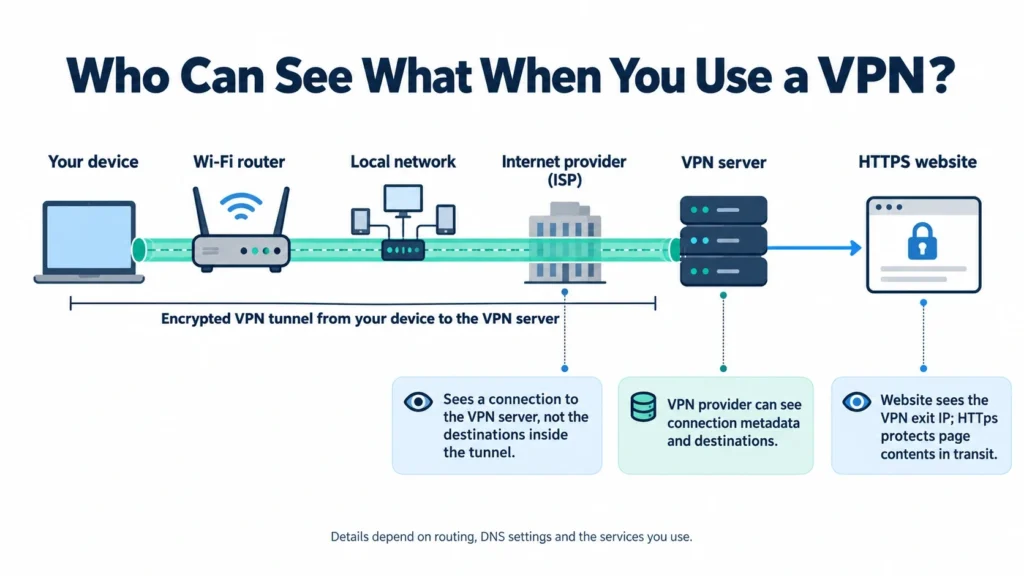
However, asking “is a VPN safe for privacy?” starts with what it can protect. VPN marketing often promises more than the technology can deliver. The EFF’s guide to choosing a VPN says advertisements “vastly oversell” VPNs, which are best at one thing: routing your connection through a different network. Here is the honest split.
On public Wi-Fi, a VPN is less essential than it used to be because most websites now use HTTPS. However, it still hides which sites you visit from people on the same network. Our guide to using a VPN on public Wi-Fi covers that case in detail.
Is a VPN safe? The real risks to check

In practice, when VPNs cause harm, it is rarely because encryption failed. Instead, it is usually because of who runs the service or how it got onto the device. For that reason, check the provider and app before you connect.
VPN safety risks from providers and apps
VPN safety risks from platforms and routing
Are free VPNs safe?
For that reason, free VPNs need the most care: running servers costs money, so providers need a way to recover it. The FTC’s advice on VPN apps says many VPN apps are free because they sell advertising, or because they share your information with third parties or route your traffic through them.
What Apple and Google require of VPN apps

Both big app stores set specific rules for VPN apps, which raises the floor. However, those rules do not replace your own checks.
Is a VPN safe? What provider audits show
To assess a provider’s claims, start with its public audits. For example, compare the scope, date and availability of each report. The EFF treats public third-party audits as a useful sign, while warning that practices can change after an audit. The table below summarizes information on five providers’ own audit and transparency pages, checked on 10 October 2026. It is not a ranking or a test.
VPN safety audits: what the reports cover
| VPN | Latest audit it highlights | Can you read the report? | Open-source code | Other public safety signals |
|---|---|---|---|---|
| NordVPN | Sixth no-logs assurance engagement, by Deloitte Lithuania, carried out 10 November to 12 December 2025 | NordVPN says the full report is available after you log in to a Nord Account | The NordVPN Linux app is published on GitHub under the GPL-3.0 licence | NordVPN says earlier no-logs reviews were done by PricewaterhouseCoopers AG Switzerland (2018 and 2020) and Deloitte |
| ExpressVPN | Third KPMG audit of its privacy commitments (June 2025) | ExpressVPN says every report, including any issues found, is published in full on its Trust Center | The core library of its Lightway protocol is open source | TrustedServer runs servers on RAM only; the Trust Center lists audits by Cure53, Praetorian, F-Secure, KPMG and PwC Switzerland |
| Proton VPN | Fifth consecutive annual no-logs audit, by Securitum (2026 report) | Yes, Proton VPN publishes the full no-logs report for anyone to read | Proton says all its VPN apps are open source | Third-party app security audits published; bug bounty programme |
| Surfshark | No-logs audits by Deloitte in 2023 and 2025 | Not stated on the trust center page checked | Not stated on the pages checked | SecuRing infrastructure audit (2025); Android MASA assessments (2023 and 2025); Google Play Verified badge |
| Mullvad | Fourth VPN infrastructure audit, by Cure53 (June 2024) | Mullvad announces its external audits on its blog, and says the 2024 app audit report is available there | The Mullvad VPN app’s source code is on GitHub under the GPL-3.0 licence | 2026 Android app MASA assessment by Leviathan Security Group; X41 audit of account and payment services; Assured audit of GotaTun |
Details come from each provider’s own pages, listed in Sources. “Not stated” means the pages checked didn’t say. On narrow screens, scroll sideways to see every column.
Assessing VPN safety claims
A few things stand out. Proton VPN publishes its no-logs report openly, ExpressVPN publishes its reports on its Trust Center, Mullvad announces its audits on its blog, and NordVPN keeps the full no-logs report behind an account login. Read the latest report yourself where you can, rather than relying on a summary.
Is a VPN safe? 8 checks to assess a provider

Fortunately, you do not need technical skills to assess a VPN. These eight checks, drawn from FTC and EFF advice, cover the points that matter most, and most take a minute or two on the provider’s website.
VPN safety checks before you choose
| What to check | Why it matters | Where to look | Red flag |
|---|---|---|---|
| Who runs the VPN | The provider can see the traffic that a VPN hides from your internet provider | The About page, company name and country, news coverage | No company name, no named people, no address |
| Privacy policy and logging | A limited, clearly defined logging policy reduces what a provider says it can link to your activity; other account data may still exist | The privacy policy, especially what is logged and when data is shared | Vague wording, or no clear statement on connection and activity logs |
| Independent audits | Audits can find problems in apps, servers and data access that you can’t see yourself | The provider’s audit or trust page, and whether you can read the reports | “Audited” claims with no auditor, date or report |
| Business model | A free service still has to pay for its servers somehow | Pricing page, ads in the app, terms of service | Free with no paid plan, no ads and no explanation of how it is funded |
| Encryption and protocols | Weak or missing encryption leaves traffic readable | The app’s protocol settings and the provider’s help pages | PPTP, or no clear statement that traffic is encrypted |
| App permissions | A VPN app already handles your traffic and shouldn’t need much more | The app store listing and the permission prompts during setup | Requests for text messages, contacts or other data that a VPN doesn’t need |
| Updates and security fixes | VPN apps have bugs like any software, and the EFF warns that a VPN not updated for issues such as TunnelVision may not protect you | The app’s update history and the provider’s security announcements | No updates for a long time |
| Where you download it | Malicious VPN apps have spread through pirated software bundles | The provider’s official website or the official app stores | VPNs bundled with cracked games or software, or from pop-up ads |
On narrow screens, scroll sideways to see every column.
How to assess VPN safety answers
Passing these checks gives you useful evidence, not proof that a VPN is safe or will stay that way. In addition, compare the provider’s claims with its published policy. If a provider hides who runs it, uses vague privacy language or distributes its app through unofficial bundles, choose another service.
How to use a VPN safely once you have one
Once you choose a trustworthy VPN, these steps help it protect you as expected.
Is it legal to use a VPN where you live?
VPNs are legal to use in many countries, but rules differ. For example, some governments impose extra requirements on providers. The EFF advises checking current policies, including any bans. Using a VPN never makes an illegal activity legal.
For Indian readers, our guide on whether a VPN is legal in India covers what the rules mean in practice.
Is a VPN safe? Privacy and provider FAQs
Is it safe to use a VPN?
A VPN can be safe to use, but it depends on whether you trust the provider and keep its app updated. It shifts some visibility from your internet provider to the VPN service and does not make you anonymous. Review the privacy policy and audit reports; however, treat them as evidence rather than guarantees.
Can a VPN see or steal my data?
A VPN provider can see the traffic that passes through its servers, which is why choosing one you trust matters. Websites using HTTPS still keep the content of your pages, logins and messages encrypted from the VPN. However, the provider can see which sites you connect to. A dishonest or malicious VPN can log and sell that information, or worse.
Are free VPNs safe?
Some free VPNs are safe, but many are not. For example, the FTC notes that many free VPN apps make money by showing ads or sharing your information with third parties, and a 2016 study of 283 free Android VPN apps found missing encryption, traffic leaks and malware detections. A free plan from an established provider with a published privacy policy and audits is a much safer bet than an unknown free app.
VPN safety: security and app FAQs
Can a VPN be hacked?
Like other software, VPN apps and servers can have security bugs. Researchers have shown attacks such as TunnelVision, which can push traffic outside the VPN on a hostile local network. Keeping the app updated, checking whether a provider publishes audit reports and using HTTPS everywhere can reduce risk.
Does a VPN make me anonymous?
No. A VPN hides your IP address from websites and your traffic from your internet provider, but sites can still track you with cookies, accounts, GPS and browser fingerprinting, and the VPN provider itself can see your traffic. If you need anonymity rather than privacy, the EFF points to Tor as the better tool.
Is a VPN on Google Play or the App Store automatically safe?
No. Apple and Google both set rules for VPN apps. For example, Apple bars VPN apps from selling user data, and Google requires them to encrypt traffic to the server. However, a store listing is not proof of trust. Google Play’s Verified badge and the MASA security review behind it are good signs, but the App Defense Alliance, which runs MASA, says the review doesn’t guarantee an app is completely safe.
VPN safety: legality and everyday use FAQs
Is it legal to use a VPN?
In many countries, VPN use is legal. However, rules differ, and some countries restrict or ban VPNs. In India, for example, CERT-In’s 2022 directions require VPN service providers to keep subscriber records for five years. Check the law where you live or travel, and remember that a VPN never makes an illegal activity legal.
Does a VPN protect me from viruses and phishing?
Not by itself. A VPN encrypts and reroutes your connection. However, it does not scan files or stop you from entering a password on a fake site. Some VPN apps add malware or tracker blocking, but antivirus software, software updates, strong passwords and two-factor authentication are still the main protection.
Is it safe to leave a VPN on all the time?
Yes, for most people it is fine to keep a trustworthy VPN connected. That way, you do not forget to turn it on when you join an unfamiliar network. Some streaming services block VPN connections, so if an app needs your normal connection, use your VPN’s split tunnelling feature, if it has one, to exclude it.
Sources
Official guidance, app store policies and provider pages checked on 10 October 2026 (IST). They support the explanations, tables and FAQs above.
Government, regulator and independent guidance
- Federal Trade Commission: In the market for a VPN app?
- FBI IC3: Guidance on the 911 S5 residential proxy service (public service announcement)
- FBI: How to identify and remove VPN applications that contain 911 S5 back doors
- UK National Cyber Security Centre: Virtual private networks guidance
- CERT-In: Directions under section 70B of the IT Act, 28 April 2022 (PDF)
- EFF Surveillance Self-Defense: Choosing the VPN that is right for you
- EFF: A wider view on TunnelVision and VPN advice
- CSIRO and partners: An analysis of the privacy and security risks of Android VPN permission-enabled apps (2016, PDF)
App store rules and security reviews
- Apple: App Store Review Guidelines (section 5.4, VPN apps)
- Google Play Console Help: Understanding Google Play’s VpnService policy
- Google Play Help: Data safety section and the Verified badge
- Android Developers Blog: Helping users find trusted apps on Google Play
- App Defense Alliance: Mobile Application Security Assessment (MASA)
Provider security disclosures
- Mullvad: Android traffic-bypass disclosure (September 2026)
- Mullvad: Android 16 traffic-bypass disclosure (May 2026)
- Mullvad: Security audit of the GotaTun WireGuard implementation (March 2026)
- Mullvad: 2026 security assessment of its Android app
VPN provider audit and transparency pages
- NordVPN: NordVPN passes its no-logs assessment for the sixth time
- NordVPN: No-log VPN feature page
- NordVPN Linux app source code on GitHub
- ExpressVPN: Trust Center and audit list
- ExpressVPN Support: Understanding ExpressVPN’s independent audits
- Proton VPN: For 5th year running, Proton VPN passes external no-logs audit
- Proton VPN: All Proton VPN apps are now open source and audited
- Surfshark: Trust center
- Mullvad: External audits on the Mullvad blog
- Mullvad VPN app source code on GitHub
The Bottom Line
A VPN is safe when the company behind it is trustworthy. The technology is mature and widely used, but every VPN shifts your trust from your internet provider to the VPN provider, so the real question is always who runs it and how it makes money.
Practical move:
- Choose carefully: pick a provider with a named company, a clear no-logs policy and published independent audits.
- Be wary of unknown free apps: check the business model and permissions, and never install a VPN that came bundled with other software.
- Set it up properly: keep the app updated, use a modern protocol, turn on the kill switch and run a leak check.
- Know its limits: a VPN doesn’t make you anonymous or stop malware and phishing, so keep your other security basics in place.
Provider audits and app store rules change over time, so check the latest versions linked in Sources. This article is general information based on official guidance and the providers’ own published information, and does not include invented test results.